“闯祸小狗”漫画
Prompt
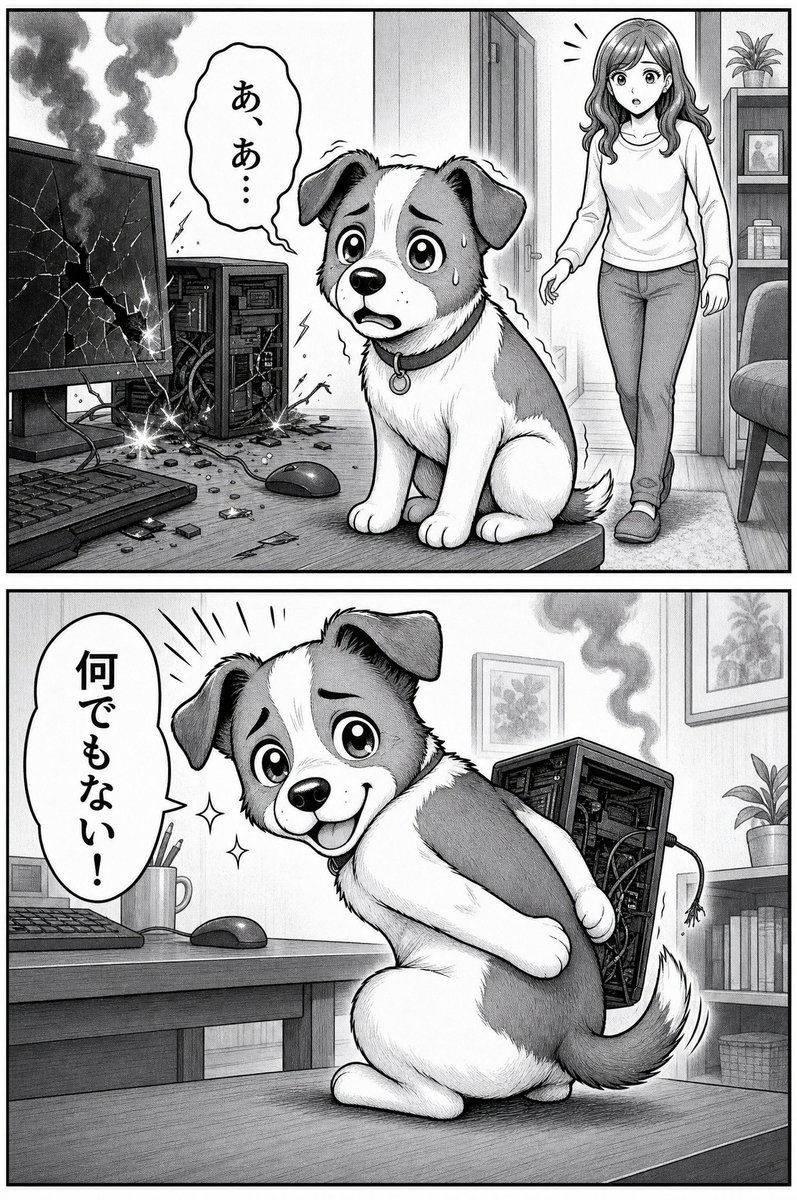
Goal: Create a black-and-white manga-style two-panel comic about a cute guilty dog and a broken desktop computer, using expressive screentone shading, clean ink outlines, dramatic reaction marks, and Japanese speech bubbles.

Canvas: Vertical comic page, approximately 2:3 aspect ratio, with a thick black outer border and one horizontal divider splitting the page into exactly 2 stacked panels.

Panel 1: Show a home office desk scene in grayscale. On the left side of the desk are exactly 4 visible computer-related items: a cracked smoking monitor with a shattered screen, an open desktop PC tower with exposed internal parts, a keyboard in the foreground, and a wired mouse near the center. Add scattered debris, broken fragments, loose cables, small sparks, and dark smoke rising from both the cracked monitor and the damaged tower. In the center foreground sits a small cute puppy, a round-faced mixed-breed dog with floppy ears, large glossy eyes, a white muzzle and chest, darker patches on the ears and body, a collar with a small round tag, and a terrified guilty expression with sweat drops. In the right background, a young woman enters through a doorway, surprised; her face is intentionally obscured by a soft square blur. She has long wavy hair, wears a plain long-sleeve top, slim jeans, and slippers. Add a bookshelf, framed picture, potted plant, chair edge, doorframe, and simple room details in the background. Include exactly 1 speech bubble in this panel, coming from the woman, with vertical Japanese text: {argument name="first speech bubble text" default="あ、あ…"}.

Panel 2: Show the same puppy now smiling brightly and posing innocently on the desk, turned slightly backward with one paw reaching behind its body as if hiding or covering the damaged computer tower. The dog should look adorable, playful, and suspiciously pleased, with sparkling effects beside its face. The broken desktop tower is behind the dog on the right, still smoking, with exposed components and a dangling cable. The desk includes exactly 3 visible desk items: keyboard, wired mouse, and a mug holding pencils. Background includes a shelf with books, a framed wall picture, a potted plant, and soft indoor room shading. Include exactly 1 speech bubble in this panel, on the left, with bold vertical Japanese text: {argument name="second speech bubble text" default="何でもない!"}.

Subject details: The dog is {argument name="dog breed or type" default="a cute small mixed-breed puppy"}, with {argument name="dog markings" default="white fur with gray patches, floppy ears, and a white blaze down the face"}. The woman is {argument name="woman appearance" default="a young woman with long wavy hair, casual sweater, jeans, slippers, and a blurred face"}.

Visual style: Monochrome Japanese manga illustration, soft pencil-like texture, detailed linework, expressive character acting, dramatic smoke and sparks, cute comedic tone, high contrast but not overly dark, realistic home office perspective mixed with exaggerated manga emotions.

Constraints: Use exactly 2 panels, exactly 2 speech bubbles total, exactly 1 dog, exactly 1 woman, and exactly 1 broken desktop computer setup. Keep all text in Japanese as specified, avoid extra captions, avoid color, avoid watermark or logo.- Category
- Posters & Typography
- Model
- GPT Image 2
- Creator
- ふったん@副業とAIと漫画大好き
- Source ID
- 20402
- Published
- May 14, 2026
Views4