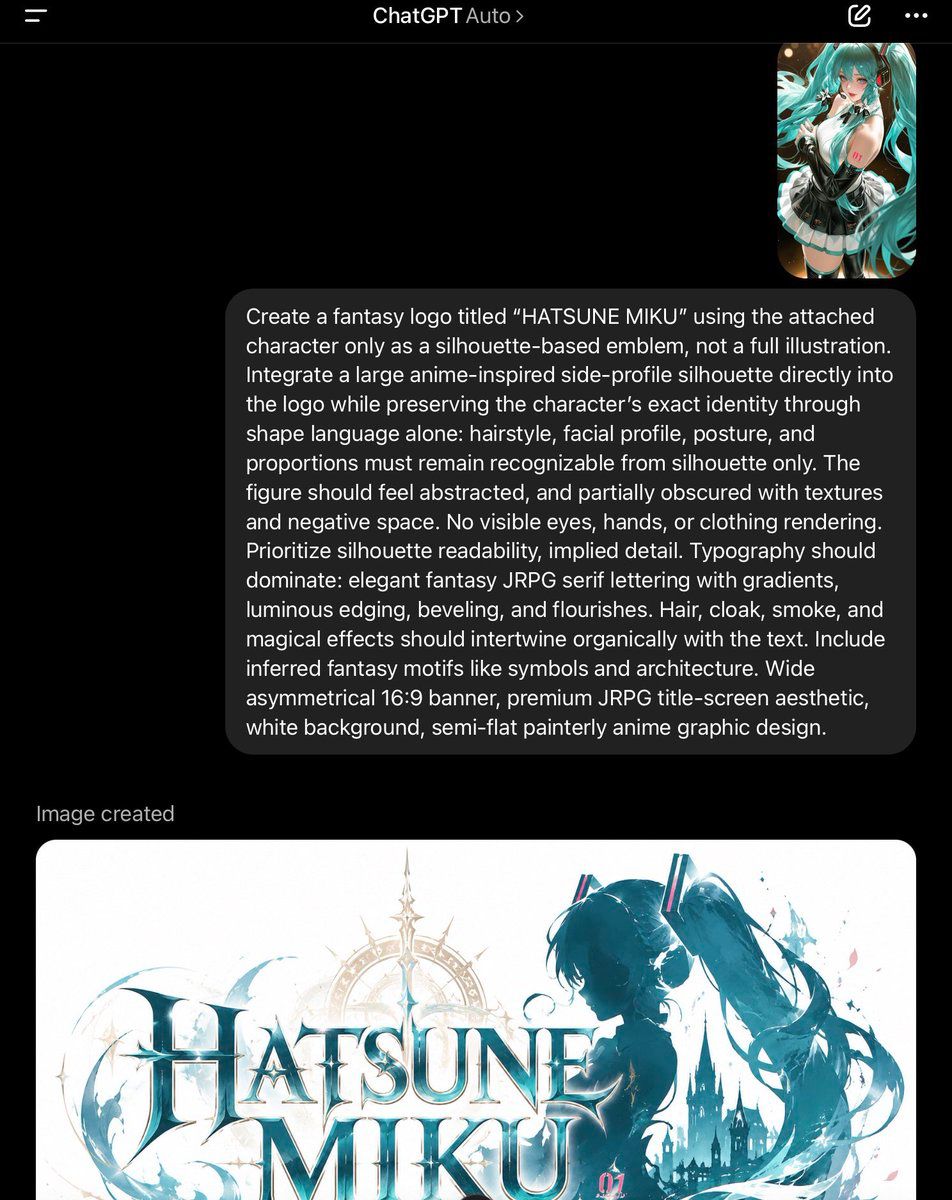
ChatGPT 梦幻 Logo 截图
Prompt
Goal: Create a photorealistic dark-mode mobile screenshot of the ChatGPT app showing a completed image-generation conversation about a fantasy logo for {argument name="character name" default="HATSUNE MIKU"}.

Canvas: Vertical smartphone screenshot, 768 x 968 px, black background, cropped so the lower generated image continues off the bottom edge. Use iOS-style statusless app framing with no visible keyboard.

Top navigation: A thin dark header bar across the top. Include exactly 4 visible header items: a hamburger menu icon at top left, centered title text “ChatGPT Auto” with a small chevron after Auto, a pencil/edit icon near the top right, and a three-dot overflow menu at the far right.

Conversation layout: On the upper right, place exactly 1 small rounded-corner image thumbnail showing an anime turquoise twin-tail girl in a black-and-white outfit. Beneath it, place exactly 1 large dark gray rounded user message bubble aligned right, with white text. The bubble text must read: “Create a fantasy logo titled “{argument name="logo title" default="HATSUNE MIKU"}” using the attached character only as a silhouette-based emblem, not a full illustration. Integrate a large anime-inspired side-profile silhouette directly into the logo while preserving the character’s exact identity through shape language alone: hairstyle, facial profile, posture, and proportions must remain recognizable from silhouette only. The figure should feel abstracted, and partially obscured with textures and negative space. No visible eyes, hands, or clothing rendering. Prioritize silhouette readability, implied detail. Typography should dominate: elegant fantasy JRPG serif lettering with gradients, luminous edging, beveling, and flourishes. Hair, cloak, smoke, and magical effects should intertwine organically with the text. Include inferred fantasy motifs like symbols and architecture. Wide asymmetrical 16:9 banner, premium JRPG title-screen aesthetic, white background, semi-flat painterly anime graphic design.”

Generated result area: Under the message bubble, add the small gray label “Image created” aligned left. Below it, show exactly 1 large generated-image preview card with rounded corners, white background, partly cut off by the bottom edge of the screenshot.

Generated image inside the preview card: A wide 16:9 fantasy JRPG title logo on a white background. The main text is exactly two stacked words, “HATSUNE” above “MIKU,” in large ornate serif letters with icy teal gradients, white highlights, metallic bevels, and luminous edges. Behind and around the lettering, include exactly 1 large anime-inspired side-profile silhouette of Hatsune Miku on the right: no visible eyes, hands, or clothing details, only a dark teal face profile and iconic long twin-tail hair shape flowing to the right. Add exactly 1 faint golden circular compass/halo ornament behind the title, exactly 1 dark gothic castle silhouette near the lower right, and swirling teal smoke, hair ribbons, splashes, starbursts, and magical flourishes wrapping around the text. Add a tiny pink “01” marking near the lower right of the logo. Keep the logo premium, semi-flat painterly, fantasy-anime, asymmetric, and clean.

Visual style: Realistic ChatGPT mobile UI screenshot, dark mode, crisp white typography, soft rounded cards, accurate spacing, high contrast, no watermark, no extra UI panels, no keyboard.- Category
- Charts & Infographics
- Model
- GPT Image 2
- Creator
- tisayai
- Source ID
- 20655
- Published
- May 15, 2026
Views6


![Based on the word “[PROMPTSREF],” design an original decorative cinematic title](https://i.pixshop.app/storage/v1/render/image/public/prompt-source-media/promptsref/work-915/image-1-b39b55eb40233f18.png?width=800&quality=75&resize=contain)


