
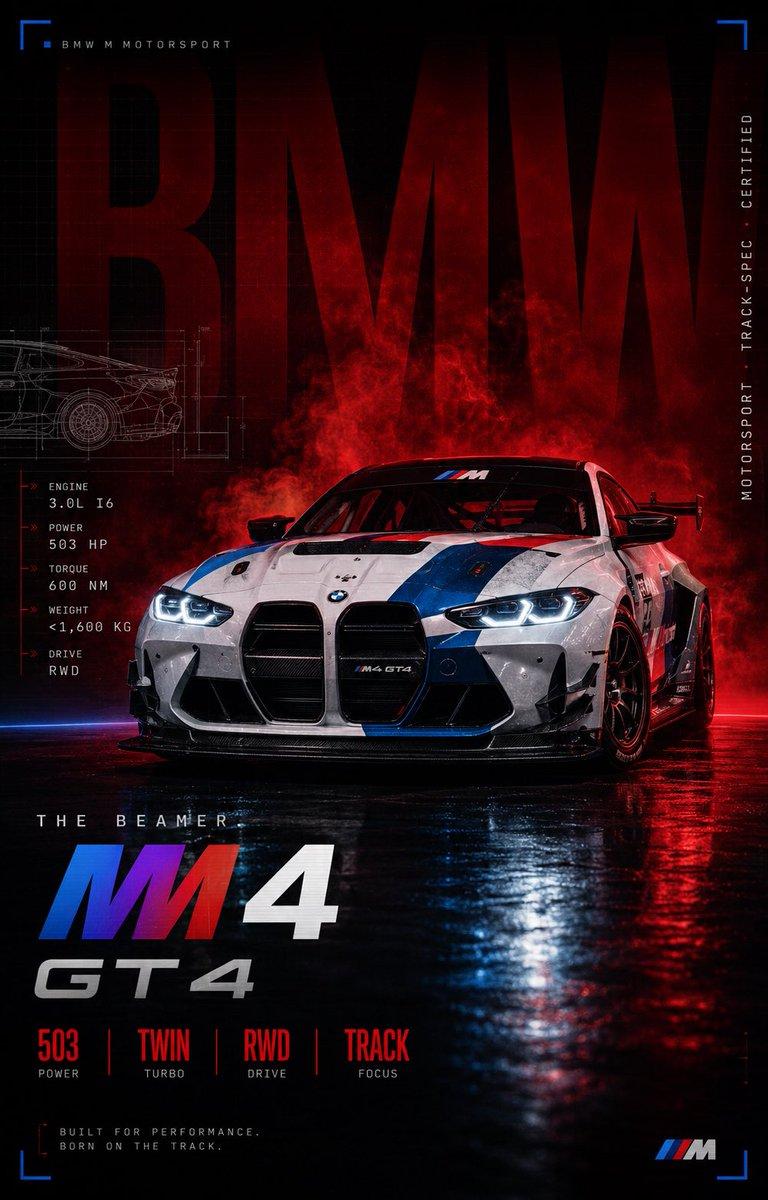
BMW M4 GT4 赛车海报
Prompt
Goal: Create a dramatic vertical motorsport advertising poster for {argument name="car model" default="BMW M4 GT4"}, styled like a premium race-car launch campaign.

Canvas: Tall 2:3 portrait poster, dark cinematic lighting, black background with deep red smoke, glossy wet asphalt reflections, high contrast, sharp commercial automotive photography mixed with graphic-design overlays.

Main subject: A white BMW M4 GT4 race car viewed from a low front three-quarter angle, positioned slightly right of center. The car has aggressive GT bodywork, wide stance, large black kidney grille, glowing cool-white LED headlights, black front splitter, black wheels, rear wing, roll cage visible through the windshield, and blue/red BMW M Motorsport racing stripes across the hood and sides. Add dirt, scratches, race wear, and water droplets for realism. The car sits on a wet reflective track surface with red and blue light reflections.

Background and atmosphere: Huge dark red transparent letters spelling {argument name="background word" default="BMW"} fill the upper background behind the car. Add red smoke or tire haze rising behind the vehicle. Include faint technical blueprint line art of the car on the left side behind the main car. Add thin grid lines, measurement marks, and subtle HUD-style interface details.

Layout and graphic elements: Use exactly 4 blue corner bracket markers: one at the top-left, one at the top-right, one at the bottom-left, and one at the bottom-right. At the top-left, add small spaced text reading “BMW M MOTORSPORT” with a tiny blue square marker. Along the right edge, add vertical small text reading “MOTORSPORT · TRACK-SPEC · CERTIFIED”.

Left technical spec block: Add exactly 5 stacked specs with red arrow markers and small white labels: 1) ENGINE — 3.0L I6, 2) POWER — 503 HP, 3) TORQUE — 600 NM, 4) WEIGHT — <1,600 KG, 5) DRIVE — RWD.

Bottom title block: Above the main title, add small spaced text “THE BEAMER”. Large title below: “M4” with the M letter in blue, purple, and red motorsport colors and the 4 in white. Under it, add “GT4” in italic metallic silver. At the bottom center, add exactly 4 feature callouts separated by thin red vertical dividers: 1) 503 / POWER, 2) TWIN / TURBO, 3) RWD / DRIVE, 4) TRACK / FOCUS. Bottom-left microcopy: “BUILT FOR PERFORMANCE. BORN ON THE TRACK.” Bottom-right: small BMW M tri-color logo mark.

Visual style: Premium editorial car poster, glossy black-and-red color grade, neon red rim light, blue accent light, realistic reflections, crisp typography, subtle film grain, vignette, cyber-technical motorsport aesthetic, ultra-detailed, photorealistic, high-end commercial advertising finish.

Constraints: Keep all text clean and legible, no extra cars, no people, no watermark, no random logos beyond BMW M-style branding, maintain the exact counted text/spec elements and corner markers.- Category
- Charts & Infographics
- Model
- GPT Image 2
- Creator
- ᴍᴜʀᴘʜʏ
- Source ID
- 20679
- Published
- May 15, 2026
Views3





![PROMPT TO ART [product], premium commercial hero shot, ultra-photorealistic 8K](https://cdn.pixshop.app/prompt-library/tweet-2002903228485165425/preview-0-1768179731056-sk12ydgh.jpeg)


