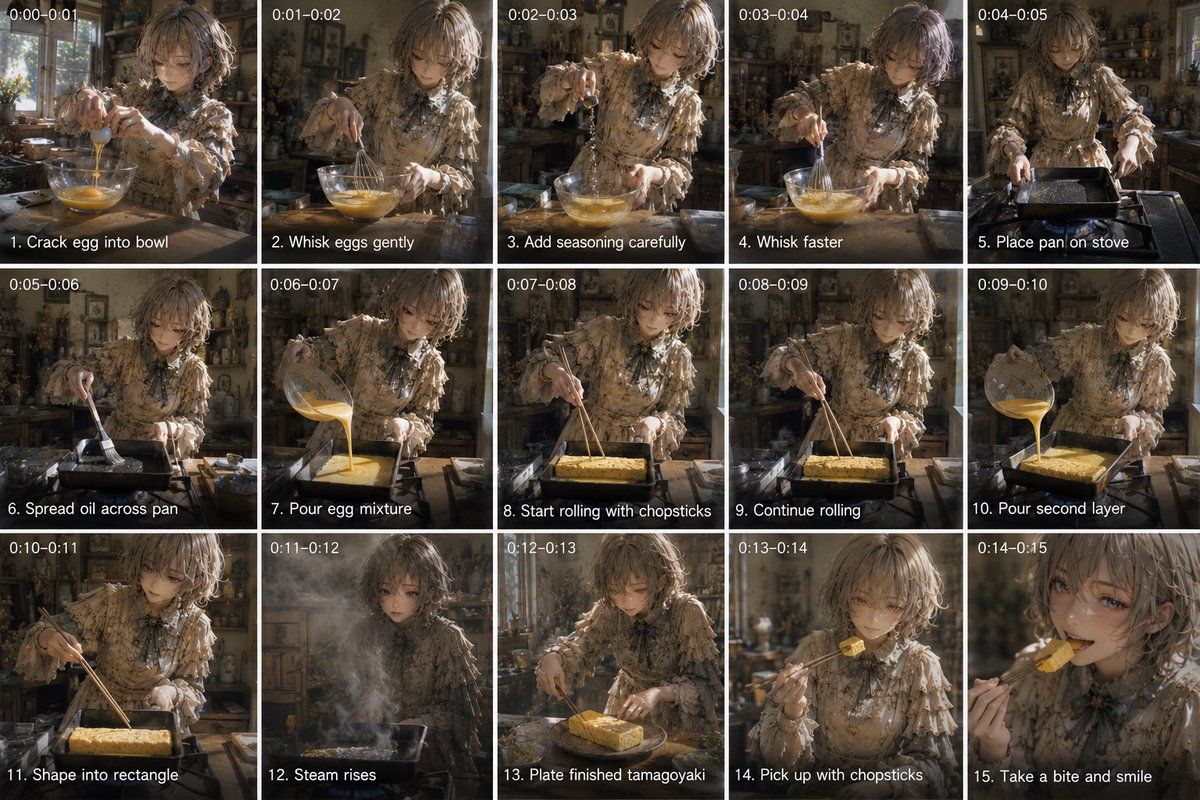
玉子烧烹饪分镜脚本
Prompt
Goal: Create a 15-panel cinematic cooking storyboard showing a young woman making tamagoyaki in a rustic kitchen, with each panel labeled by timestamp and step caption.

Canvas: Wide 16:9 contact-sheet layout, exactly 5 columns by 3 rows, thin white dividers between panels. Each panel has small white timestamp text at the top-left and a white step caption with a black shadow at the bottom-left.

Subject details: A delicate anime-inspired young woman with {argument name="hair color" default="soft ash-blonde wavy bob hair"}, wearing a {argument name="outfit" default="frilly vintage beige floral blouse with lace ruffles and a dark ribbon bow at the collar"}. She cooks at a wooden counter in an old cozy kitchen filled with shelves, jars, utensils, plants, warm sunlight, and atmospheric dust. Her face should be softly obscured or blurred in all panels for privacy, while hands, food, cookware, and clothing remain detailed.

Visual style: Photorealistic cinematic anime realism, warm golden-brown color grade, shallow depth of field, moody natural window light, textured rustic kitchen background, realistic steam, oil shine, egg texture, and handheld film-still feeling.

Panel sequence: Include exactly 15 discrete panels with these visible labels and actions:
1. timestamp “0:00-0:01”, caption “1. Crack egg into bowl”, she cracks an egg into a glass bowl on the counter.
2. timestamp “0:01-0:02”, caption “2. Whisk eggs gently”, she gently whisks yellow eggs in the glass bowl.
3. timestamp “0:02-0:03”, caption “3. Add seasoning carefully”, she sprinkles seasoning into the bowl while holding the whisk.
4. timestamp “0:03-0:04”, caption “4. Whisk faster”, she vigorously whisks the egg mixture.
5. timestamp “0:04-0:05”, caption “5. Place pan on stove”, she sets a rectangular tamagoyaki pan on a stovetop.
6. timestamp “0:05-0:06”, caption “6. Spread oil across pan”, she brushes oil across the rectangular pan.
7. timestamp “0:06-0:07”, caption “7. Pour egg mixture”, she pours egg mixture from the glass bowl into the pan.
8. timestamp “0:07-0:08”, caption “8. Start rolling with chopsticks”, she begins rolling the egg sheet with chopsticks.
9. timestamp “0:08-0:09”, caption “9. Continue rolling”, she continues shaping the rolled omelette with chopsticks.
10. timestamp “0:09-0:10”, caption “10. Pour second layer”, she pours another layer of egg mixture into the pan around the roll.
11. timestamp “0:10-0:11”, caption “11. Shape into rectangle”, she shapes the tamagoyaki into a neat rectangle with chopsticks.
12. timestamp “0:11-0:12”, caption “12. Steam rises”, the pan releases a dramatic cloud of steam in front of her.
13. timestamp “0:12-0:13”, caption “13. Plate finished tamagoyaki”, the finished rectangular golden tamagoyaki sits on a plate on the counter.
14. timestamp “0:13-0:14”, caption “14. Pick up with chopsticks”, she lifts a bite-sized piece with chopsticks.
15. timestamp “0:14-0:15”, caption “15. Take a bite and smile”, close-up of her bringing the tamagoyaki to her mouth with chopsticks, face still obscured.

Constraints: Preserve the exact 15-panel count, exact timestamps, and exact English captions. Do not add extra panels, logos, watermarks, or unrelated text. The food should be {argument name="dish" default="golden Japanese tamagoyaki"}, and the kitchen mood should feel {argument name="mood" default="warm, nostalgic, and cinematic"}.- Category
- Posters & Typography
- Model
- GPT Image 2
- Creator
- IMa kOu
- Source ID
- 21396
- Published
- May 18, 2026
Views5








![[STORYBOARD PROMPT] - SEGMENT 1/3 (0s–8s) STYLE: Cinematográfico Realista, 35mm](https://i.pixshop.app/storage/v1/render/image/public/prompt-source-media/promptsref/work-40297/image-1-21b401e475e76e15.png?width=800&quality=75&resize=contain)