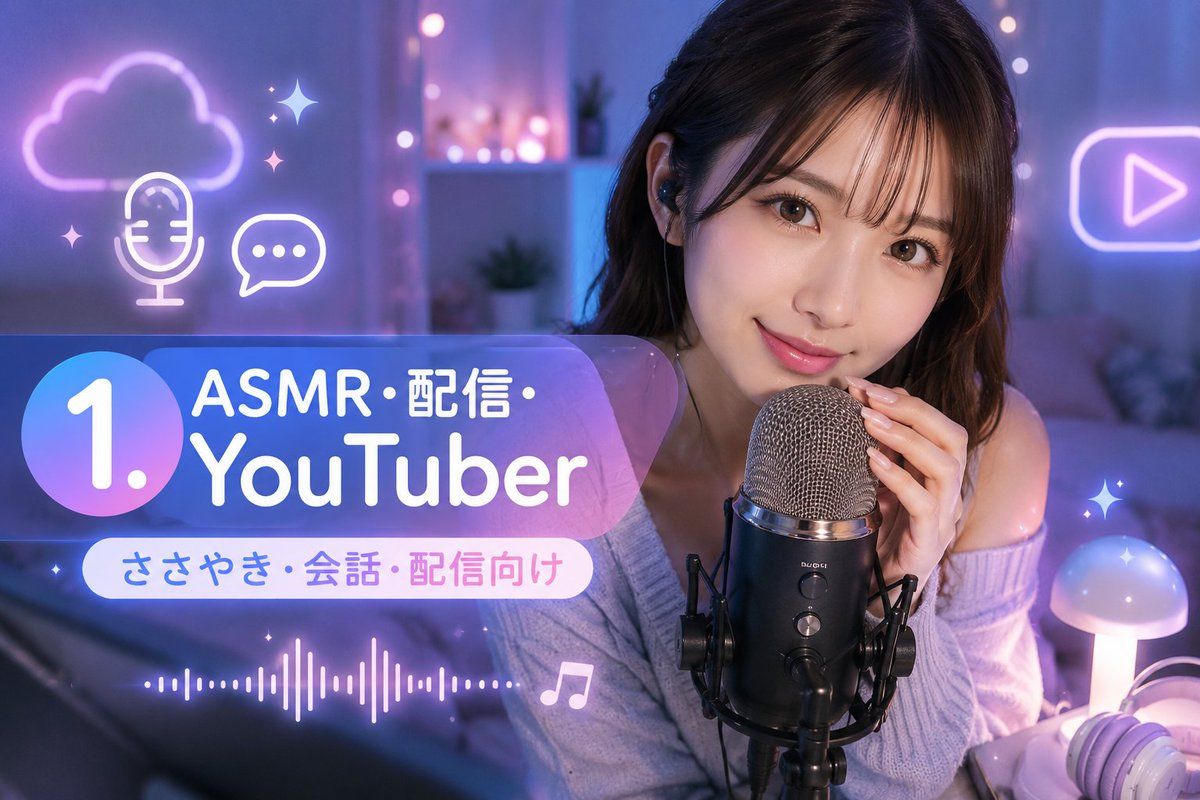
ASMR YouTuber 缩略图
Prompt
Goal: Create a glossy YouTube thumbnail-style image for an ASMR streamer niche, combining a realistic cozy creator photo with large Japanese title graphics and neon social-media icons.

Canvas: Horizontal 16:9 thumbnail, 1152×768 style composition, cinematic shallow depth of field, cool blue and purple lighting with soft pink highlights.

Main subject: A young female ASMR YouTuber sits on the right half of the frame in a cozy bedroom or streaming room, wearing an off-shoulder lavender knit sweater and black in-ear monitors. Her face is intentionally covered by a large flat rectangular privacy block in muted brown, centered over the face from forehead to chin. She holds a large black condenser microphone with silver mesh grille close to her mouth, mounted in a black shock mount on a stand. Her visible hands have neat pale nails. The mood is intimate, calm, and whisper-stream themed.

Background: Soft-focus bedroom/studio with curtains, shelves, small plants, fairy lights, and a bed or sofa. Use blue-purple ambient lighting throughout, with pink bokeh lights in the center background. Add a glowing mushroom-shaped table lamp at the bottom right and white-and-lavender headphones partially visible beside it.

Layout: Put the creator and microphone on the right, and place a large translucent rounded rectangle title panel across the lower-left to center-left. The panel has a blue-to-purple gradient glassmorphism look. On the far left of the panel, include one large circular gradient badge containing the number “1.” in bold white. To the right of the badge, place the main headline in bold rounded white lettering: “ASMR・配信・” on the first line and “YouTuber” on the second line. Beneath it, add a smaller white pill-shaped label containing “ささやき・会話・配信向け” in blue-to-pink text.

Visible text: Use exactly 3 text blocks: 1) “1.” inside the circle badge, 2) main headline “{argument name="headline text" default="ASMR・配信・YouTuber"}”, 3) subtitle “{argument name="subtitle text" default="ささやき・会話・配信向け"}”. Keep all text crisp, readable, and faithful to the Japanese characters.

Decorative elements: Include exactly 7 neon/social graphic elements around the scene: 1) glowing cloud outline in the upper left, 2) white neon microphone icon below the cloud, 3) white neon chat bubble with three dots beside it, 4) glowing play-button outline in the upper right, 5) audio waveform line along the lower left, 6) one white music-note icon near the bottom center, 7) multiple small sparkle stars scattered near the icons and right edge as a single sparkle cluster style. Use purple, white, and pink neon glow.

Visual style: Realistic photo base with overlaid clean vector graphics, modern creator-economy thumbnail design, soft bloom, high contrast, glossy gradients, rounded typography, dreamy ASMR atmosphere, no watermark, no extra logos, no extra text. Use {argument name="main color palette" default="lavender, blue, purple, and soft pink"} lighting and emphasize {argument name="content niche" default="ASMR streaming and YouTuber prompts"}.- Category
- Charts & Infographics
- Model
- GPT Image 2
- Creator
- AI写真ラボ / AIバーチャルカメラマン
- Source ID
- 22408
- Published
- May 24, 2026
Views7












