16

匿名儿童工作室时尚肖像
Enlarge

Example images

匿名儿童工作室时尚肖像

Prompt
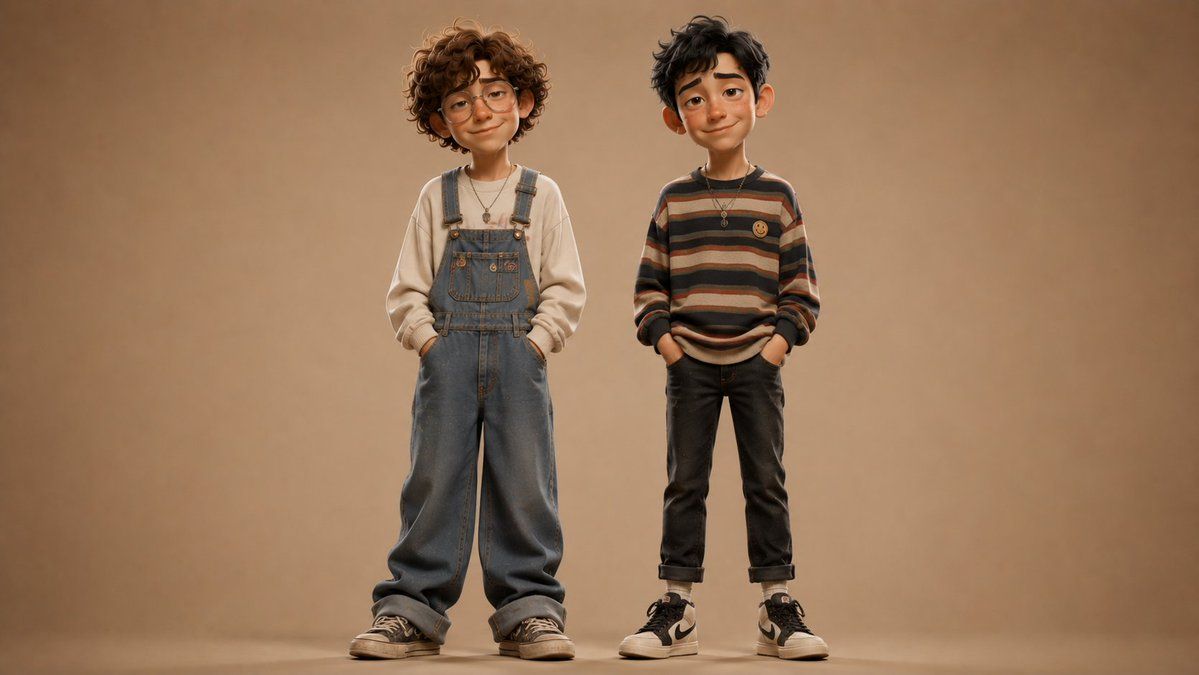
Create a realistic full-body studio fashion portrait of exactly two young children standing side by side against a warm seamless beige-brown backdrop, centered with generous empty space around them and soft floor shadows. The child on the left is {argument name="left child age" default="about 6 years old"}, slightly taller, with voluminous curly medium-brown hair, wearing a cream oversized sweatshirt under loose faded blue denim overalls, hands tucked in the overall pockets, a small pendant necklace, and worn black low-top sneakers. The child on the right is {argument name="right child age" default="about 6 years old"}, slightly shorter, with messy short dark hair, wearing a relaxed horizontal striped sweater in muted brown, tan, cream, rust, and charcoal tones with a small yellow smiley patch on the chest, dark cuffed jeans, white socks, black-and-white high-top sneakers, hands in pockets, and a small pendant necklace. Both children face the camera with calm neutral posture, but their faces are intentionally anonymized by smooth rectangular skin-tone blur blocks with no visible facial features. Use warm cinematic studio lighting, shallow depth of field, high-end editorial children’s fashion styling, natural fabric texture, realistic proportions, muted earthy color palette, 16:9 horizontal composition, no text, no logos except generic shoe styling, no extra people or props.
Category
Brand & Logos
Model
GPT Image 2
Views8
Source ID
22441
Published
May 24, 2026

Guide

About "匿名儿童工作室时尚肖像"

What is this prompt for?

"匿名儿童工作室时尚肖像" AI image prompt for GPT Image 2 (Brand & Logos). 一张写实的编辑风格工作室肖像,展示了两名时尚儿童,面部经过匿名处理,适用于时尚或注重隐私的视觉概念。 Copy it on Picva and recreate the look in one…

The full copyable prompt and example visuals above are ready for AI image generation or one-click recreate in Picva.

How to use this prompt

  1. Step 1

    Open the prompt detail

    Review the example visuals, category, and full prompt text for "匿名儿童工作室时尚肖像".

  2. Step 2

    Copy the prompt

    Copy the prompt body from this page, or load it directly in Studio.

  3. Step 3

    Pick a model (GPT Image 2)

    Prefer GPT Image 2. If you switch models, keep subject and composition and tweak style terms.

  4. Step 4

    Generate and export

    Recreate the look in Picva, or export into your workflow for editing and publishing.

FAQ

What is the "匿名儿童工作室时尚肖像" prompt?
It is an AI image-generation prompt for GPT Image 2 in the Brand & Logos category. This page includes the full prompt text, example visuals, and a one-click recreate path in Picva.
How do I use this prompt to generate an image?
Copy the prompt from this page, or use Generate / Studio. Paste it into a compatible image model, or recreate the look in Picva with optional reference images.
Which model is this prompt for?
This page lists GPT Image 2. Most descriptive prompts also transfer to nearby image models such as GPT Image, Flux, or Midjourney with light style tweaks.
Can I use the result commercially?
You can usually copy the prompt for creation, but commercial use of the final image depends on the model terms, reference-image rights, and the generated content. Follow the source author and platform rules.