都市黑色电影时尚大片
Prompt
Use the attached reference image as your exact reference for composition, style, pose, facial framing, monochromatic aesthetic, and cinematic atmosphere. Maintain my exact facial identity, including facial structure, jawline, hairstyle, eye shape, eyebrows, nose, lips, skin texture, and a realistic appearance with extremely high fidelity to identity. Do not stylize, embellish, or alter recognizable facial features.

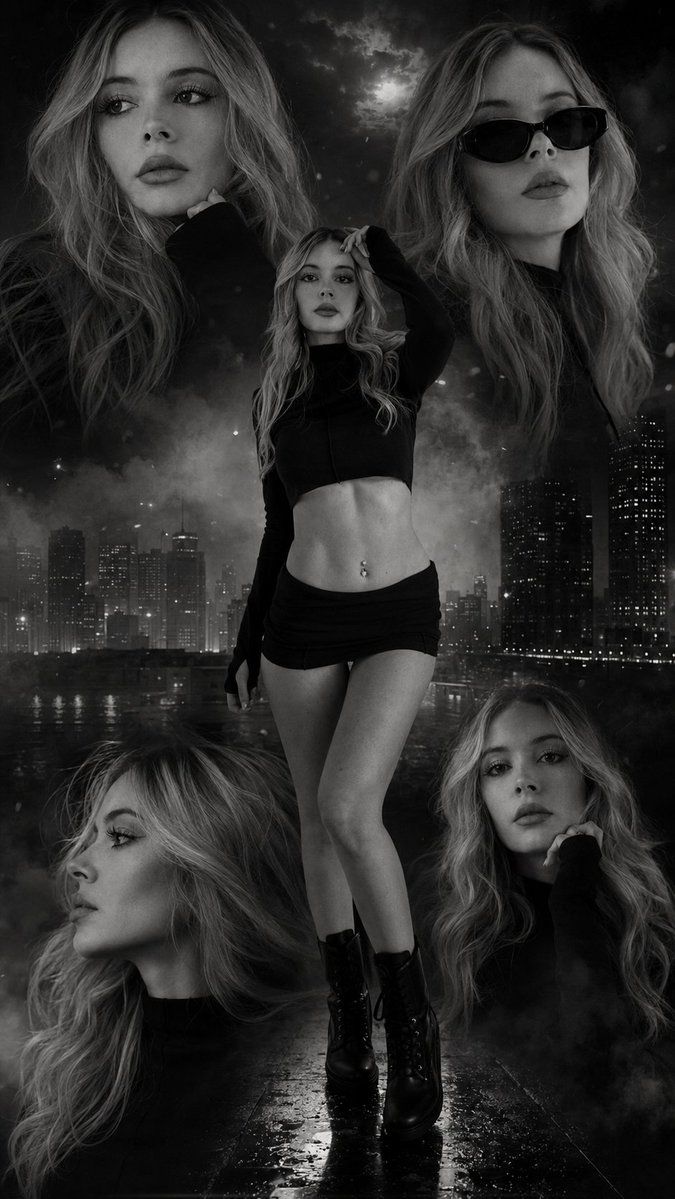
Create a high-end, {argument name="color scheme" default="black-and-white"}, cinematic portrait collage, composed of multiple frames, showcasing the same woman in various elegant poses and expressions throughout the composition. The overall work should evoke the aesthetic of a {argument name="style" default="luxury fashion editorial poster"}, combined with an urban drama and action aesthetic. Use five different versions of the same attached model, artistically arranged in a layered composition with varying camera angles, facial expressions, and poses.

Center shot:
A full-length portrait of the woman, as in the attached image, standing confidently in the center, with a cinematic touch.

Side portraits:
Include close-up portraits from both sides showing different facial angles:
* one looking thoughtfully away with soft, dramatic lighting,
* one with black sunglasses and an elegant, confident demeanor,
* a profile portrait with a strong emphasis on the jawline,
* a contemplative pose with the hand close to the face.

The hair should have texture, volume, a slightly tousled look, and sharp details.

Setting and background:
Create a {argument name="background" default="dark, cinematic urban rooftop/nighttime city atmosphere"} with blurred skyscrapers, subtle moonlight, fog, smoke clouds, floating particles, dust texture, and atmospheric haze. Add soft contour lighting, smoky overlays, and dramatic shadows to the entire collage. It includes subdued urban lighting, a grayscale contrast with a melancholic touch, reflective wet-ground textures, and layered depth effects.

Color correction should be primarily monochromatic in black and white with deep blacks, silver highlights, matte shadows, and subtle warm gray tones. Maintain ultra-realistic skin textures and high dynamic range (HDR) lighting.

Lighting: Use dramatic cinematic lighting with strong contrast, soft edge lighting, volumetric fog, shadow gradients, and luxurious editorial highlights. Faces should have sharp details with a soft, diffused glow around the hair and shoulders.

Style: Collage of ultra-realistic, cinematic, monochromatic portraits; luxury fashion editorial; dark urban aesthetic; high-end poster design; realistic male model photography; melancholic atmosphere; smoky cinematic composition; dramatic shadows; hyper-detailed skin texture; realistic fabric folds; shallow depth of field; premium magazine cover quality; 8K ultra detail; Unreal Engine 5 realism; photographic look- Category
- Charts & Infographics
- Model
- GPT Image 2
- Creator
- HER19845
- Source ID
- 23474
- Published
- May 31, 2026
Views4