19

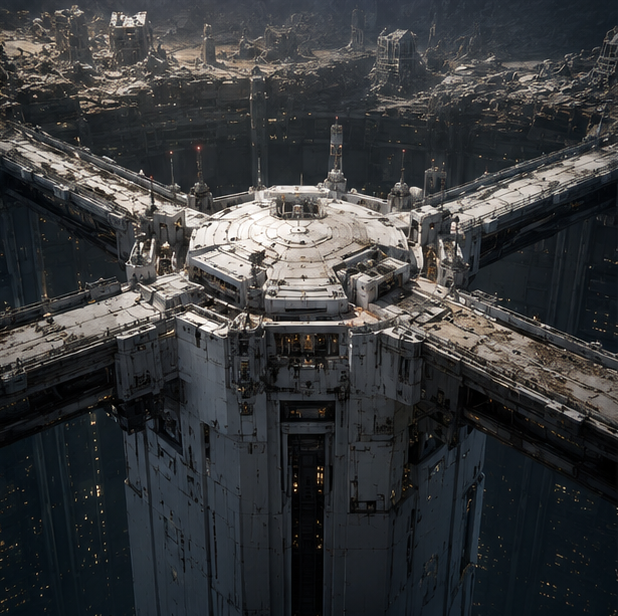
东京地底都市中央塔顶
Enlarge

东京地底都市中央塔顶

Prompt
Create a cinematic dark sci-fi concept art scene of {argument name="location name" default="Tokyo Geofront central tower rooftop"}: an immense cylindrical white-gray industrial tower rising from a vast underground megacity cavern, viewed from a high oblique aerial angle. The tower has a broad circular rooftop platform with concentric rings, panel seams, vents, antennas, small machinery blocks, railings, and weathered modular armor plates. Exactly four massive elevated bridges extend radially from the rooftop in a cross-like layout toward the surrounding city walls, each bridge wide, damaged, layered with pipes and structural ribs. Around and below the tower is a deep vertical abyss filled with countless tiny warm yellow window lights, suggesting an enormous subterranean city shaft. In the background, show a ruined rocky cavern rim and dense decayed industrial districts built into the cliffs, with broken towers, scaffolds, and eroded concrete structures. Use a gritty hard-surface mecha/anime game background style, photorealistic concept art detail, desaturated charcoal and off-white palette, cold ambient light from above, warm pinprick lights below, heavy scale, atmospheric haze, dramatic shadows, no people, no vehicles, no readable text, no logos. Emphasize the rooftop design of the central tower, with intricate believable sci-fi architecture and a monumental dystopian mood.
Category
Posters & Typography
Model
GPT Image 2
Views11
Source ID
24040
Published
Jun 3, 2026

Guide

About "东京地底都市中央塔顶"

What is this prompt for?

"东京地底都市中央塔顶" AI image prompt for GPT Image 2 (Posters & Typography). 用于生成暗黑科幻地下巨型城市塔顶环境游戏概念图的详细提示词。 Copy it on Picva and recreate the look in one click.

The full copyable prompt and example visuals above are ready for AI image generation or one-click recreate in Picva.

How to use this prompt

  1. Step 1

    Open the prompt detail

    Review the example visuals, category, and full prompt text for "东京地底都市中央塔顶".

  2. Step 2

    Copy the prompt

    Copy the prompt body from this page, or load it directly in Studio.

  3. Step 3

    Pick a model (GPT Image 2)

    Prefer GPT Image 2. If you switch models, keep subject and composition and tweak style terms.

  4. Step 4

    Generate and export

    Recreate the look in Picva, or export into your workflow for editing and publishing.

FAQ

What is the "东京地底都市中央塔顶" prompt?
It is an AI image-generation prompt for GPT Image 2 in the Posters & Typography category. This page includes the full prompt text, example visuals, and a one-click recreate path in Picva.
How do I use this prompt to generate an image?
Copy the prompt from this page, or use Generate / Studio. Paste it into a compatible image model, or recreate the look in Picva with optional reference images.
Which model is this prompt for?
This page lists GPT Image 2. Most descriptive prompts also transfer to nearby image models such as GPT Image, Flux, or Midjourney with light style tweaks.
Can I use the result commercially?
You can usually copy the prompt for creation, but commercial use of the final image depends on the model terms, reference-image rights, and the generated content. Follow the source author and platform rules.