16

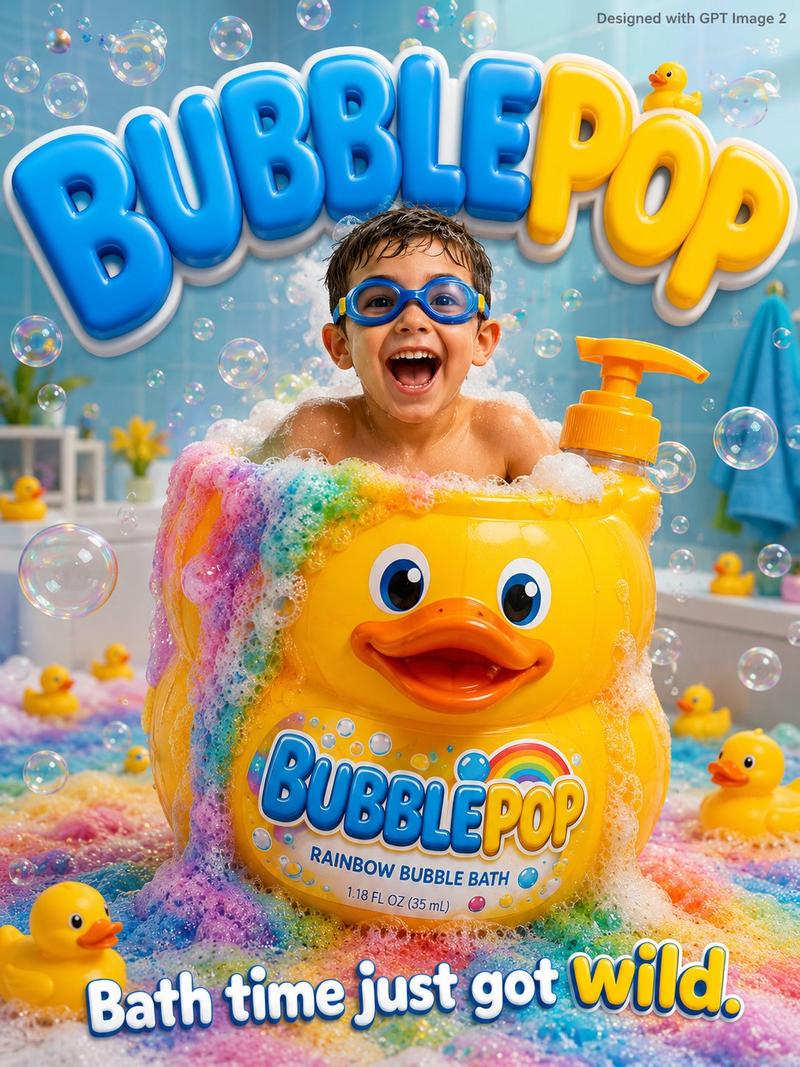
儿童沐浴产品广告海报
Enlarge

儿童沐浴产品广告海报

Prompt
A fun bubbly kids advertisement poster. An excited young boy age {argument name="age" default="5"} in swimming goggles sits inside a giant rubber duck shaped bubble bath bottle 3x his height overflowing with rainbow bubbles everywhere, "{argument name="product name" default="BUBBLEPOP"}" written in big bouncy letters on the bottle. Bright pastel blue bathroom background with floating rubber ducks soap bubbles and rainbow foam. Big bouncy rounded typography "{argument name="product name" default="BUBBLEPOP"}" in bright blue and yellow filling the background. Tagline bottom: "Bath time just got wild." Small text top-right corner reads "Designed with GPT Image 2" in grey. Photorealistic, fun kids bath product commercial, bright soft bathroom lighting.
Category
Posters & Typography
Model
GPT Image 2
Creator
𝐌
Views2
Source ID
24797
Published
Jun 8, 2026

Guide

About "儿童沐浴产品广告海报"

What is this prompt for?

"儿童沐浴产品广告海报" AI image prompt for GPT Image 2 (Posters & Typography). 生成一张充满趣味、泡沫丰富的儿童广告海报,采用明亮的柔和色调、彩虹泡沫以及 3D 字体,专为沐浴产品设计。 Copy it on Picva and recreate the lo…

The full copyable prompt and example visuals above are ready for AI image generation or one-click recreate in Picva.

How to use this prompt

  1. Step 1

    Open the prompt detail

    Review the example visuals, category, and full prompt text for "儿童沐浴产品广告海报".

  2. Step 2

    Copy the prompt

    Copy the prompt body from this page, or load it directly in Studio.

  3. Step 3

    Pick a model (GPT Image 2)

    Prefer GPT Image 2. If you switch models, keep subject and composition and tweak style terms.

  4. Step 4

    Generate and export

    Recreate the look in Picva, or export into your workflow for editing and publishing.

FAQ

What is the "儿童沐浴产品广告海报" prompt?
It is an AI image-generation prompt for GPT Image 2 in the Posters & Typography category. This page includes the full prompt text, example visuals, and a one-click recreate path in Picva.
How do I use this prompt to generate an image?
Copy the prompt from this page, or use Generate / Studio. Paste it into a compatible image model, or recreate the look in Picva with optional reference images.
Which model is this prompt for?
This page lists GPT Image 2. Most descriptive prompts also transfer to nearby image models such as GPT Image, Flux, or Midjourney with light style tweaks.
Can I use the result commercially?
You can usually copy the prompt for creation, but commercial use of the final image depends on the model terms, reference-image rights, and the generated content. Follow the source author and platform rules.