朋克吉他手漫画封面
Prompt
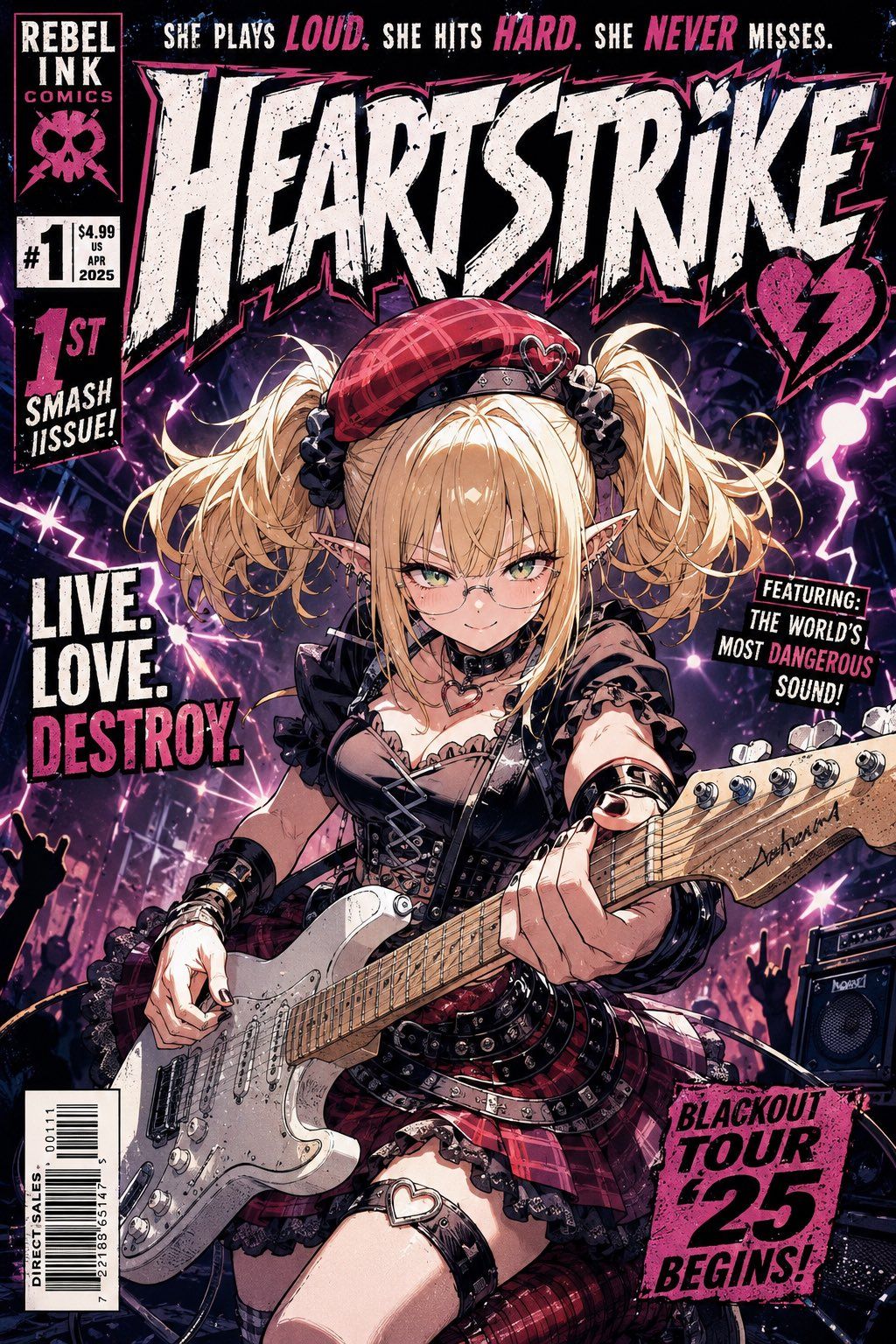
Goal: Create a vertical American comic book cover in a gritty punk-rock manga/anime style for a fictional issue titled {argument name="comic title" default="HEARTSTRIKE"}.

Canvas: Portrait comic cover, 2:3 aspect ratio, full-bleed illustration with a black distressed print border, halftone texture, ink speckles, worn paper scratches, high-contrast magenta, black, white, and purple lighting.

Main subject: Center a young female punk rock guitarist idol in dynamic low-angle perspective, filling most of the cover. She has blonde twin-tail hair, pointed elf ears, a red plaid beret with a small heart pin, black ribbon hair ties, gothic punk makeup vibe, a black corset top with frills, fishnet/mesh sleeves, studded bracelets, choker, red plaid skirt, belts, chains, lace trim, and a heart-shaped garter detail. Her face is deliberately covered by a plain skin-tone rectangular censor block with no facial features. She is aggressively playing a white Stratocaster-style electric guitar angled diagonally from lower left to mid-right, with detailed strings, pickups, knobs, worn scratches, and a visible headstock signature.

Background: A chaotic concert stage packed with silhouetted fans raising rock hand signs, purple lightning bolts, starburst stage lights, smoke, electric energy, and black speaker amps on the right. The mood is loud, rebellious, dangerous, and glamorous.

Cover typography and layout: Use exaggerated distressed comic lettering with jagged edges, pink shadows, white fills, black outlines, and ink splatter. Include exactly 8 visible text blocks: 1) top-left publisher box: "REBEL INK COMICS" with a pink skull-and-bow emblem; 2) price/issue box: "#1", "$4.99", "US", "APR", "2025"; 3) top tagline across the cover: "SHE PLAYS LOUD. SHE HITS HARD. SHE NEVER MISSES." with the words "LOUD", "HARD", and "NEVER" in hot pink; 4) huge main masthead: "{argument name="comic title" default="HEARTSTRIKE"}"; 5) left promo stack: "1ST SMASH ISSUE!"; 6) left slogan: "LIVE. LOVE. DESTROY." with "DESTROY." in hot pink; 7) right tilted caption: "FEATURING: THE WORLD'S MOST DANGEROUS SOUND!" with "DANGEROUS" in hot pink; 8) bottom-right hot pink tour stamp: "{argument name="tour stamp text" default="BLACKOUT TOUR '25 BEGINS!"}". Add a small vertical barcode box at bottom left with "DIRECT SALES" and barcode numbers.

Visual style: Fusion of American punk comic cover, Japanese anime character rendering, heavy cel shading, detailed line art, distressed screenprint texture, neon magenta rim light, purple concert glow, dramatic foreshortening, sharp inked outlines, glossy highlights on guitar hardware, chaotic composition.

Constraints: Keep the cover busy but readable, preserve the exact count of 8 major text blocks, do not add extra title banners or logos beyond the listed elements, keep the face fully hidden by the plain rectangle, and make it look like a collectible first-issue comic cover.- Category
- Posters & Typography
- Model
- GPT Image 2
- Creator
- Toudaiji
- Source ID
- 25068
- Published
- Jun 10, 2026
Views0