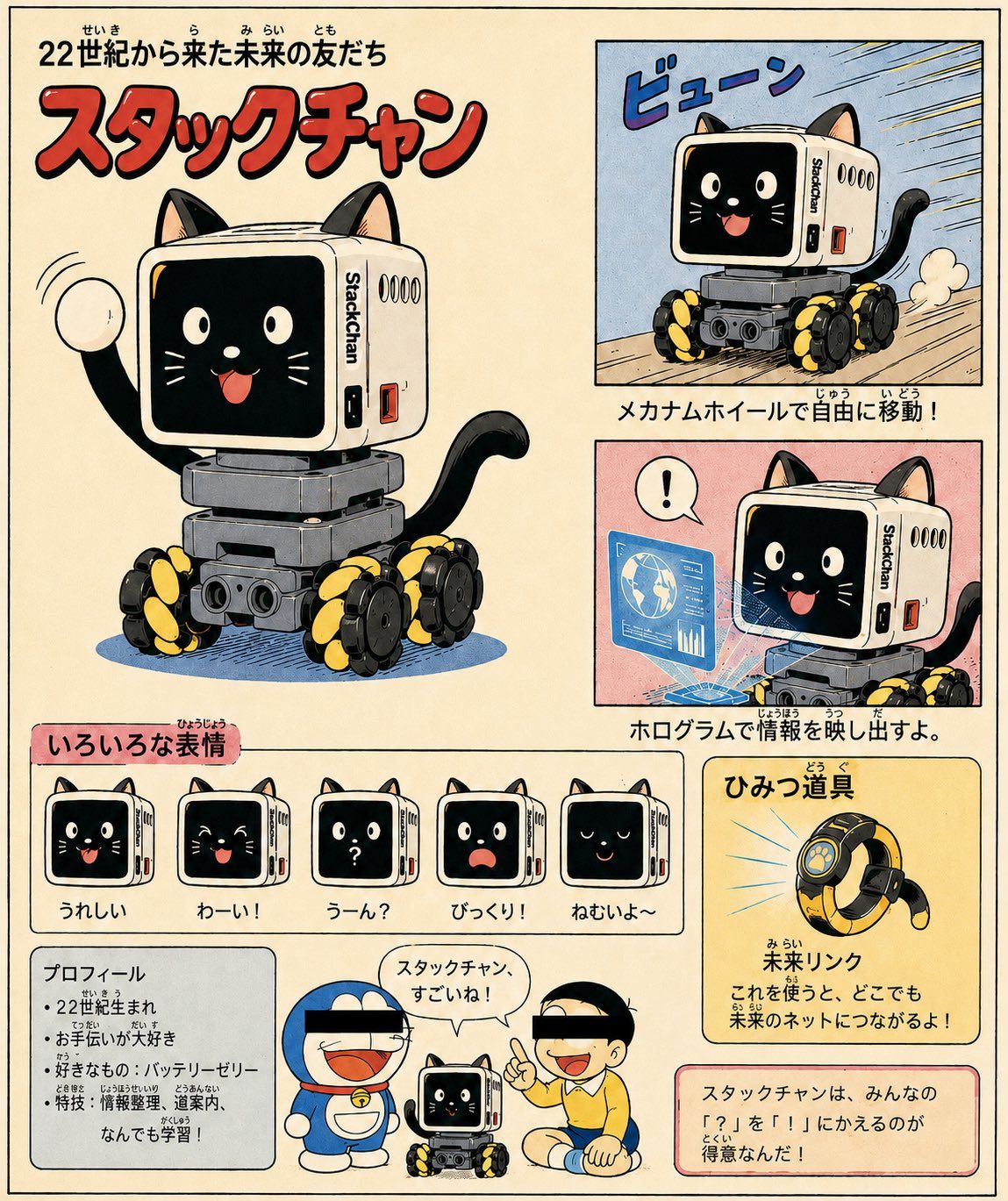
复古漫画风格 StackChan 概念设计图
Prompt
Using REFERENCE_0 and REFERENCE_1 as the base design for the small StackChan wheeled robot, transform it into a cheerful retro Japanese manga/anime concept sheet for a cute “friend from the future.” Keep the recognizable white cube head, black screen face, side StackChan label, gray body, and black/yellow mecanum wheels, but stylize everything as hand-drawn 1970s–1980s children’s manga with ink outlines, halftone texture, warm cream paper, and slightly faded print colors.

Goal: Create a full-page character introduction poster for {argument name="character name" default="StackChan"}, presented as a futuristic robot-cat companion who is good at turning “?” into “!”. Add cat ears, a cat tail, a friendly animated face on the screen, and playful manga energy.

Layout: Use a vintage Japanese magazine/comic-page layout with exactly 8 main content areas:
1. Large hero illustration on the left: the robot-cat waving happily, with the title above.
2. Top-right action panel: the robot moving fast on its mecanum wheels with speed lines and the sound effect 「ビューン」.
3. Middle-right feature panel: the robot projecting a blue hologram information display, with a speech bubble showing 「!」.
4. Expression strip: exactly 5 small face-expression icons labeled in Japanese — happy, yay, confused with a question mark, surprised, and sleepy.
5. Lower-left profile box with bullet-point facts.
6. Bottom-center cameo panel: two famous blue robotic-cat and schoolboy-inspired silhouettes with black censor bars over their eyes, standing beside StackChan, with a speech bubble saying 「スタックチャン、すごいね!」.
7. Lower-right secret gadget card featuring a ring-shaped device.
8. Bottom-right concept message box explaining that the character turns everyone’s 「?」 into 「!」.

Text: Include Japanese typography and furigana-style small kana for a retro children’s encyclopedia feel. Main headline should read {argument name="headline text" default="22世紀から来た未来の友だち"}. Big red title should read {argument name="title text" default="スタックチャン"}. Feature captions should describe free movement by mecanum wheels, projecting information with holograms, and the gadget 「未来リンク」 that connects to the future network.

Style constraints: Make it look like a scanned vintage manga character guide page, not a photo. Use bold red title lettering, cream background, blue/pink/yellow feature panels, thick black panel borders, hand-lettered Japanese captions, visible print grain, and whimsical child-friendly sci-fi energy. Do not add more than the 5 expression icons or more than the single secret gadget card.- Category
- Posters & Typography
- Model
- GPT Image 2
- Creator
- Yuto Flatmountain
- Source ID
- 25708
- Published
- Jun 14, 2026
Views1