扁平涂鸦风格照片转换
Prompt
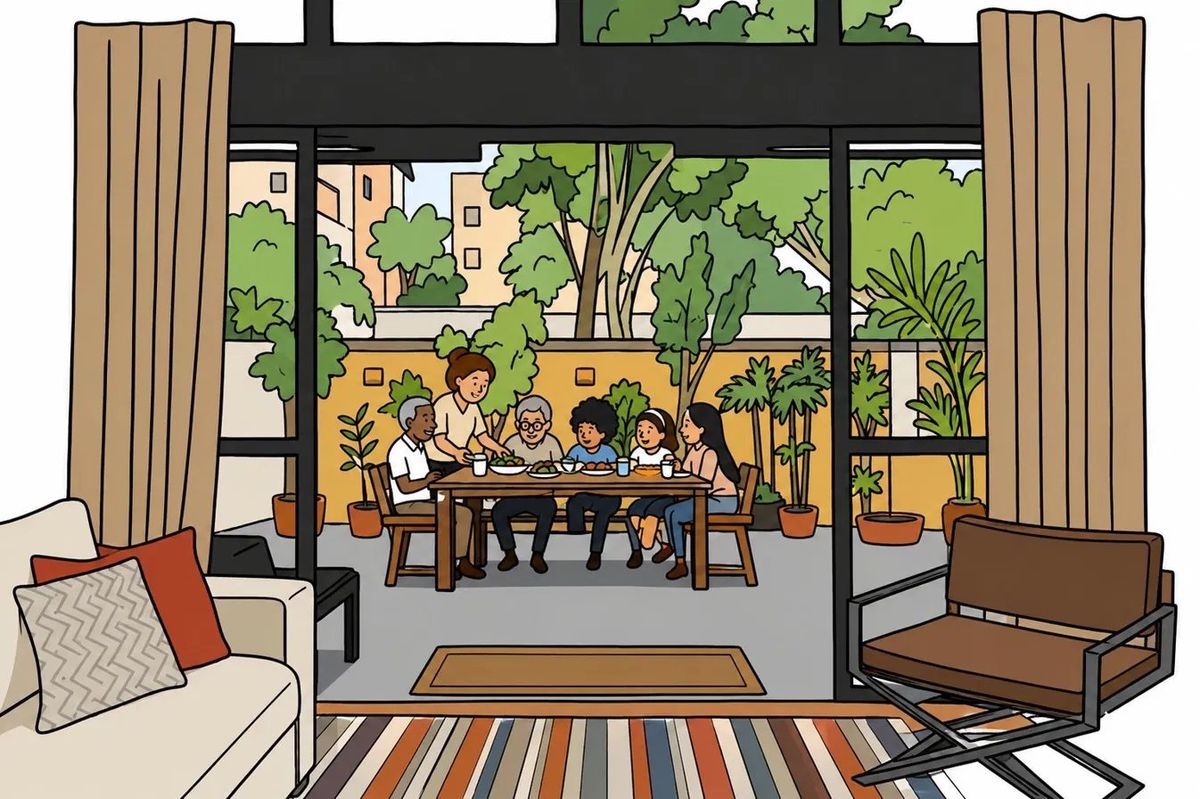
Using the provided reference image, transform it into a clean doodle / flat illustration. Preserve the original composition, camera angle, room layout, subject positions, indoor-outdoor framing, and overall scene exactly: the view from inside the living room through the large glass doors toward the patio dining table.

Style: Convert the photograph into a polished flat vector-like cartoon illustration with simple shapes, clean black outlines, medium-weight linework, flat colors, and zero realistic shading or gradients. Simplify textures and details while keeping all major objects recognizable.

People and layout: Keep exactly 6 people seated or standing around the outdoor table in the same relative positions as the reference: 1 older man at the left, 1 standing adult behind the table, 1 elderly person near the center, 1 child near center-right, 1 child to the right, and 1 adult woman at the far right. Keep the table, chairs, food, cups, patio plants, glass doors, curtains, sofa with pillows, rug, and lounge chair in their original locations.

Color treatment: Use warm, friendly flat colors inspired by the photo: beige curtains, cream sofa, red accent pillow, striped rug, black window frames, brown patio furniture, gray patio floor, yellow garden wall, and bright green plants and trees.

Constraints: No photorealism, no painterly brushwork, no shadows, no hatching, no extra people, no text, no watermark. The final image should look like a clean editorial flat illustration made from the reference photo.
- Category
- Architecture & Spaces
- Model
- GPT Image 2
- Creator
- Samuel Ferrero.
- Source ID
- 26629
- Published
- Jun 23, 2026
Views0