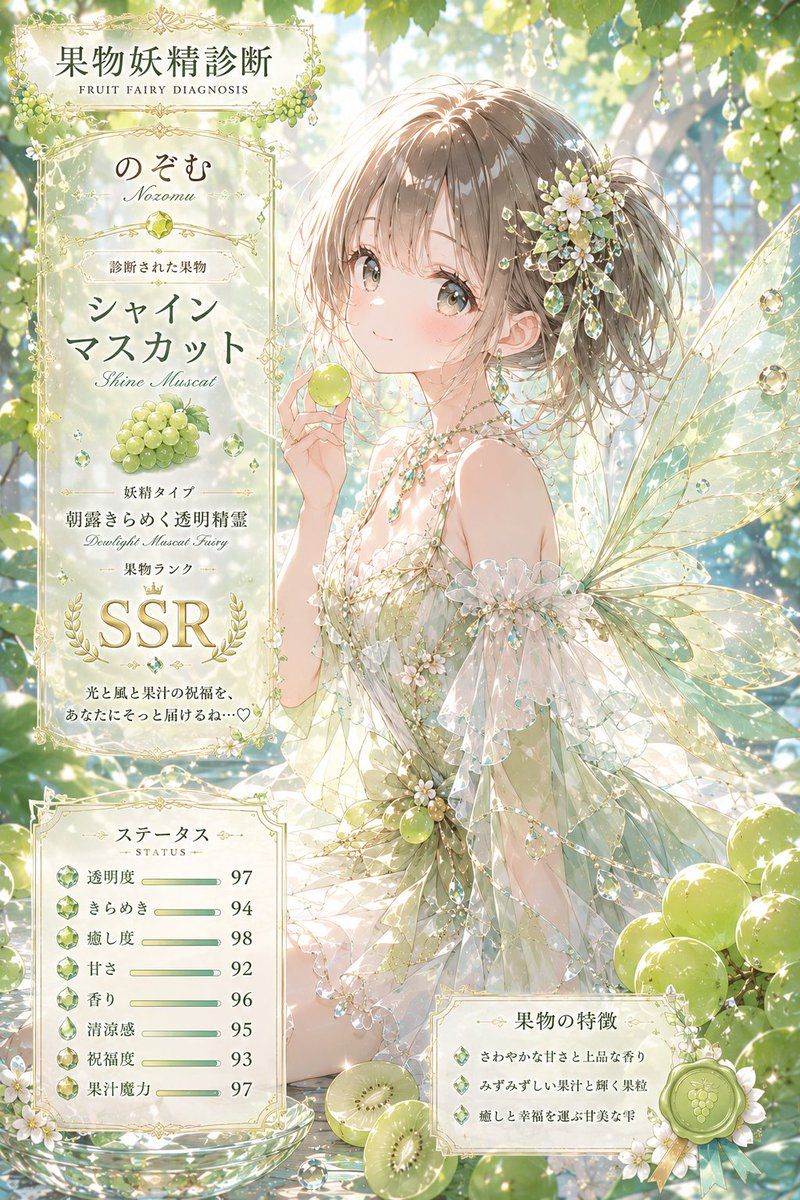
阳光玫瑰葡萄精灵诊断
Prompt
Goal: Create a vertical ornate anime fantasy “fruit fairy diagnosis” result card featuring {argument name="character name" default="のぞむ"} as a luminous Shine Muscat grape fairy.

Canvas: Portrait 2:3 composition, highly detailed, soft sunlit greenhouse or grape arbor background with green leaves, bokeh, sparkling dew, hanging crystal droplets, and clusters of pale green grapes. Use a delicate watercolor-anime style with luxury fantasy illustration polish, pastel ivory, mint green, champagne gold, and translucent aquamarine.

Main subject: On the right side, draw one young fairy girl with light brown ash-blonde hair in a loose side ponytail, large hazel-green eyes, rosy cheeks, and a gentle smile. She holds one single Shine Muscat grape near her face. Her hair is decorated with exactly one floral hairpiece made of small white blossoms, green grapes, leaves, ribbons, and dangling jewels. She wears a sheer off-shoulder fairy dress in white, pale green, and crystal tones, covered with bead chains, tiny flowers, grape motifs, ruffled transparent sleeves, and iridescent gems. Add large transparent insect-like fairy wings with gold vein lines and dew drops extending behind her. Place additional Shine Muscat grape clusters around the lower right and upper background, plus sliced green fruit at the bottom.

Layout: Make the image feel like a collectible diagnosis/result sheet. Use ornate gold filigree frames, botanical borders, laurel motifs, and translucent parchment panels. Put one tall main information panel on the left, one smaller status panel at bottom left, and one feature panel at bottom right. The subject overlaps the panels slightly but remains the visual focus.

Left main information panel: At the top, include the Japanese headline {argument name="headline text" default="果物妖精診断"} with the small English subtitle “FRUIT FAIRY DIAGNOSIS.” Below it show the name {argument name="character name" default="のぞむ"} with romanization “Nozomu.” Add a section for the diagnosed fruit using Japanese fruit name {argument name="fruit name" default="シャインマスカット"} and English “Shine Muscat,” with an illustration of exactly one bunch of pale green grapes. Add fairy type text in Japanese and English: “Daylight Muscat Fairy.” Add fruit rank with a crown and very large gold serif letters {argument name="fruit rank" default="SSR"}, surrounded by laurel branches. Include a short blessing line in Japanese-style decorative text at the bottom.

Bottom-left status panel: Include exactly 8 status rows, each with a small green gem or grape icon, a Japanese label, a thin horizontal green progress bar, and a number at the right. The 8 visible values are: transparency 97, sparkle 94, healing level 98, sweetness 92, fragrance 96, freshness 95, blessing level 93, and fruit-juice magic 97. Title this panel “STATUS” beneath a Japanese status heading.

Bottom-right feature panel: Include exactly 3 bullet points with green gem icons describing the fruit characteristics: refreshing sweetness and elegant fragrance; juicy, shining pulp; gentle hands that bring healing and happiness. Decorate with a green wax seal stamped with a grape emblem and two ribbon tails.

Visual style: Ultra-detailed Japanese anime illustration, ethereal, elegant, high-key lighting, sparkling highlights, soft focus depth of field, gold ornamental typography, translucent layers, crystal reflections, delicate botanical fantasy. Keep the overall mood pure, luxurious, fresh, and magical.

Constraints: Use exactly 1 main fairy character, 1 left main info panel, 1 bottom-left status panel, 1 bottom-right feature panel, 8 status rows, and 3 feature bullets. Avoid modern UI styling, harsh shadows, dark colors, extra characters, or watermarks.- Category
- UI & Interfaces
- Model
- GPT Image 2
- Creator
- のぞむ*AIイラスト
- Source ID
- 27591
- Published
- Jul 3, 2026
Views0