13

梦幻东方祖母绿美人
Enlarge

梦幻东方祖母绿美人

Prompt
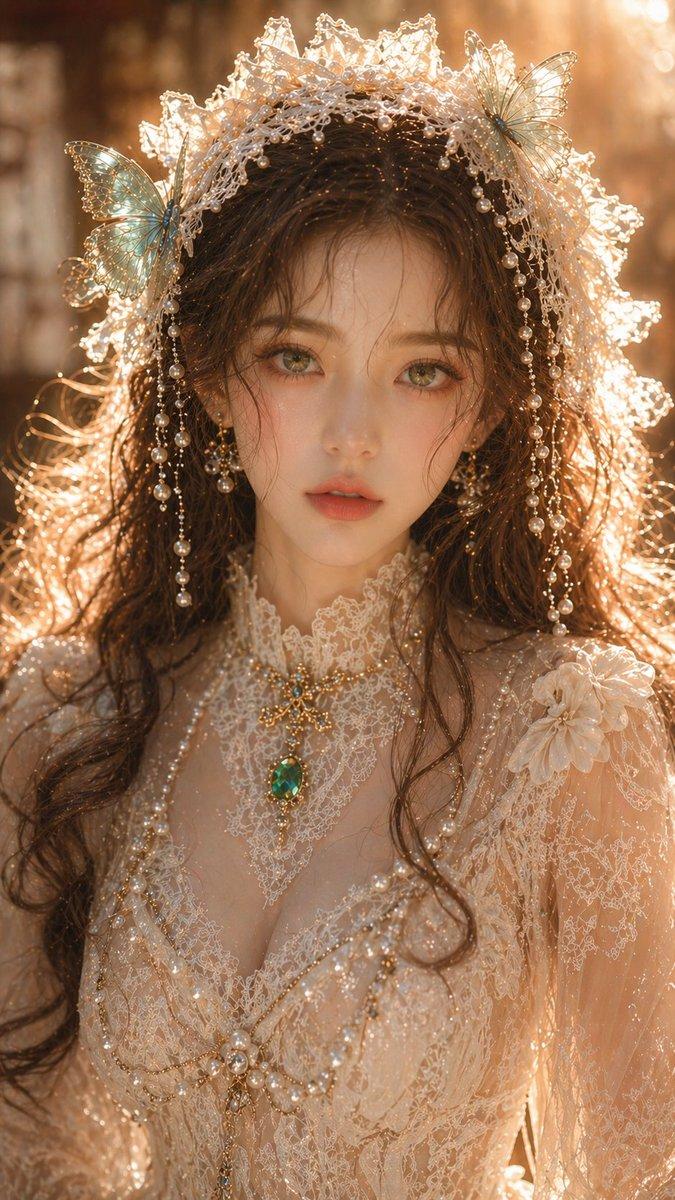
Dreamy oriental female portrait, adult female, close-up portrait, exquisite facial features, fair and translucent skin, delicate but clean skin texture, emerald green eyes, soft and charming gaze, brown slightly curly hair naturally scattered; off-white lace headpiece, cyan-green butterfly embellishments, pearl decorations, clothing is exquisite lace dress, clear structure, clean texture not overly complex, emerald jewelry; lighting is soft warm golden side backlight, clear rim light but not overexposed, skin has slight highlights but not overly reflective, overall light is clean and translucent, background softly blurred, shallow depth of field; high-end portrait photography texture, clear but restrained details, no grain, no noise, real physical lighting, 8K, commercial-grade texture. Aspect ratio: 9:16
Category
Photography & Realism
Model
ChatGPT
Creator
@liyue_ai
Views213
Source ID
13800
Published
Apr 30, 2026

Guide

About "梦幻东方祖母绿美人"

What is this prompt for?

"梦幻东方祖母绿美人" AI image prompt for ChatGPT (Photography & Realism). 梦幻东方女性人像,成年女性,近景肖像,精致五官,白皙通透肌肤,细腻但干净的皮肤质感,祖母绿色眼睛,柔和迷人眼神,棕色微卷发自然散落; 米白色蕾丝头饰,青绿色蝴蝶点缀,珍珠装饰,服饰为精致蕾…

The full copyable prompt and example visuals above are ready for AI image generation or one-click recreate in Picva.

How to use this prompt

  1. Step 1

    Open the prompt detail

    Review the example visuals, category, and full prompt text for "梦幻东方祖母绿美人".

  2. Step 2

    Copy the prompt

    Copy the prompt body from this page, or load it directly in Studio.

  3. Step 3

    Pick a model (ChatGPT)

    Prefer ChatGPT. If you switch models, keep subject and composition and tweak style terms.

  4. Step 4

    Generate and export

    Recreate the look in Picva, or export into your workflow for editing and publishing.

FAQ

What is the "梦幻东方祖母绿美人" prompt?
It is an AI image-generation prompt for ChatGPT in the Photography & Realism category. This page includes the full prompt text, example visuals, and a one-click recreate path in Picva.
How do I use this prompt to generate an image?
Copy the prompt from this page, or use Generate / Studio. Paste it into a compatible image model, or recreate the look in Picva with optional reference images.
Which model is this prompt for?
This page lists ChatGPT. Most descriptive prompts also transfer to nearby image models such as GPT Image, Flux, or Midjourney with light style tweaks.
Can I use the result commercially?
You can usually copy the prompt for creation, but commercial use of the final image depends on the model terms, reference-image rights, and the generated content. Follow the source author and platform rules.