18

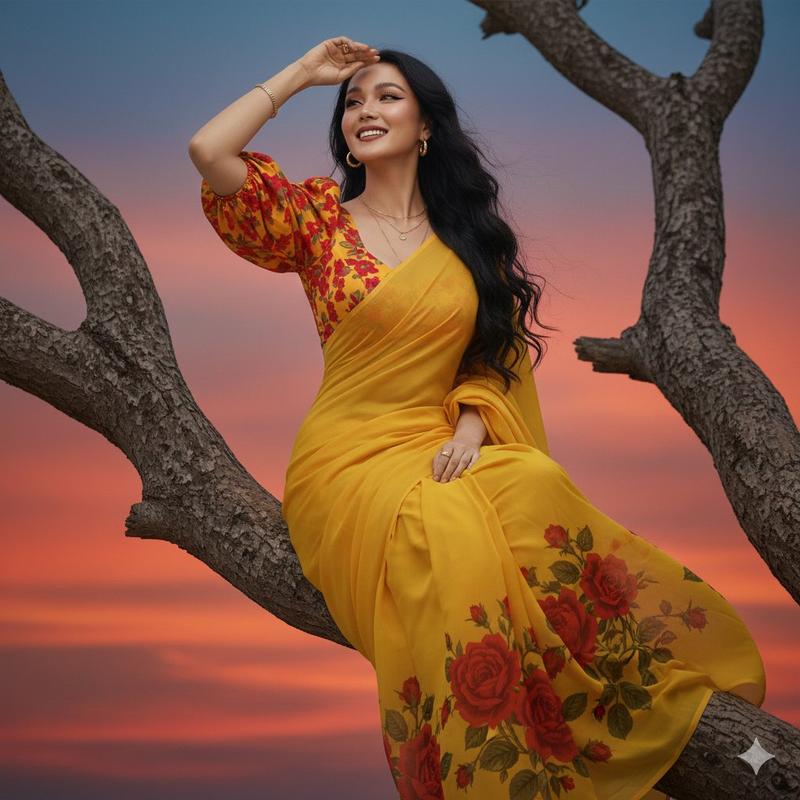
夕阳树枝上眺望的纱丽美人
Enlarge

夕阳树枝上眺望的纱丽美人

Prompt
“A hyper-realistic HD portrait of a beautiful young woman sitting gracefully on a tree branch, legs dangling, smiling brightly. She is wearing a yellow saree with a printed red rose design on the lower portion, and a puffy red-and-yellow shoulder blouse underneath. Soft natural makeup, dramatic winged eyeliner, brown eyes, and deep maroon lipstick. She wears a simple gold chain and simple gold earrings. Her long dark wavy hair reaches her knees, flowing in the air, with a few strands falling softly across her face. Use the exact same face from the reference image without changing any facial features. The background shows a reddish-blue sky during sunset, giving a classic, dramatic, high-contrast cinematic look. Pose her as if she is holding her hand near her forehead, looking into the distance with a graceful expression.
Category
Photography & Realism
Model
Nano Banana Pro
Creator
@AbidkingB
Views35
Source ID
12229
Published
Apr 20, 2026

Guide

About "夕阳树枝上眺望的纱丽美人"

What is this prompt for?

"夕阳树枝上眺望的纱丽美人" AI image prompt for Nano Banana Pro (Photography & Realism). “一张超写实高清肖像,描绘了一位美丽的年轻女子优雅地坐在树枝上,双腿悬空,笑容灿烂。她身穿黄色纱丽,下摆印有红色玫瑰图案,内搭一件蓬松的红黄相间露肩上衣。妆容自然柔和…

The full copyable prompt and example visuals above are ready for AI image generation or one-click recreate in Picva.

How to use this prompt

  1. Step 1

    Open the prompt detail

    Review the example visuals, category, and full prompt text for "夕阳树枝上眺望的纱丽美人".

  2. Step 2

    Copy the prompt

    Copy the prompt body from this page, or load it directly in Studio.

  3. Step 3

    Pick a model (Nano Banana Pro)

    Prefer Nano Banana Pro. If you switch models, keep subject and composition and tweak style terms.

  4. Step 4

    Generate and export

    Recreate the look in Picva, or export into your workflow for editing and publishing.

FAQ

What is the "夕阳树枝上眺望的纱丽美人" prompt?
It is an AI image-generation prompt for Nano Banana Pro in the Photography & Realism category. This page includes the full prompt text, example visuals, and a one-click recreate path in Picva.
How do I use this prompt to generate an image?
Copy the prompt from this page, or use Generate / Studio. Paste it into a compatible image model, or recreate the look in Picva with optional reference images.
Which model is this prompt for?
This page lists Nano Banana Pro. Most descriptive prompts also transfer to nearby image models such as GPT Image, Flux, or Midjourney with light style tweaks.
Can I use the result commercially?
You can usually copy the prompt for creation, but commercial use of the final image depends on the model terms, reference-image rights, and the generated content. Follow the source author and platform rules.