复古千禧风时尚杂志封面人像提示词
Prompt
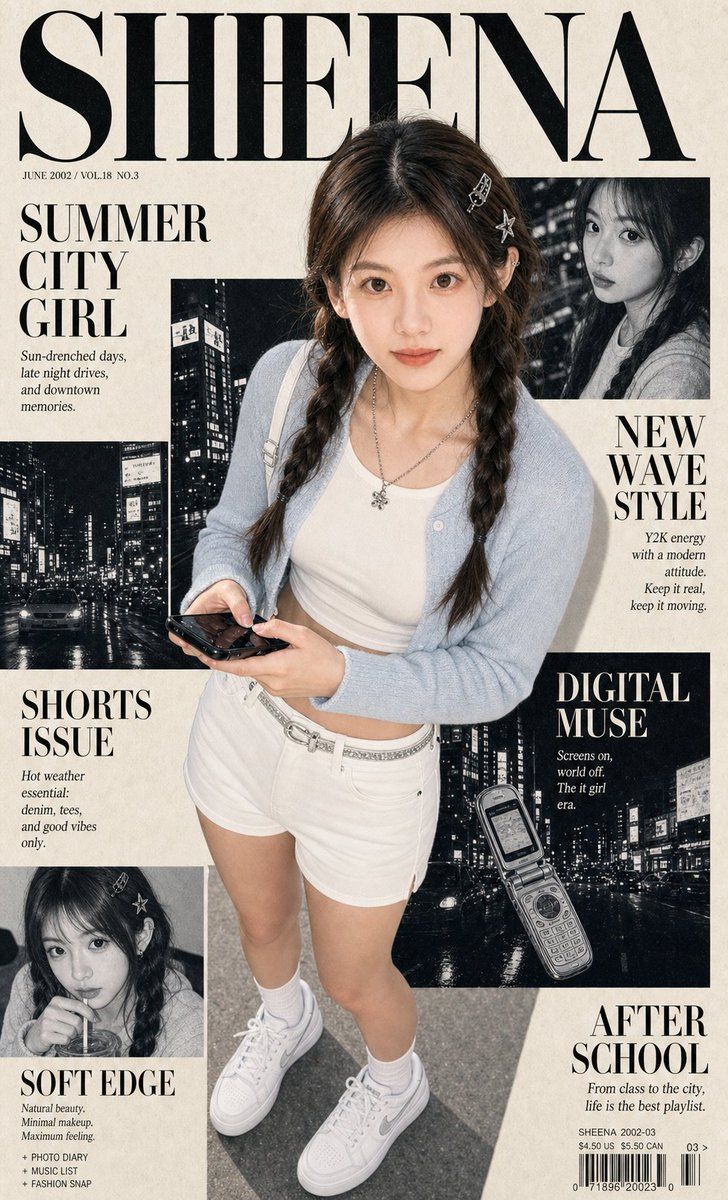
Create a vertical photorealistic Y2K editorial fashion magazine cover portrait for social media. Use the uploaded portrait photo as the appearance reference for the person, with strong facial likeness as the top priority. Preserve the same soft oval face, warm brown eyes, straight natural brows, gentle nose shape, small natural lips, fair warm skin tone, calm approachable expression, and natural dark brown hair direction from the uploaded portrait photo.

Keep the face realistic and close to the portrait, not doll-like, not anime, not a different model. Style the hair with a soft center part, loose face-framing strands, and relaxed long twin braids or low braided sections. Use clean natural editorial makeup, soft glossy lips, no heavy smoky makeup, and no exaggerated eyelashes.

Create a layered Y2K fashion magazine collage cover with cream paper texture, black-and-white editorial image panels, bold serif masthead, clean article blocks, small columns, subtle halftone, print grain, and high-contrast black-and-cream layout. The large readable masthead at the top must read exactly “SHEENA”. Add stylish readable cover lines: “SUMMER CITY GIRL”, “NEW WAVE STYLE”, “WHITE SHORTS ISSUE”, “DIGITAL MUSE”, “SOFT EDGE”, and “AFTER SCHOOL”.

Outfit: cute, sharp, polished Y2K summer street-fashion look with flattering clean white high-waisted tailored shorts, slightly A-line, mid-thigh length, structured but fresh and feminine. Pair with a fitted white cropped baby tee or slim pale top, cropped light-wash denim jacket or cropped soft cardigan, slim silver belt or subtle belt detail, small silver hair clips, layered silver necklace, white crew socks, and clean sporty white sneakers.

Composition: dramatic high-angle full-body-to-three-quarter portrait, the subject looking up toward the camera, casually holding a black smartphone, legs visible to show the white shorts and sneakers, body centered over the magazine-cover collage.

Lighting and mood: direct-camera flash, crisp shadows, glossy highlights, realistic skin texture, downtown Y2K editorial snapshot energy, stylish but natural. Palette: cream paper, black typography, charcoal collage panels, white outfit details, pale denim blue, white socks and sneakers, cool silver accessories, warm natural skin tones. No watermark, no external brand logo, no signature.

Negative Prompt:

wrong identity, different person, doll face, anime face, overly large eyes, heavy glam makeup, exaggerated eyelashes, plastic skin, over-smoothed skin, blurry face, low detail, asymmetrical eyes, warped body, broken anatomy, distorted hands, extra fingers, fused fingers, deformed phone, ugly shorts, bulky shorts, wrinkled awkward shorts, dark shorts, long pants, skirt, dress, leather shoes, loafers, black dress shoes, boots, bulky outfit, leopard print, watermark, external logo, signature, misspelled SHEENA, unreadable masthead, random gibberish main title, messy layout, low-resolution print, heavy compression artifacts
- Category
- Posters & Typography
- Model
- ChatGPT
- Creator
- @Shinning1010
- Source ID
- 14206
- Published
- May 12, 2026
Views180