20

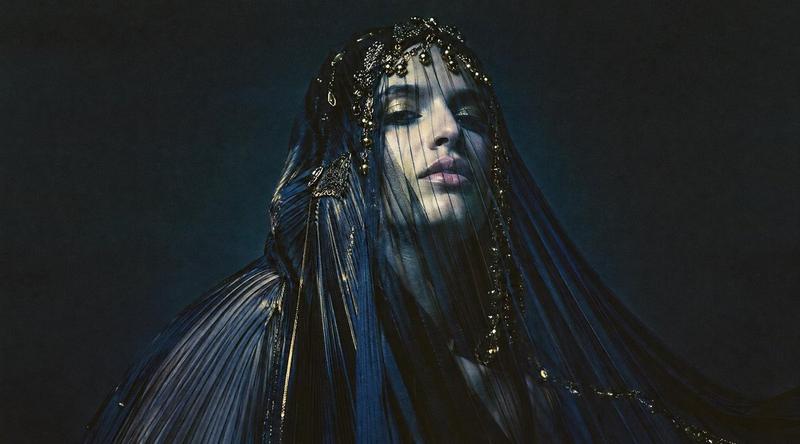
暗黑面纱高级定制肖像
Enlarge

暗黑面纱高级定制肖像

Prompt
Create a dark cinematic editorial portrait of a mysterious {argument name="subject" default="veiled female figure"} standing against a smoky nearly black background. The figure is draped head-to-toe in glossy pleated {argument name="fabric color" default="midnight blue and black"} sheer fabric, like a sculptural couture veil with long flowing panels spreading outward to both sides. Add wet-looking highlights, tiny beadwork, metallic gold embroidery, sequins, and delicate dangling ornaments along the headpiece and seams. The face must be completely hidden by a flat centered {argument name="face covering" default="matte dark gray square censor block"} over the upper head and face, creating an anonymous surreal fashion-horror mood. Use a widescreen 16:9 composition, medium-close framing from torso to head, low-key lighting, deep shadows, subtle blue rim light, high contrast, film grain, and an atmospheric gothic runway aesthetic. Keep the background empty and smoky, with no text, no logo, and no extra people.
Category
Charts & Infographics
Model
GPT Image 2
Creator
Marco
Views9
Source ID
20562
Published
May 15, 2026

Guide

About "暗黑面纱高级定制肖像"

What is this prompt for?

"暗黑面纱高级定制肖像" AI image prompt for GPT Image 2 (Charts & Infographics). 一张电影质感的哥特式时尚肖像,描绘了一个被光泽感午夜蓝褶皱面纱包裹的匿名人物,呈现出忧郁的编辑视觉效果。 Copy it on Picva and recreate the lo…

The full copyable prompt and example visuals above are ready for AI image generation or one-click recreate in Picva.

How to use this prompt

  1. Step 1

    Open the prompt detail

    Review the example visuals, category, and full prompt text for "暗黑面纱高级定制肖像".

  2. Step 2

    Copy the prompt

    Copy the prompt body from this page, or load it directly in Studio.

  3. Step 3

    Pick a model (GPT Image 2)

    Prefer GPT Image 2. If you switch models, keep subject and composition and tweak style terms.

  4. Step 4

    Generate and export

    Recreate the look in Picva, or export into your workflow for editing and publishing.

FAQ

What is the "暗黑面纱高级定制肖像" prompt?
It is an AI image-generation prompt for GPT Image 2 in the Charts & Infographics category. This page includes the full prompt text, example visuals, and a one-click recreate path in Picva.
How do I use this prompt to generate an image?
Copy the prompt from this page, or use Generate / Studio. Paste it into a compatible image model, or recreate the look in Picva with optional reference images.
Which model is this prompt for?
This page lists GPT Image 2. Most descriptive prompts also transfer to nearby image models such as GPT Image, Flux, or Midjourney with light style tweaks.
Can I use the result commercially?
You can usually copy the prompt for creation, but commercial use of the final image depends on the model terms, reference-image rights, and the generated content. Follow the source author and platform rules.