13

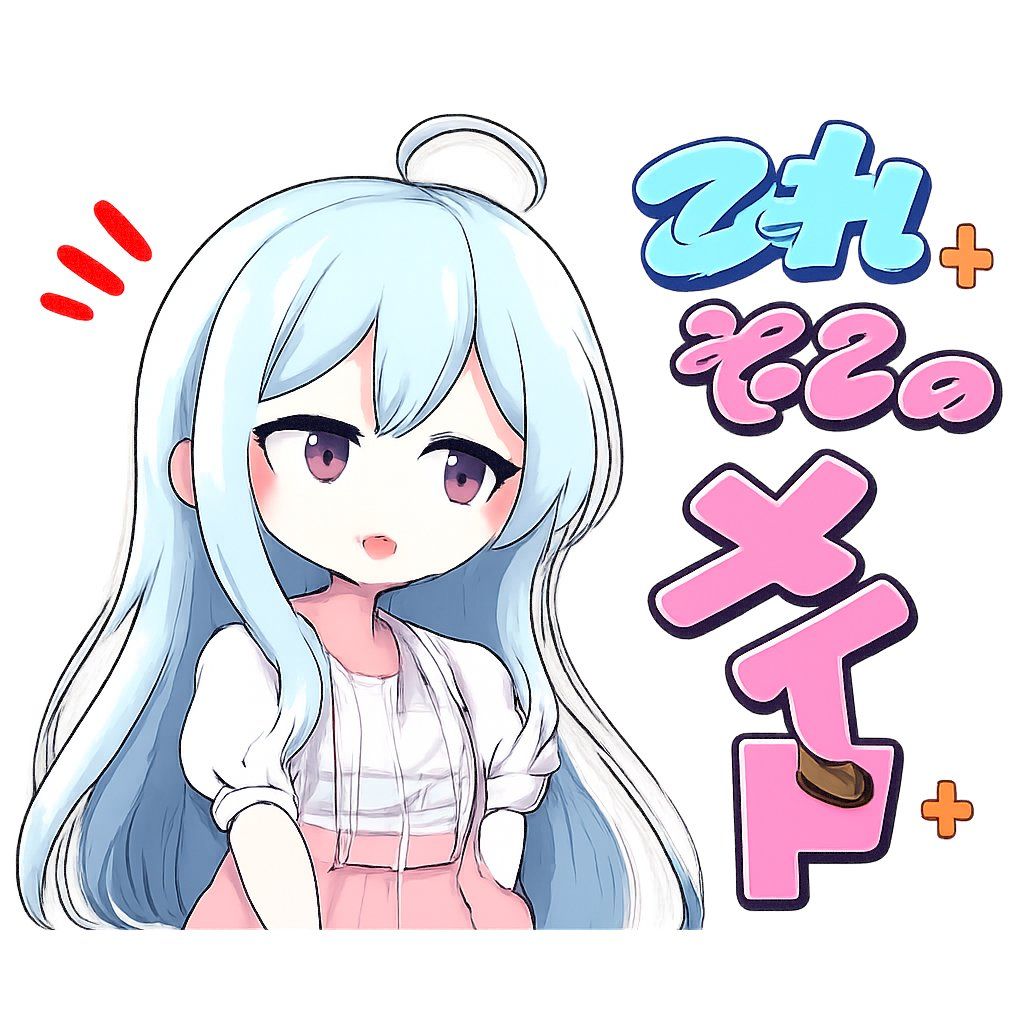
动漫风审查遮挡贴纸
Enlarge

动漫风审查遮挡贴纸

Prompt
Create a square 1:1 anime-style sticker illustration on a clean white background. On the left, draw a cute young chibi anime girl from the waist up with very long flowing {argument name="hair color" default="pale icy blue"} hair, a small ahoge loop on top, soft black sketch outlines, glossy highlights, and a white short-sleeve blouse with a pale pink skirt or apron. Her face is intentionally obscured by a large centered opaque square censor block in a light gray-to-blue gradient, covering most of the head and upper torso. Add three bright red comic emphasis strokes to the upper left of her head. On the right side, place large bubbly Japanese sticker lettering in a vertical playful layout with thick dark navy outlines and soft highlights: exactly 3 main text groups reading {argument name="top text" default="てみ"} in cyan, {argument name="middle text" default="そその"} in pink, and {argument name="bottom text" default="メイド"} in large pink characters stacked downward. Include exactly 2 small orange plus signs, one near the upper right of the cyan text and one near the lower right of the bottom text. Add a small brown oval accent on the lower pink character. Keep the composition bright, messy-cute, hand-drawn, slightly imperfect, like a low-quality AI-generated anime sticker, with bold outlines, pastel colors, and no extra background details.
Category
Charts & Infographics
Model
GPT Image 2
Views7
Source ID
21159
Published
May 17, 2026

Guide

About "动漫风审查遮挡贴纸"

What is this prompt for?

"动漫风审查遮挡贴纸" AI image prompt for GPT Image 2 (Charts & Infographics). 生成一张正方形的柔和色调动漫贴纸,主角是一位蓝发女仆风格少女,面部带有遮挡效果,并配有日文气泡文字,适合模因(meme)风格使用。 Copy it on Picva and rec…

The full copyable prompt and example visuals above are ready for AI image generation or one-click recreate in Picva.

How to use this prompt

  1. Step 1

    Open the prompt detail

    Review the example visuals, category, and full prompt text for "动漫风审查遮挡贴纸".

  2. Step 2

    Copy the prompt

    Copy the prompt body from this page, or load it directly in Studio.

  3. Step 3

    Pick a model (GPT Image 2)

    Prefer GPT Image 2. If you switch models, keep subject and composition and tweak style terms.

  4. Step 4

    Generate and export

    Recreate the look in Picva, or export into your workflow for editing and publishing.

FAQ

What is the "动漫风审查遮挡贴纸" prompt?
It is an AI image-generation prompt for GPT Image 2 in the Charts & Infographics category. This page includes the full prompt text, example visuals, and a one-click recreate path in Picva.
How do I use this prompt to generate an image?
Copy the prompt from this page, or use Generate / Studio. Paste it into a compatible image model, or recreate the look in Picva with optional reference images.
Which model is this prompt for?
This page lists GPT Image 2. Most descriptive prompts also transfer to nearby image models such as GPT Image, Flux, or Midjourney with light style tweaks.
Can I use the result commercially?
You can usually copy the prompt for creation, but commercial use of the final image depends on the model terms, reference-image rights, and the generated content. Follow the source author and platform rules.