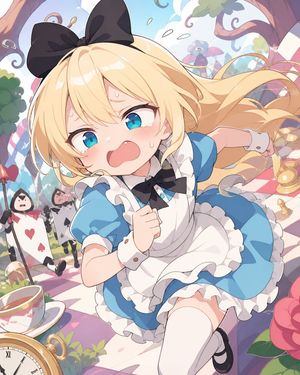
惊慌失措的爱丽丝梦游仙境追逐战
Prompt
Create a dynamic high-detail anime illustration of {argument name="character name" default="Alice"} in a whimsical Wonderland garden, as if she is sprinting toward the viewer in panic. She is a young blonde girl with long flowing hair, bright turquoise-blue eyes, flushed cheeks, tiny tears and sweat drops, an open frightened mouth, and a huge black bow on top of her head. She wears a classic blue-and-white Alice maid-style dress: blue puff sleeves, white frilled apron, layered ruffled skirt, black neck bow, white wrist cuffs with small buttons, white thigh-high stockings, and black Mary Jane shoes. Use a dramatic low-angle close-up composition with her body foreshortened, one fist clenched near her chest and one arm thrown back, skirt and hair flying from motion. The setting is a pastel fantasy tea-party path with exactly 7 notable background/object elements: 1 large teacup and saucer in the lower left, 1 gold pocket watch/clock in the lower left foreground, 1 red heart-shaped flower or topiary on the left, 1 large pink flower in the lower right, 1 red-and-white checkered garden path, 1 prominent playing-card soldier holding an ace-of-hearts card on the left, and 1 blurred background figure with a parasol near the center. Add curled tree branches framing the top, leafy greenery, floating petals, golden chess-piece-like ornaments on the right, and soft bokeh depth. Style should be polished modern Japanese anime, cute but frantic, with clean line art, glossy highlights, soft pastel colors, cinematic motion, shallow depth of field, and a bright airy fairytale atmosphere. Keep the image vertical, full color, no captions, no watermark, no extra text.- Category
- Characters & People
- Model
- GPT Image 2
- Creator
- 雨宮さん家@幼女ぱんつの人
- Source ID
- 26052
- Published
- Jun 17, 2026
Views12