17

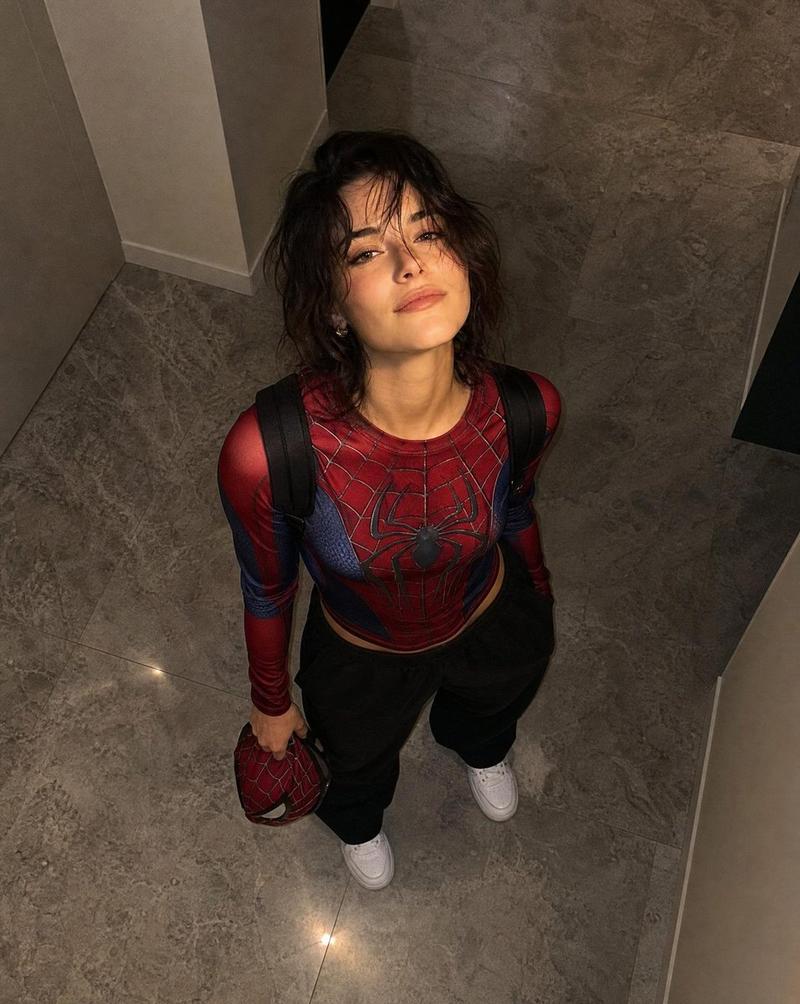
俯视视角蜘蛛侠战衣肖像
Enlarge

Example images

俯视视角蜘蛛侠战衣肖像

Prompt
Ultra-realistic overhead portrait photograph, shot from directly above. A person with {argument name="hair style" default="long, wavy dark hair"}, facial features matching the reference images image on on elegant grey marble flooring, gazing straight up into the camera with a confident, natural expression. They wear a detailed {argument name="outfit" default="red-and-blue Spider-Man textured athletic suit top, relaxed grey sweatpants, crisp white sneakers, and a black backpack"}.

The Spider-Man mask is held loosely in their right hand wilf hand remains casually tucked into a pocket. Professional photography, top-down perspective, realistic proportions, authentic skin detail, natural lighting, shallow depth of field, soft backgnd cinematic composition, premium DSLR camera, 50mm lens look, high dynamic range, realistic fabric texture, shahous, magazine-quality quiaadity portrait, photorealistic, ultra-detailed, 8K.
Category
Posters & Typography
Model
GPT Image 2
Creator
Jahan Zaib
Views0
Source ID
26732
Published
Jun 25, 2026

Guide

About "俯视视角蜘蛛侠战衣肖像"

What is this prompt for?

"俯视视角蜘蛛侠战衣肖像" AI image prompt for GPT Image 2 (Posters & Typography). 一个专业的俯视肖像提示词,展示了身穿精致蜘蛛侠运动服的人物在大理石地面上的形象,专为高分辨率写实效果设计。 Copy it on Picva and recreate the l…

The full copyable prompt and example visuals above are ready for AI image generation or one-click recreate in Picva.

How to use this prompt

  1. Step 1

    Open the prompt detail

    Review the example visuals, category, and full prompt text for "俯视视角蜘蛛侠战衣肖像".

  2. Step 2

    Copy the prompt

    Copy the prompt body from this page, or load it directly in Studio.

  3. Step 3

    Pick a model (GPT Image 2)

    Prefer GPT Image 2. If you switch models, keep subject and composition and tweak style terms.

  4. Step 4

    Generate and export

    Recreate the look in Picva, or export into your workflow for editing and publishing.

FAQ

What is the "俯视视角蜘蛛侠战衣肖像" prompt?
It is an AI image-generation prompt for GPT Image 2 in the Posters & Typography category. This page includes the full prompt text, example visuals, and a one-click recreate path in Picva.
How do I use this prompt to generate an image?
Copy the prompt from this page, or use Generate / Studio. Paste it into a compatible image model, or recreate the look in Picva with optional reference images.
Which model is this prompt for?
This page lists GPT Image 2. Most descriptive prompts also transfer to nearby image models such as GPT Image, Flux, or Midjourney with light style tweaks.
Can I use the result commercially?
You can usually copy the prompt for creation, but commercial use of the final image depends on the model terms, reference-image rights, and the generated content. Follow the source author and platform rules.