20

Woman portrait: GPT Image 2 prompt
Enlarge

Woman portrait: GPT Image 2 prompt

Prompt
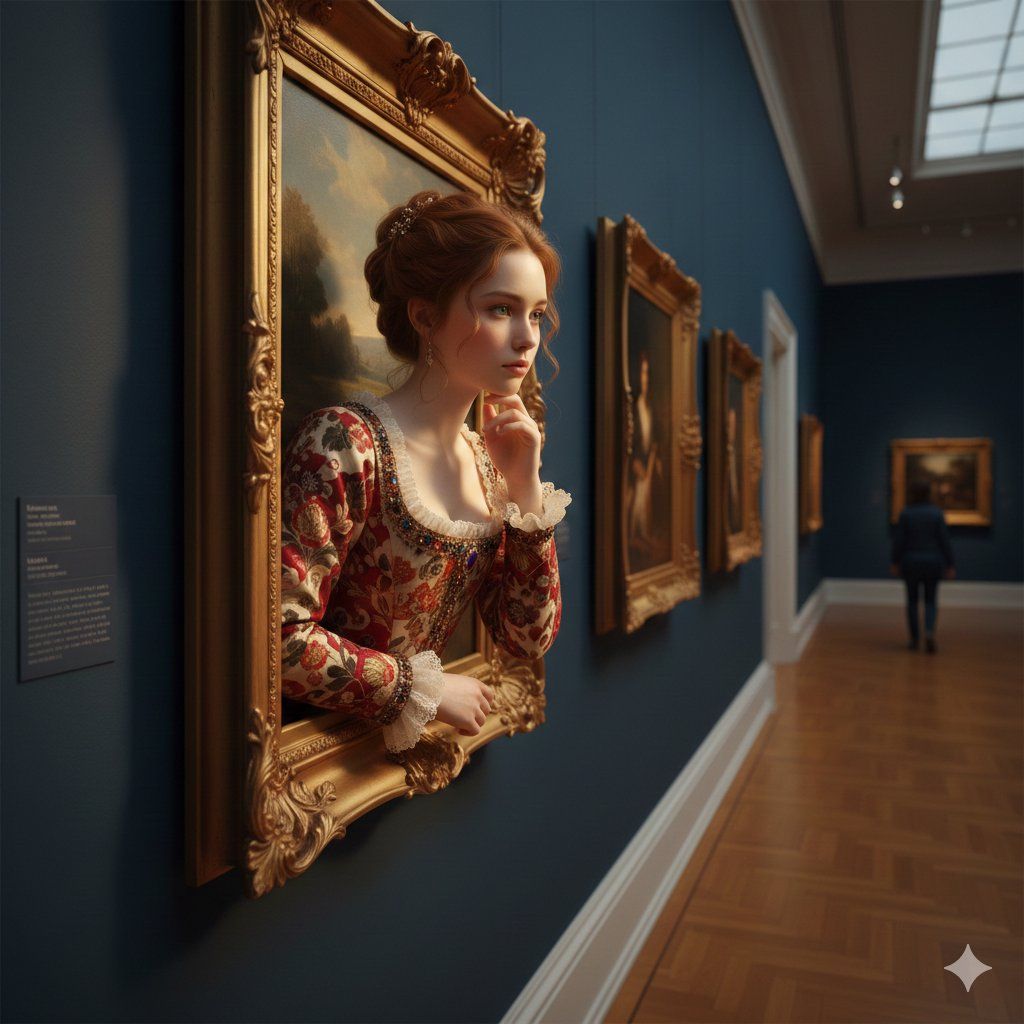
A surreal, ultra-realistic scene of a young woman emerging from an ornate golden picture frame mounted on a deep blue gallery wall. She has soft auburn hair styled in an elegant updo, delicate features, and wears a richly detailed Renaissance-inspired dress with embroidered floral patterns and lace cuffs. Her chin rests thoughtfully on her hand as she gazes sideways with a pensive expression. Warm, cinematic lighting highlights her face and the gilded frame. The setting is an art gallery hallway with wooden parquet floors, framed paintings along the walls, and a softly blurred figure in the distance. Shallow depth of field, dramatic perspective, high detail, photorealistic, 8k resolution, painterly yet lifelike textures, golden hour tones
Category
Photography & Realism
Model
GPT Image 2
Creator
Aijaz
Views0
Source ID
2023082481331904583
Published
Feb 15, 2026

Guide

About "Woman portrait: GPT Image 2 prompt"

What is this prompt for?

"Woman portrait: GPT Image 2 prompt" AI image prompt for GPT Image 2 (Photography & Realism). A surreal, ultra-realistic scene of a young woman emerging from a…

The full copyable prompt and example visuals above are ready for AI image generation or one-click recreate in Picva.

How to use this prompt

  1. Step 1

    Open the prompt detail

    Review the example visuals, category, and full prompt text for "Woman portrait: GPT Image 2 prompt".

  2. Step 2

    Copy the prompt

    Copy the prompt body from this page, or load it directly in Studio.

  3. Step 3

    Pick a model (GPT Image 2)

    Prefer GPT Image 2. If you switch models, keep subject and composition and tweak style terms.

  4. Step 4

    Generate and export

    Recreate the look in Picva, or export into your workflow for editing and publishing.

FAQ

What is the "Woman portrait: GPT Image 2 prompt" prompt?
It is an AI image-generation prompt for GPT Image 2 in the Photography & Realism category. This page includes the full prompt text, example visuals, and a one-click recreate path in Picva.
How do I use this prompt to generate an image?
Copy the prompt from this page, or use Generate / Studio. Paste it into a compatible image model, or recreate the look in Picva with optional reference images.
Which model is this prompt for?
This page lists GPT Image 2. Most descriptive prompts also transfer to nearby image models such as GPT Image, Flux, or Midjourney with light style tweaks.
Can I use the result commercially?
You can usually copy the prompt for creation, but commercial use of the final image depends on the model terms, reference-image rights, and the generated content. Follow the source author and platform rules.