19

Editorial style king: GPT Image 2 prompt
Enlarge

Editorial style king: GPT Image 2 prompt

Prompt
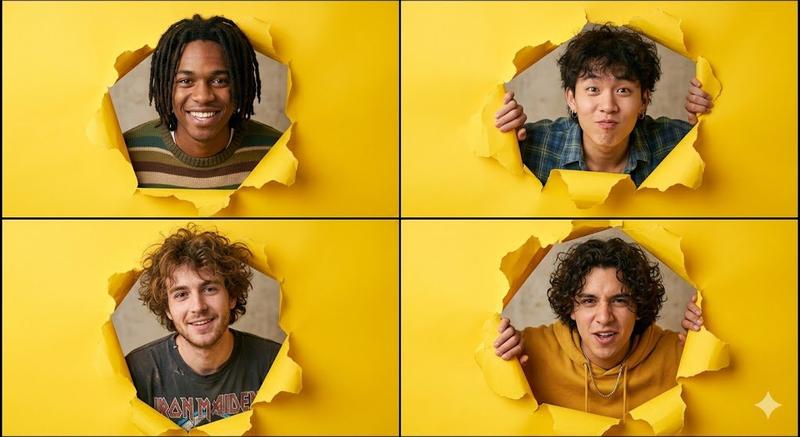
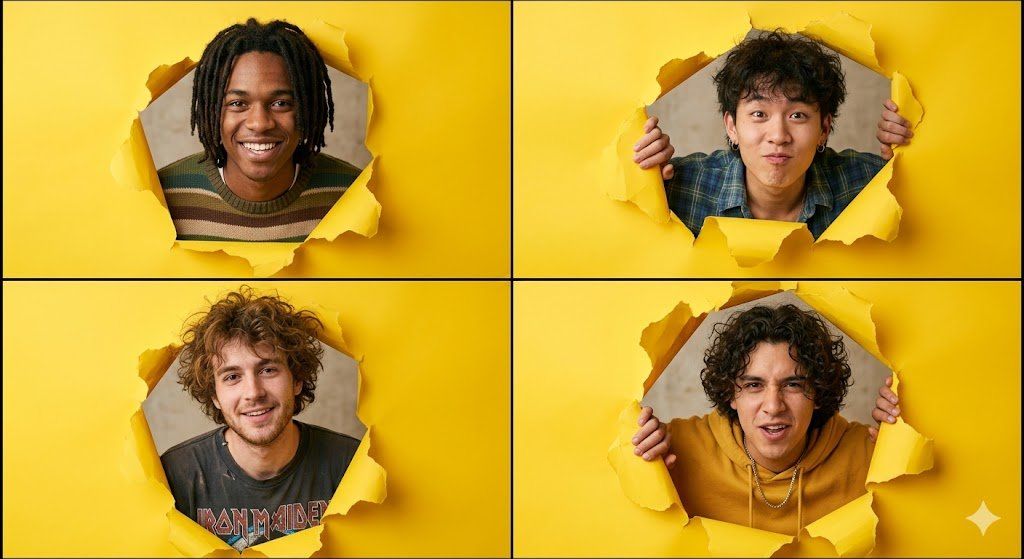
A high-resolution 2x2 grid collage of four individual portraits. In each square, a different young man peeks through a jagged, ripped hole in bright yellow seamless paper. The subjects have a 1990s indie-pop aesthetic with diverse hairstyles, including messy curls and dreadlocks. The lighting is soft and even, typical of a professional studio photoshoot. The color palette is dominated by the vibrant yellow paper against a neutral beige background visible through the tears. Cinematic quality, sharp focus, 8k resolution, editorial photography style.
Key Elements Breakdown
If you want to tweak the result, here are the specific descriptors that make this style work:

Composition: 2x2 grid collage, quad split screen, peeking through a hole.
Main Prop: torn yellow construction paper, jagged ripped edges, seamless paper background.
Subject Style: Gen Z fashion, indie band aesthetic, 90s grunge-lite, youthful expressive faces.
Technical Specs: flat lighting, low depth of field, clean studio photography, vibrant saturation.
Category
Photography & Realism
Model
GPT Image 2
Creator
Cherry 2.O
Views0
Source ID
2041840872925606344
Published
Apr 8, 2026

Guide

About "Editorial style king: GPT Image 2 prompt"

What is this prompt for?

"Editorial style king: GPT Image 2 prompt" AI image prompt for GPT Image 2 (Photography & Realism). A high-resolution 2x2 grid collage of four individual portr…

The full copyable prompt and example visuals above are ready for AI image generation or one-click recreate in Picva.

How to use this prompt

  1. Step 1

    Open the prompt detail

    Review the example visuals, category, and full prompt text for "Editorial style king: GPT Image 2 prompt".

  2. Step 2

    Copy the prompt

    Copy the prompt body from this page, or load it directly in Studio.

  3. Step 3

    Pick a model (GPT Image 2)

    Prefer GPT Image 2. If you switch models, keep subject and composition and tweak style terms.

  4. Step 4

    Generate and export

    Recreate the look in Picva, or export into your workflow for editing and publishing.

FAQ

What is the "Editorial style king: GPT Image 2 prompt" prompt?
It is an AI image-generation prompt for GPT Image 2 in the Photography & Realism category. This page includes the full prompt text, example visuals, and a one-click recreate path in Picva.
How do I use this prompt to generate an image?
Copy the prompt from this page, or use Generate / Studio. Paste it into a compatible image model, or recreate the look in Picva with optional reference images.
Which model is this prompt for?
This page lists GPT Image 2. Most descriptive prompts also transfer to nearby image models such as GPT Image, Flux, or Midjourney with light style tweaks.
Can I use the result commercially?
You can usually copy the prompt for creation, but commercial use of the final image depends on the model terms, reference-image rights, and the generated content. Follow the source author and platform rules.