20

Motion blur beauty close-up: GPT Image 2 prompt
Enlarge

Example images

Motion blur beauty close-up: GPT Image 2 prompt

Prompt
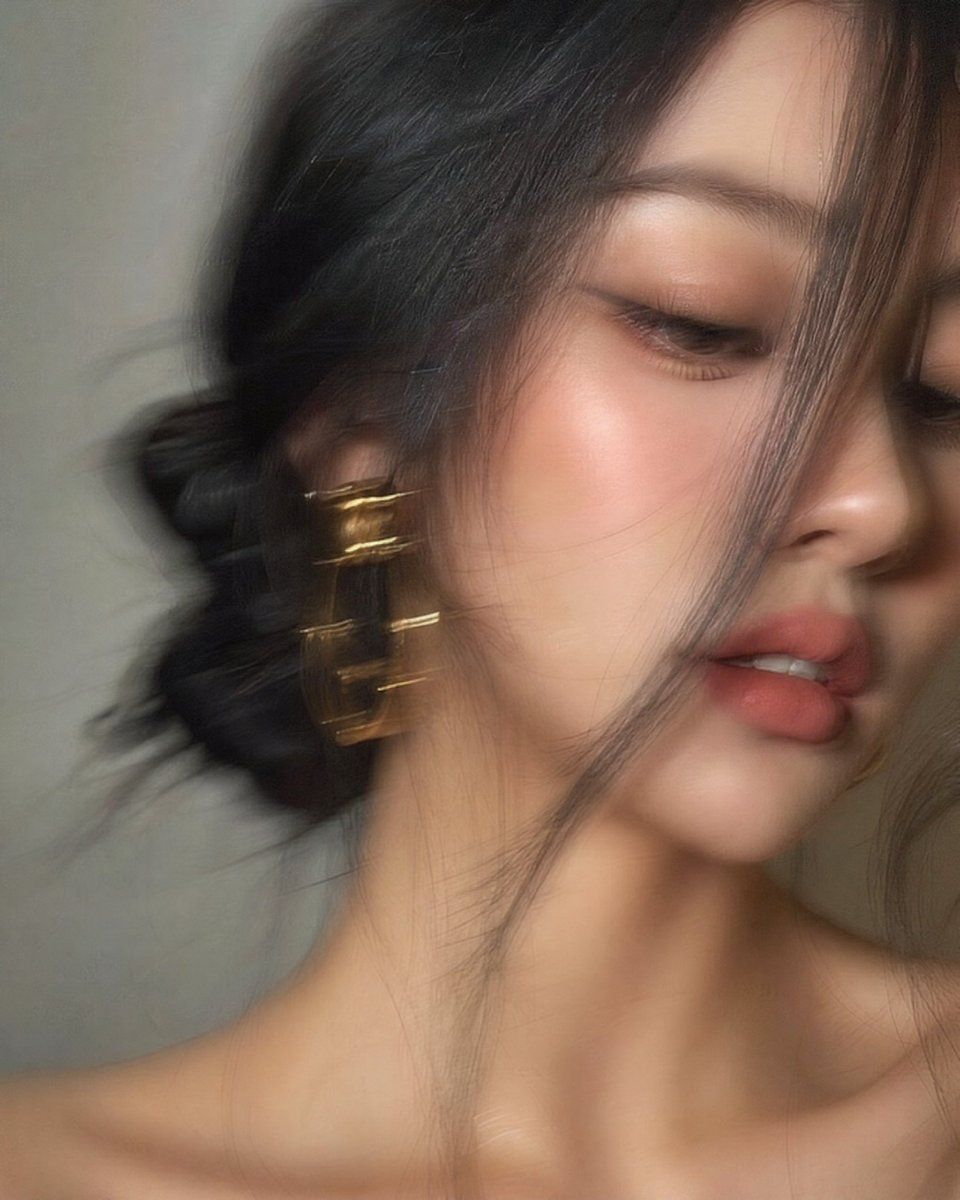
An artistic portrait featuring intentional motion blur, captured with a smartphone or using a long-exposure effect. An extreme close-up of a woman with her hair styled in a relaxed low braided bun, with a long face-framing lock draped across one side of her face, partially concealing one eye. She gazes downward and slightly away from the camera, her lips gently parted. She wears oversized gold statement earrings, with bare shoulders visible. Her skin appears smooth, radiant, and luminous, enhanced by a soft peach blush, a subtle glow on the high points of the face, refined natural makeup, well-defined lashes, and matte dusty-rose lips outlined with a slightly deeper lip liner.
Category
Photography & Realism
Model
GPT Image 2
Views5
Source ID
2077024429121679745
Published
Jul 14, 2026

Guide

About "Motion blur beauty close-up: GPT Image 2 prompt"

What is this prompt for?

"Motion blur beauty close-up: GPT Image 2 prompt" AI image prompt for GPT Image 2 (Photography & Realism). An artistic portrait featuring intentional motion bl…

The full copyable prompt and example visuals above are ready for AI image generation or one-click recreate in Picva.

How to use this prompt

  1. Step 1

    Open the prompt detail

    Review the example visuals, category, and full prompt text for "Motion blur beauty close-up: GPT Image 2 prompt".

  2. Step 2

    Copy the prompt

    Copy the prompt body from this page, or load it directly in Studio.

  3. Step 3

    Pick a model (GPT Image 2)

    Prefer GPT Image 2. If you switch models, keep subject and composition and tweak style terms.

  4. Step 4

    Generate and export

    Recreate the look in Picva, or export into your workflow for editing and publishing.

FAQ

What is the "Motion blur beauty close-up: GPT Image 2 prompt" prompt?
It is an AI image-generation prompt for GPT Image 2 in the Photography & Realism category. This page includes the full prompt text, example visuals, and a one-click recreate path in Picva.
How do I use this prompt to generate an image?
Copy the prompt from this page, or use Generate / Studio. Paste it into a compatible image model, or recreate the look in Picva with optional reference images.
Which model is this prompt for?
This page lists GPT Image 2. Most descriptive prompts also transfer to nearby image models such as GPT Image, Flux, or Midjourney with light style tweaks.
Can I use the result commercially?
You can usually copy the prompt for creation, but commercial use of the final image depends on the model terms, reference-image rights, and the generated content. Follow the source author and platform rules.