19

主题海报版式设计
Enlarge

主题海报版式设计

Prompt
{
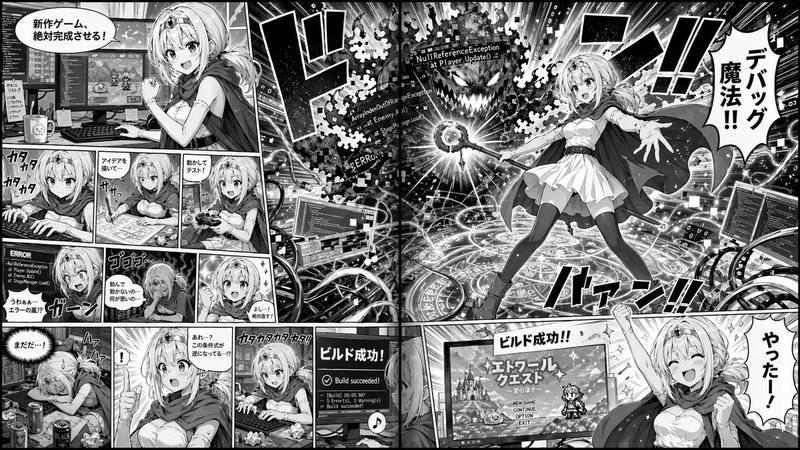
  "type": "2-page manga spread",
  "style": "monochrome anime manga, screentones",
  "theme": "{argument name=\"main action\" default=\"fantasy mage developing a video game\"}",
  "character": "{argument name=\"character appearance\" default=\"anime girl with blonde hair, tiara, cape, white dress, thigh-highs\"}",
  "layout": {
    "left_page": {
      "panel_count": 11,
      "rows": [
        {"panels": 1, "action": "Determined at dual-monitor desk, speech bubble: '新作ゲーム、絶対完成させる!'"},
        {"panels": 3, "action": "Typing, drawing on tablet, testing with controller"},
        {"panels": 3, "action": "Shocked at ERROR screen, depressed, determined again"},
        {"panels": 4, "action": "Exhausted, sudden realization, furious typing, monitor showing 'Build succeeded!'"}
      ]
    },
    "right_page": {
      "panel_count": 2,
      "panels": [
        {"type": "large splash", "action": "Casting magic from a glowing circle at a code-error monster labeled '{argument name=\"error text\" default=\"NullReferenceException\"}'. Speech bubble: '{argument name=\"spell text\" default=\"デバッグ魔法!!\"}'"},
        {"type": "bottom banner", "action": "Cheering in front of RPG title screen. Speech bubble: '{argument name=\"success text\" default=\"やったー!\"}'"}
      ]
    }
  }
}
Category
Illustration & Art
Model
GPT Image 2
Views2
Source ID
116

Guide

About "主题海报版式设计"

What is this prompt for?

"主题海报版式设计" AI image prompt for GPT Image 2 (Illustration & Art). { "type": "2-page manga spread", "style": "monochrome anime manga, screentones", "theme": "{ar…

The full copyable prompt and example visuals above are ready for AI image generation or one-click recreate in Picva.

How to use this prompt

  1. Step 1

    Open the prompt detail

    Review the example visuals, category, and full prompt text for "主题海报版式设计".

  2. Step 2

    Copy the prompt

    Copy the prompt body from this page, or load it directly in Studio.

  3. Step 3

    Pick a model (GPT Image 2)

    Prefer GPT Image 2. If you switch models, keep subject and composition and tweak style terms.

  4. Step 4

    Generate and export

    Recreate the look in Picva, or export into your workflow for editing and publishing.

FAQ

What is the "主题海报版式设计" prompt?
It is an AI image-generation prompt for GPT Image 2 in the Illustration & Art category. This page includes the full prompt text, example visuals, and a one-click recreate path in Picva.
How do I use this prompt to generate an image?
Copy the prompt from this page, or use Generate / Studio. Paste it into a compatible image model, or recreate the look in Picva with optional reference images.
Which model is this prompt for?
This page lists GPT Image 2. Most descriptive prompts also transfer to nearby image models such as GPT Image, Flux, or Midjourney with light style tweaks.
Can I use the result commercially?
You can usually copy the prompt for creation, but commercial use of the final image depends on the model terms, reference-image rights, and the generated content. Follow the source author and platform rules.