15

宋朝文人的赛博朋友圈
Enlarge

宋朝文人的赛博朋友圈

Prompt
[中文]
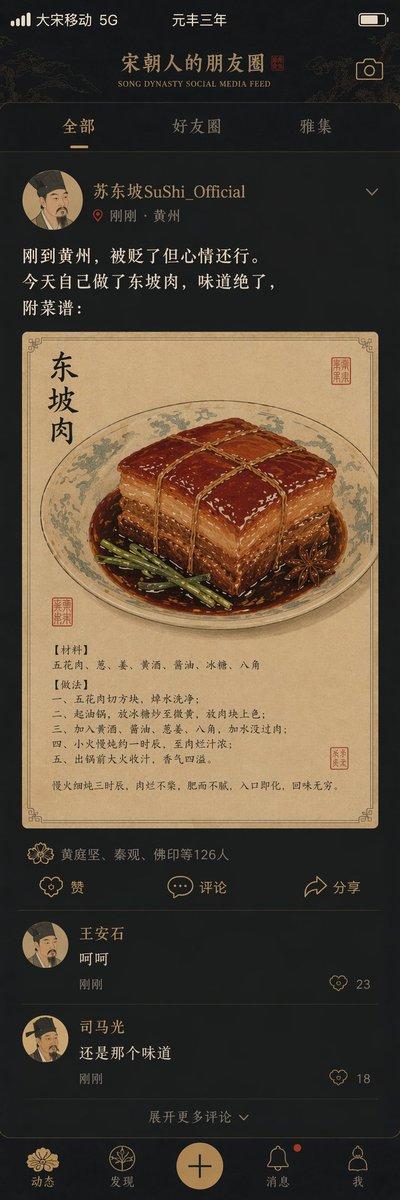
"宋朝人的朋友圈"/"SONG DYNASTY SOCIAL MEDIA FEED",古今穿越幽默融合界面设计风格,画面模拟手机社交媒体界面,但内容全部是宋朝场景头像是宋代文人画像,用户名"苏东坡SuShi_Official",发布内容"刚到黄州,被贬了但心情还行。今天自己做了东坡肉,味道绝了,附菜谱:",配图为工笔画风格的东坡肉特写,点赞列表"黄庭坚、秦观、佛印等126人",评论区"王安石:呵呵""司马光:还是那个味道",界面元素如点赞图标用宋代花纹替代,状态栏显示"大宋移动 5G"和"元丰三年",配色为手机深色模式搭配宋代雅致色调,历史与社交媒体的趣味碰撞杰作

[English]
"Song Dynasty People's Moments"/"SONG DYNASTY SOCIAL MEDIA FEED", Ancient and modern time-travel humor fusion interface design style, The image simulates a mobile phone social media interface, but the content is entirely Song Dynasty scenes, The avatar is a portrait of a Song Dynasty literati, Username "Su Dongpo SuShi_Official", Post content "Just arrived in Huangzhou, demoted but feeling okay. Made Dongpo pork myself today, tastes amazing, recipe attached:", The attached image is a close-up of Dongpo pork in Gongbi painting style, Likes list "Huang Tingjian, Qin Guan, Fo Yin etc. 126 people", Comments section "Wang Anshi: Hehe" "Sima Guang: Still the same taste", Interface elements such as the like icon are replaced with Song Dynasty patterns, The status bar shows "Great Song Mobile 5G" and "Third Year of Yuanfeng", The color scheme is mobile phone dark mode paired with elegant Song Dynasty tones, A masterpiece of fun collision between history and social media
Category
History & Classical
Model
GPT Image 2
Views5
Source ID
267

Guide

About "宋朝文人的赛博朋友圈"

What is this prompt for?

"宋朝文人的赛博朋友圈" AI image prompt for GPT Image 2 (History & Classical). [中文] "宋朝人的朋友圈"/"SONG DYNASTY SOCIAL MEDIA FEED",古今穿越幽默融合界面设计风格,画面模拟手机社交媒体界面,但内容全部是宋朝场景头像是宋代…

The full copyable prompt and example visuals above are ready for AI image generation or one-click recreate in Picva.

How to use this prompt

  1. Step 1

    Open the prompt detail

    Review the example visuals, category, and full prompt text for "宋朝文人的赛博朋友圈".

  2. Step 2

    Copy the prompt

    Copy the prompt body from this page, or load it directly in Studio.

  3. Step 3

    Pick a model (GPT Image 2)

    Prefer GPT Image 2. If you switch models, keep subject and composition and tweak style terms.

  4. Step 4

    Generate and export

    Recreate the look in Picva, or export into your workflow for editing and publishing.

FAQ

What is the "宋朝文人的赛博朋友圈" prompt?
It is an AI image-generation prompt for GPT Image 2 in the History & Classical category. This page includes the full prompt text, example visuals, and a one-click recreate path in Picva.
How do I use this prompt to generate an image?
Copy the prompt from this page, or use Generate / Studio. Paste it into a compatible image model, or recreate the look in Picva with optional reference images.
Which model is this prompt for?
This page lists GPT Image 2. Most descriptive prompts also transfer to nearby image models such as GPT Image, Flux, or Midjourney with light style tweaks.
Can I use the result commercially?
You can usually copy the prompt for creation, but commercial use of the final image depends on the model terms, reference-image rights, and the generated content. Follow the source author and platform rules.