14

韩国美女日常时尚穿搭三联拼贴画
Enlarge

韩国美女日常时尚穿搭三联拼贴画

Prompt
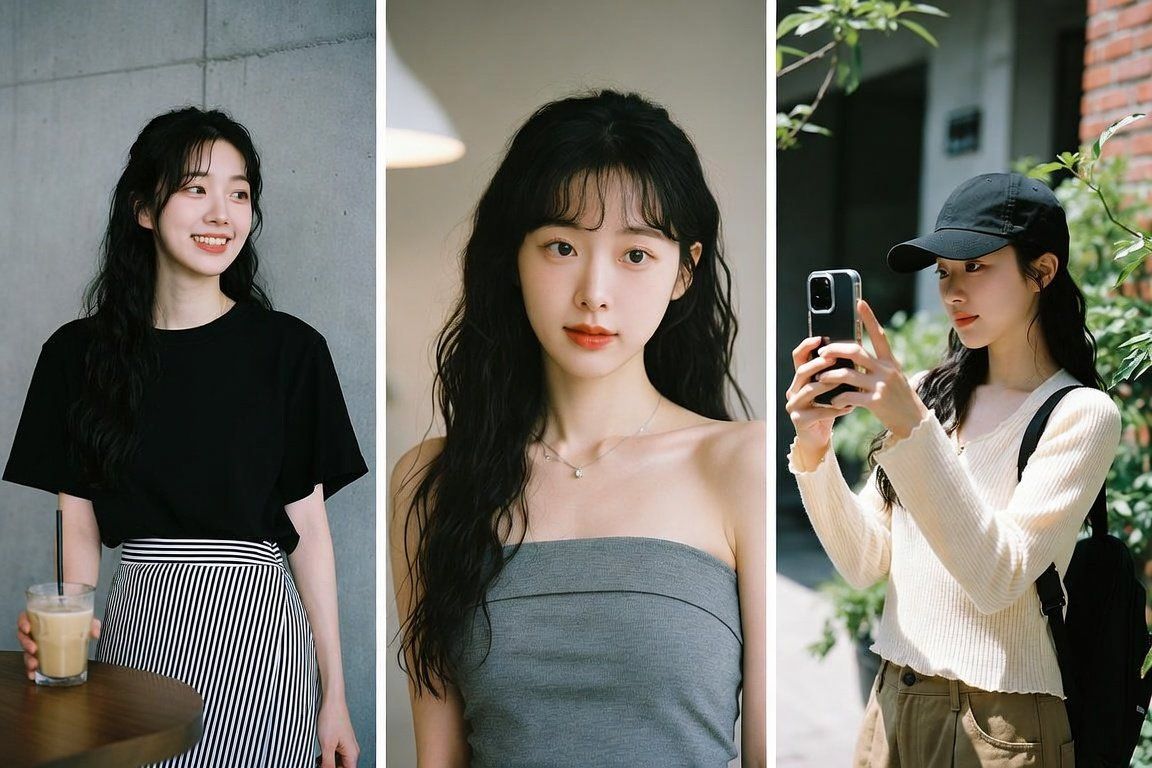
A horizontal 3-panel photo collage, triptych layout, displaying three different daily lifestyle fashion looks of a beautiful young Korean woman with long dark hair. 
Left panel: She is smiling gently at a cafe, wearing a simple black t-shirt and a black-and-white vertical striped wrap skirt, holding a glass of iced coffee against a gray concrete wall.
Middle panel: A close-up selfie portrait, wearing a grey strapless tube top dress, looking directly into the camera with long wavy hair and air bangs under soft indoor lighting.
Right panel: An outdoor candid shot, wearing a black baseball cap, a cream-colored textured long-sleeve top, and khaki pants, holding her smartphone up for a selfie with green plants and a brick wall background.
All three images share a cohesive natural film color grading, clean minimalist aesthetic, realistic skin textures, and candid lifestyle photography style. White thin vertical borders separate the panels.
Category
Charts & Infographics
Model
ChatGPT
Creator
@OninoETH
Views0
Source ID
17426
Published
Jul 5, 2026

Guide

About "韩国美女日常时尚穿搭三联拼贴画"

What is this prompt for?

"韩国美女日常时尚穿搭三联拼贴画" AI image prompt for ChatGPT (Charts & Infographics). 一张横向三栏照片拼贴画,三联画布局,展示了一位留着黑色长发的漂亮年轻韩国女性的三种不同日常时尚造型。左栏:她正在咖啡馆里温柔地微笑,穿着一件简单的黑色T恤和一条黑白竖条纹裹身裙…

The full copyable prompt and example visuals above are ready for AI image generation or one-click recreate in Picva.

How to use this prompt

  1. Step 1

    Open the prompt detail

    Review the example visuals, category, and full prompt text for "韩国美女日常时尚穿搭三联拼贴画".

  2. Step 2

    Copy the prompt

    Copy the prompt body from this page, or load it directly in Studio.

  3. Step 3

    Pick a model (ChatGPT)

    Prefer ChatGPT. If you switch models, keep subject and composition and tweak style terms.

  4. Step 4

    Generate and export

    Recreate the look in Picva, or export into your workflow for editing and publishing.

FAQ

What is the "韩国美女日常时尚穿搭三联拼贴画" prompt?
It is an AI image-generation prompt for ChatGPT in the Charts & Infographics category. This page includes the full prompt text, example visuals, and a one-click recreate path in Picva.
How do I use this prompt to generate an image?
Copy the prompt from this page, or use Generate / Studio. Paste it into a compatible image model, or recreate the look in Picva with optional reference images.
Which model is this prompt for?
This page lists ChatGPT. Most descriptive prompts also transfer to nearby image models such as GPT Image, Flux, or Midjourney with light style tweaks.
Can I use the result commercially?
You can usually copy the prompt for creation, but commercial use of the final image depends on the model terms, reference-image rights, and the generated content. Follow the source author and platform rules.