20

SPIDER-MAN" (Top Line): Use a bold, sharp sans-serif font
Enlarge

SPIDER-MAN" (Top Line): Use a bold, sharp sans-serif font

Prompt
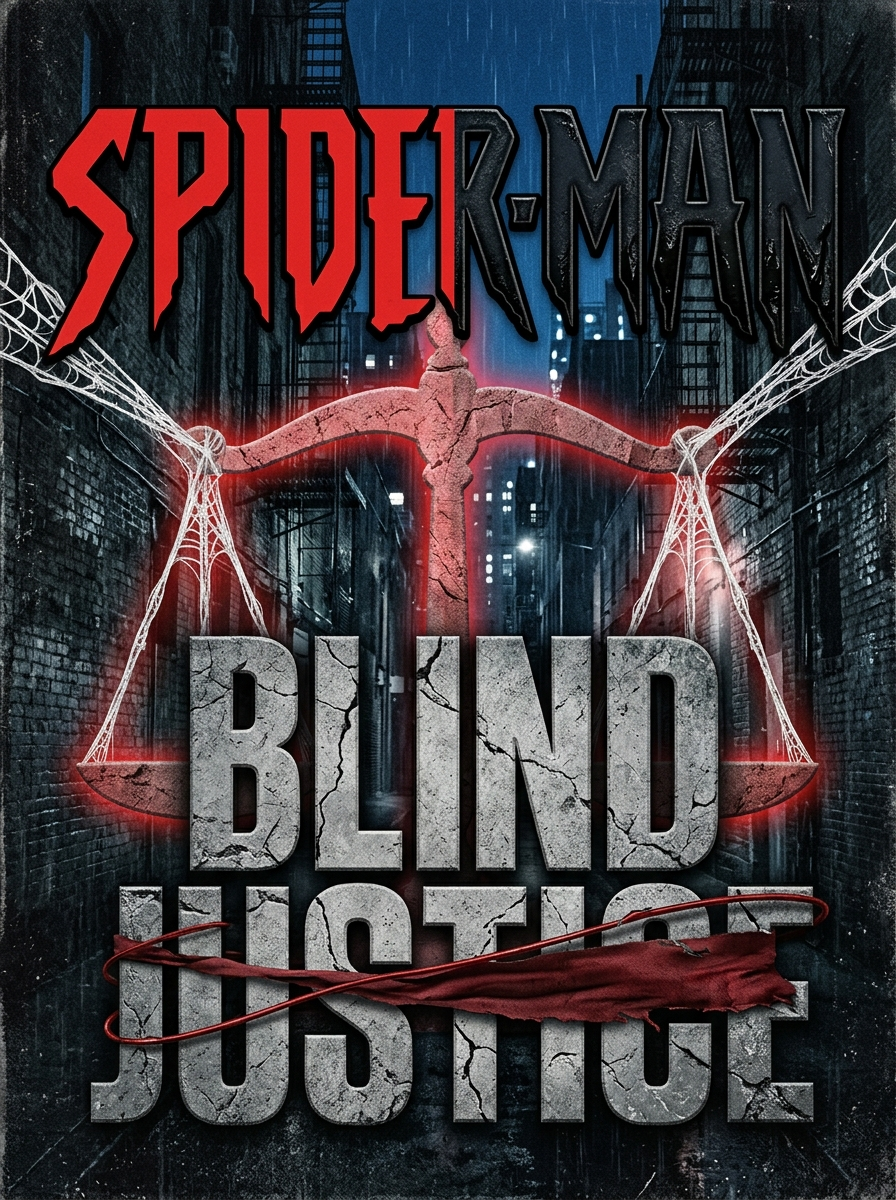
SPIDER-MAN" (Top Line): Use a bold, sharp sans-serif font. Split the colouring right down the middle—the left half is classic comic red, while the right half fades into a dark, textured oily black (representing the lingering residue of the symbiote lawsuit)."BLIND JUSTICE" (Bottom Line): Place this directly beneath Spider-Man. Use a rough, weathered slab-serif font inspired by classic Daredevil title cards. Texture it to look like fractured grey stone or concrete.🎨 Visual Details & FXThe Scale Theme: Weave a subtle, glowing red graphic of the Scales of Justice right behind the text. Instead of traditional chains, use thick, white strands of Spider-Man’s webbing holding the scales up.The Blindfold Motif: Have a single strand of Daredevil's iconic red weapon wire or a torn strip of red cloth wrapped horizontally across the word "JUSTICE", mirroring a blindfold.The Contrast: Keep the overall image dark and desaturated (gritty greys, blacks, and deep blues), allowing only the sharp reds of Daredevil's influence and the white of the spider-webs to pop out.
Category
Brand & Logos
Model
Nano Banana 2
Views39
Source ID
29812
Published
Jun 17, 2026

Guide

About "SPIDER-MAN" (Top Line): Use a bold, sharp sans-serif font"

What is this prompt for?

"SPIDER-MAN" (Top Line): Use a bold, sharp sans-serif font" AI image prompt for Nano Banana 2 (Brand & Logos). SPIDER-MAN" (Top Line): Use a bold, sharp sans-s…

The full copyable prompt and example visuals above are ready for AI image generation or one-click recreate in Picva.

How to use this prompt

  1. Step 1

    Open the prompt detail

    Review the example visuals, category, and full prompt text for "SPIDER-MAN" (Top Line): Use a bold, sharp sans-serif font".

  2. Step 2

    Copy the prompt

    Copy the prompt body from this page, or load it directly in Studio.

  3. Step 3

    Pick a model (Nano Banana 2)

    Prefer Nano Banana 2. If you switch models, keep subject and composition and tweak style terms.

  4. Step 4

    Generate and export

    Recreate the look in Picva, or export into your workflow for editing and publishing.

FAQ

What is the "SPIDER-MAN" (Top Line): Use a bold, sharp sans-serif font" prompt?
It is an AI image-generation prompt for Nano Banana 2 in the Brand & Logos category. This page includes the full prompt text, example visuals, and a one-click recreate path in Picva.
How do I use this prompt to generate an image?
Copy the prompt from this page, or use Generate / Studio. Paste it into a compatible image model, or recreate the look in Picva with optional reference images.
Which model is this prompt for?
This page lists Nano Banana 2. Most descriptive prompts also transfer to nearby image models such as GPT Image, Flux, or Midjourney with light style tweaks.
Can I use the result commercially?
You can usually copy the prompt for creation, but commercial use of the final image depends on the model terms, reference-image rights, and the generated content. Follow the source author and platform rules.