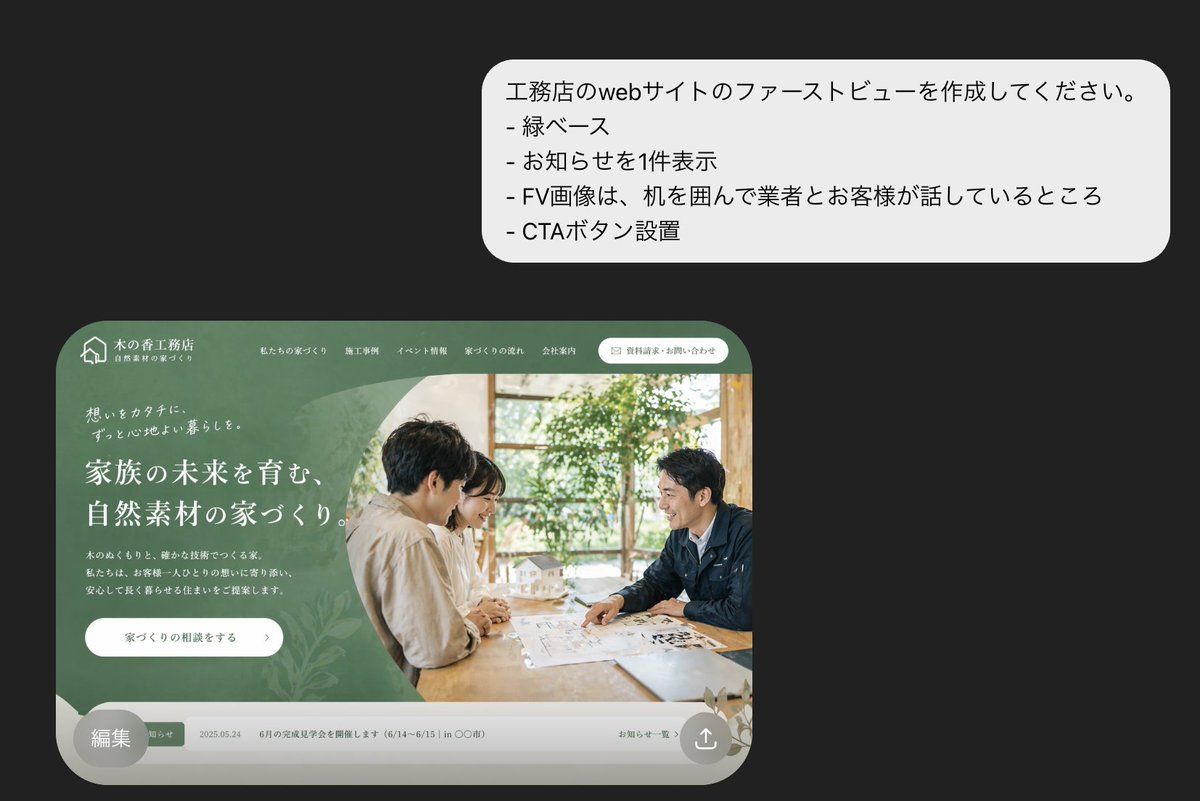
日本建筑公司网站首屏设计模型
Prompt
A polished presentation-style mockup on a dark charcoal background showing a Japanese homebuilder website first view concept. In the upper right, place a large white rounded speech bubble with 4 Japanese bullet lines in clean sans-serif text: 「工務店のwebサイトのファーストビューを作成してください。」, 「- 緑ベース」, 「- お知らせを1件表示」, 「- FV画像は、机を囲んで業者とお客様が話しているところ」, 「- CTAボタン設置」. In the lower left, show a realistic desktop website hero section inside a large rounded browser-like frame with a muted forest-green theme and elegant lifestyle branding for a Japanese construction company. The top navigation bar includes a small house logo at far left, the company name in Japanese, 5 navigation links across the top, and 1 rounded white contact button on the right. The hero area is split visually into 2 major zones: on the left, a green textured panel with layered organic leaf patterns, small introductory copy, a large white Japanese headline in multiple lines, a short paragraph of smaller Japanese body text, and 1 white rounded CTA button; on the right, a warm natural-light photo of exactly 2 people seated across a wooden table in discussion, with papers and a small architectural house model visible, indoor plants and window light in the background. The entire website card has soft shadows, premium editorial spacing, and rounded bottom corners. Along the bottom of the website mockup, include a narrow light-gray notice bar showing exactly 1 announcement item with a small green tag, a date, Japanese notice text, and a subtle link on the right. Add a semi-transparent gray circular badge overlapping the bottom-left corner of the website card containing the Japanese text 「編集」. In the bottom-right corner of the website card, add a small circular share/upload icon. Overall style: high-end Japanese web design concept, realistic UI mockup, refined typography, green natural-material branding, minimal and elegant composition.
- Category
- Charts & Infographics
- Model
- GPT Image 2
- Creator
- フカタイッセイ 🌶 🌶 🌶
- Source ID
- 14659
- Published
- Apr 21, 2026
Views0