带有广告设计网格的 AI 聊天截图
Prompt
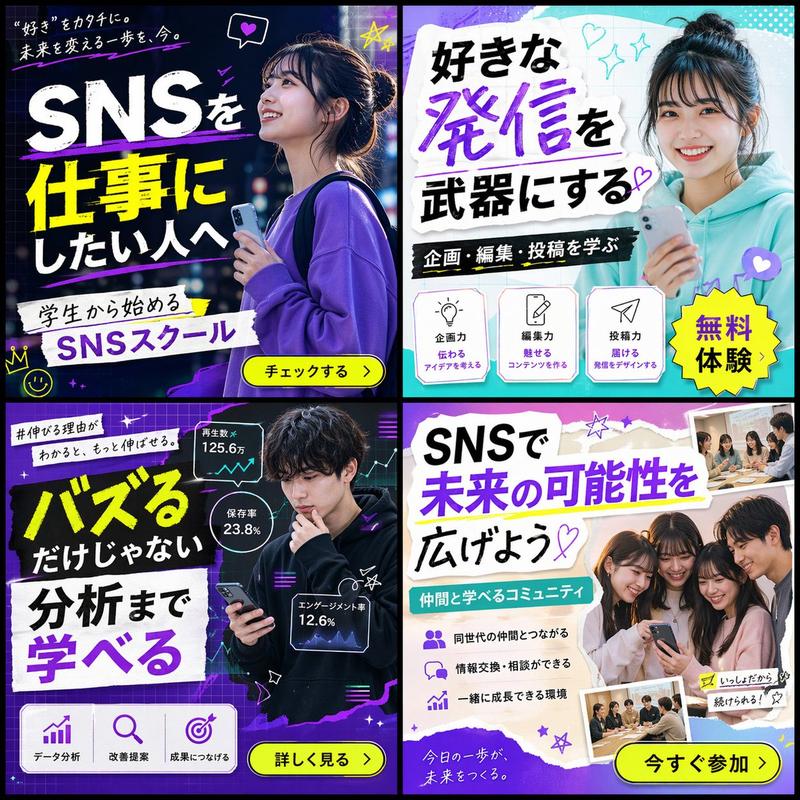
A dark-mode mobile chat interface screenshot showing two separate Japanese prompt-and-result exchanges about AI-generated ad design. The background is nearly black. There are 2 large rounded light-gray chat bubbles aligned to the right, each containing Japanese text. The first bubble says: 「日本語の幼稚園の広告画像を、トンマナ違いで4種類並べて画像生成して。プロデザイナーが作ったトレンドのデザインで。アスペクト比は16:9」. Beneath it is 1 rounded rectangular generated image preview showing a 2x2 grid of kindergarten advertisement variations in soft pastel colors. In the top-left panel, show a bright, airy ad with a close-up photo of a young child in profile at right, soft sunlight, cream and pale green tones, handwritten-style Japanese headline text on the left, small circular badges near the bottom, and floral accents. In the top-right panel, show an energetic outdoor ad with 4 children running under a blue sky, bold Japanese headline text, teal and yellow graphic accents, and a yellow circular callout. In the bottom-left panel, show a modern kindergarten campus building with a grassy yard and children playing, with a large white speech-bubble-shaped text area on the left and muted green-beige abstract shapes. In the bottom-right panel, show an illustrated large green tree with children and parents underneath, sky-blue background, warm family-friendly Japanese copy, and soft rounded decorative shapes. Add 1 small gray circular overlay button labeled 「編集」 at the lower-left corner of this preview and 1 small semi-transparent circular upload/share icon at the lower-right corner. Under this first preview, include 4 small interface icons in a row: copy, thumbs up, thumbs down, and more options. Lower on the screen, show the second right-aligned light-gray chat bubble with this Japanese text: 「日本語の健康食品の広告画像を、トンマナ違いで4種類並べて画像生成して。プロデザイナーが作ったトレンドのデザインで。アスペクト比は16:9」. Beneath it is a second rounded rectangular generated image preview showing a 2x2 grid of health food advertisement variations. In the top-left panel, show a clean wellness ad in white and pale green with a woman touching her neck, Japanese headline text about inner balance, several circular benefit icons, and price text. In the top-right panel, show a dramatic black-and-gold supplement ad with a dark pouch package, glowing gold particles, luxury serif-style Japanese text, and a bold red-orange price tag reading 980円. In the bottom-left panel, show a soft pink beauty supplement ad with translucent floral or crystalline textures, pastel packaging, delicate Japanese copy, circular info badges, and feminine cosmetic styling. In the bottom-right panel, show a natural green juice ad with a tall glass of green smoothie, fresh vegetables in the background, a green-and-white product box, clean Japanese health copy, and a circular yellow callout. Add 1 small gray circular overlay button labeled 「編集」 at the lower-left of this second preview and 1 small semi-transparent circular upload/share icon at the lower-right. The overall image should feel like a realistic smartphone app screenshot of an AI image-generation chat, with generous spacing between the 2 conversations, rounded corners, crisp Japanese typography, and a premium contemporary UI.
- Category
- Charts & Infographics
- Model
- GPT Image 2
- Creator
- フカタイッセイ 🌶 🌶 🌶
- Source ID
- 14661
- Published
- Apr 21, 2026
Views4