奢华出版与品牌推广编辑排版
Prompt
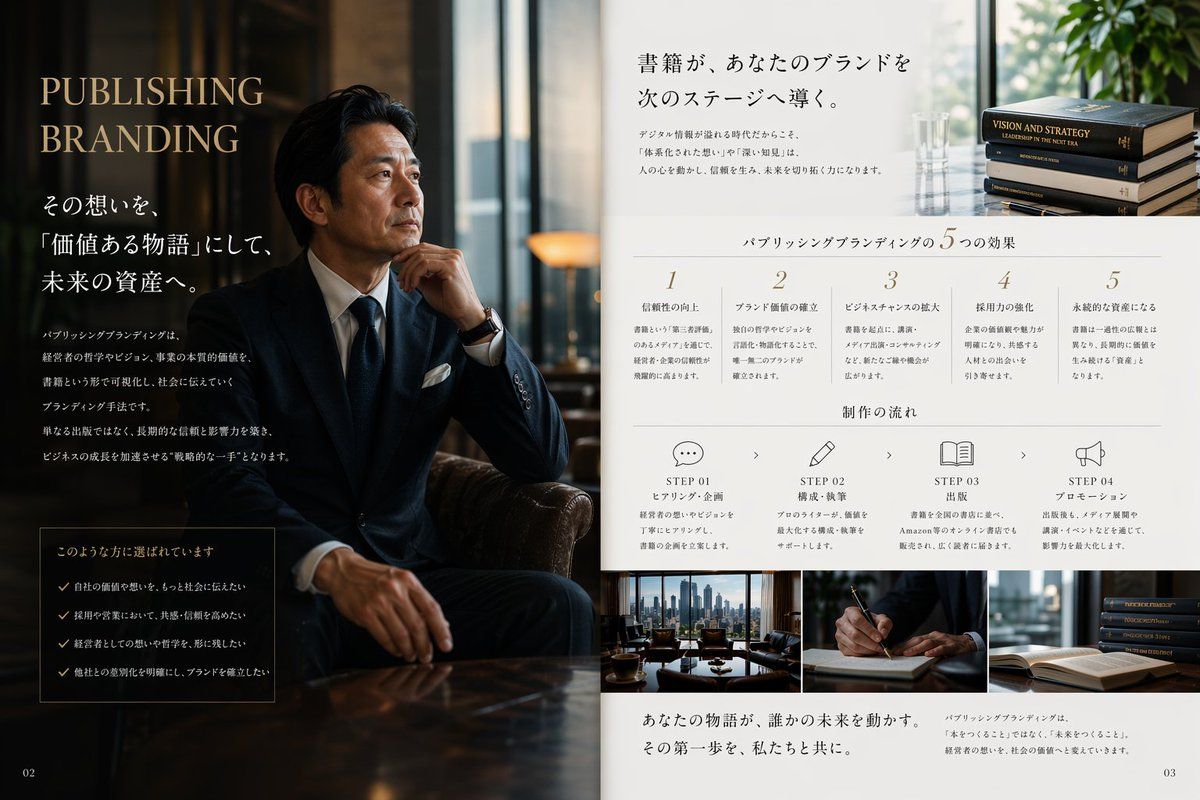
Create a luxurious Japanese magazine-style PR editorial spread for a publishing and branding service, designed as a two-page brochure layout. The left half is a dark, cinematic portrait scene in a sophisticated office lounge: a seated Japanese businessman in a navy bespoke suit, white shirt, dark tie, white pocket square, and wristwatch sits in a leather chair with one hand near his chin, posed thoughtfully beside a glossy wooden table. His face is intentionally obscured with a soft rectangular blur. The lighting is moody and warm, with reflections from tall windows and a premium executive atmosphere. On this dark left page, place large elegant serif headline text in English reading {argument name="headline text" default="PUBLISHING BRANDING"}, stacked in two lines near the upper left in muted gold. Below it, add multiple lines of Japanese copy in white, including a larger subheadline and several short body paragraphs arranged vertically. Near the lower left, include a bordered dark box containing exactly 4 checklist items, each preceded by a check mark, with Japanese text. Put a small page number "02" in the bottom-left corner. The right half is a clean white editorial information page with refined minimalist typography and generous spacing. At the top, place a large Japanese headline in black, aligned upper center-right, with two short Japanese body text blocks beneath it; on the upper far right include a small photo of exactly 4 stacked hardcover books and a glass vase near a bright window with greenery. Across the middle, add a centered section title in Japanese for five benefits, followed by exactly 5 numbered columns labeled 1 through 5, each with a short Japanese heading and several lines of smaller explanatory Japanese text. Beneath that, add another centered Japanese section title for workflow, followed by exactly 4 step blocks laid out horizontally: STEP 01 with a speech bubble icon, STEP 02 with a pencil icon, STEP 03 with an open book icon, STEP 04 with a megaphone icon. Each step includes the English word STEP plus a two-digit number, a short Japanese subtitle, and a few lines of smaller Japanese description, with small chevrons between steps. Along the bottom of the right page, place exactly 3 rectangular photos side by side: a city-view office meeting table scene, a close-up of a hand writing with a pen, and a stack of books near an open book. Under these images, add a prominent Japanese closing statement in a serif style on the lower left, and a smaller Japanese paragraph on the lower right. Put page number "03" in the bottom-right corner. Use a premium palette of deep navy, black, warm brown, ivory, and muted gold, with a balance of editorial luxury, corporate trust, and high-end publishing aesthetics. The overall composition should feel like a real magazine advertisement or consulting brochure, polished, photorealistic, elegant, and credible.- Category
- Charts & Infographics
- Model
- GPT Image 2
- Creator
- Publishing Branding
- Source ID
- 15026
- Published
- Apr 23, 2026
Views6