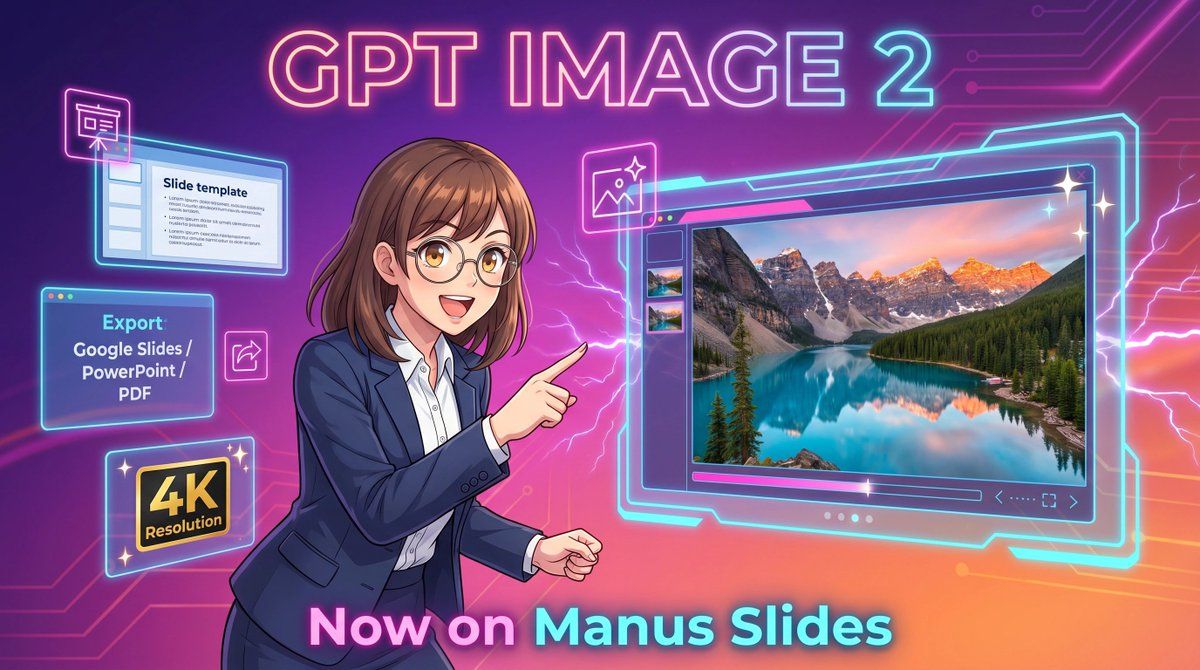
Neon GPT Image 2 宣传海报
Prompt
A vibrant futuristic promotional illustration in a wide 16:9 composition, styled like polished anime-tech advertising art. The background is a glowing purple-to-pink-to-orange gradient with neon circuit traces running across the top right and left edges, plus electric lightning effects behind the character and around the interface elements. At the top center, place large luminous headline text reading {argument name="headline text" default="GPT IMAGE 2"} in a bold rounded sans-serif font with a pink, cyan, and violet neon glow. In the center-left foreground, show a half-body anime-style businesswoman with {argument name="hair color" default="medium brown"} shoulder-length hair with soft bangs and slightly curled ends, wearing thin glasses, a navy business suit, and a white button-up shirt. Her face is obscured by a soft rectangular blur block, but her pose is energetic and confident: she faces right and points with her right index finger toward a large floating software window. On the right half of the image, show a large glowing futuristic image-generation interface outlined in cyan neon, with a main preview panel displaying a highly detailed 4K photoreal mountain lake landscape at sunset: turquoise water, evergreen forest, dramatic rocky peaks with snow, and warm pink-orange sky reflections. Include 3 small vertical thumbnail previews along the left side of this interface, a slim control bar below the main image, and tiny navigation icons in the lower right of the panel. Around the woman on the left side, add 4 floating neon-outlined feature cards: a top-left slide editor window with the visible title “Slide template” and simple bullet lines, a mid-left export box with the visible text “Export” and “Google Slides / PowerPoint / PDF”, a bottom-left black-and-gold badge reading “4K Resolution”, and a small square image icon near the woman’s pointing hand. Add 3 sparkle stars around the large interface for a glossy premium look. At the bottom center, place large glowing gradient text reading {argument name="bottom text" default="Now on Manus Slides"}. Make the entire scene sleek, high-contrast, glossy, and commercial, with crisp line art, soft cel shading, neon rim lighting, and a clean tech-launch poster aesthetic.- Category
- Charts & Infographics
- Model
- GPT Image 2
- Source ID
- 17479
- Published
- Apr 30, 2026
Views2