日文 GPT Image2 缩略图
Prompt
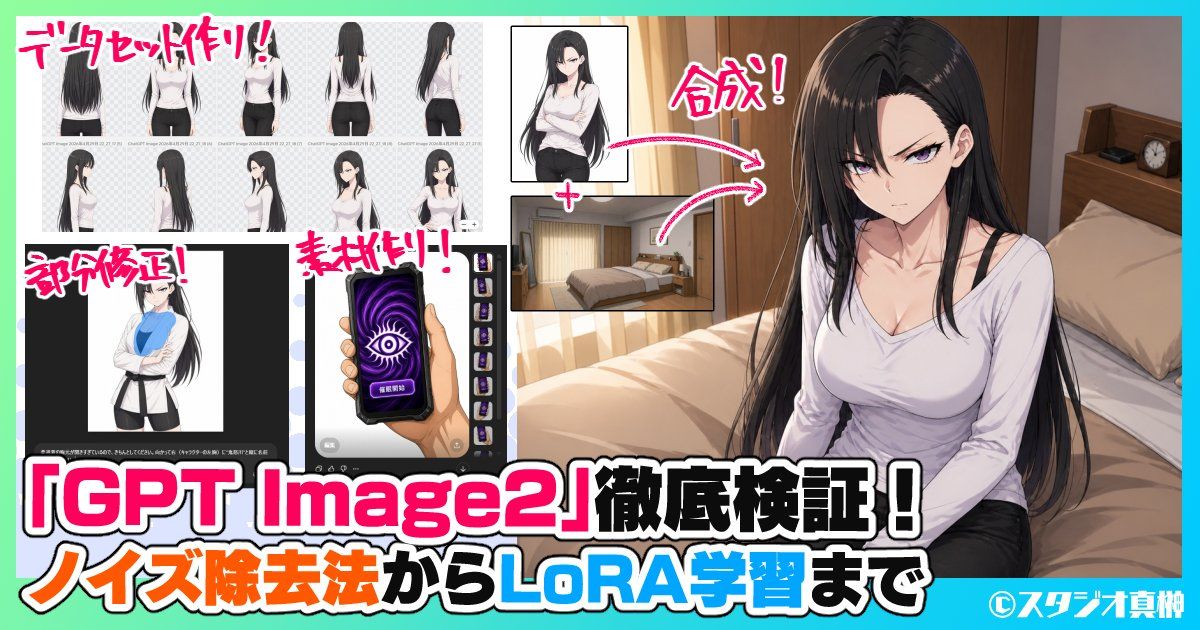
{"type":"Japanese YouTube thumbnail collage","style":"bold anime-tech promotional thumbnail with clean digital illustration, high contrast, saturated colors, thick outlined typography, energetic magazine-style composition","canvas":{"aspect_ratio":"16:9","resolution":"1200x630"},"background":{"frame":"mint green outer border with cyan accent strip along the top and bottom edges","main_scene":"warm modern bedroom interior with wooden headboard, beige bedding, cream curtains, bedside shelf, and a small alarm clock"},"layout":{"sections":[{"title":"データセット作り!","position":"top-left","count":8,"labels":["back view","three-quarter back view","front view","full back standing view","side profile","rear side profile","three-quarter front view","standing portrait with crossed arms"]},{"title":"部分修正!","position":"bottom-left","count":1,"labels":["character editing app screenshot with anime woman in white jacket over blue shirt"]},{"title":"素材作り!","position":"lower-mid-left","count":1,"labels":["smartphone asset design image showing a hand holding a purple screen phone with a large eye symbol and a vertical strip of 5 small variant thumbnails"]},{"title":"合成!","position":"upper-center-right","count":2,"labels":["anime woman cutout portrait","bedroom background plate"]}],"connectors":{"count":2,"style":"curved pink arrows with white outline pointing from the cutout portrait and bedroom plate toward the final composite on the right"},"text_overlays":{"count":7,"items":["データセット作り!","部分修正!","素材作り!","合成!","「{argument name=\"headline text\" default=\"GPT Image2\"}」徹底検証!","ノイズ除去法から{argument name=\"feature text\" default=\"LoRA学習\"}まで","©{argument name=\"credit name\" default=\"スタジオ真榊\"}"]}},"subjects":{"main":{"type":"anime woman","count":1,"appearance":{"age":"young adult","build":"slim curvy","hair":{"color":"{argument name=\"hair color\" default=\"long black\"}","style":"very long straight hair with soft shine, center part, strands falling over shoulders"},"face":"intentionally blurred/censored rectangle over the face","outfit":["white fitted long-sleeve scoop-neck top","visible black camisole straps","black pants"]},"pose":"seated on the edge of a bed, torso angled slightly left, hands resting near lap, looking toward camera"},"inset_character":{"type":"same anime woman reference art","count":10,"notes":"all inset figures use the same character design with face blurred in several panels"}},"typography":{"primary":"very large Japanese headline across the bottom in white with black outline and hot pink emphasis around GPT Image2","secondary":"subheadline in orange, white, black, and bright blue mixed emphasis","annotation":"handwritten energetic pink labels with white stroke near each inset section"},"color_palette":{"count":8,"colors":["hot pink","white","black","cyan","mint green","orange","beige","dark brown"]},"composition":"right half dominated by the final anime bedroom illustration, left half packed with inset process examples and screenshots, oversized bottom headline spanning nearly full width, designed to advertise a deep-dive verification article about GPT Image2 workflows for dataset creation, partial edits, asset generation, compositing, noise removal, and LoRA training"}- Category
- Charts & Infographics
- Model
- GPT Image 2
- Creator
- 賢木イオ🍀AIイラスト
- Source ID
- 17706
- Published
- May 1, 2026
Views1