电影级动作片分镜脚本
Prompt
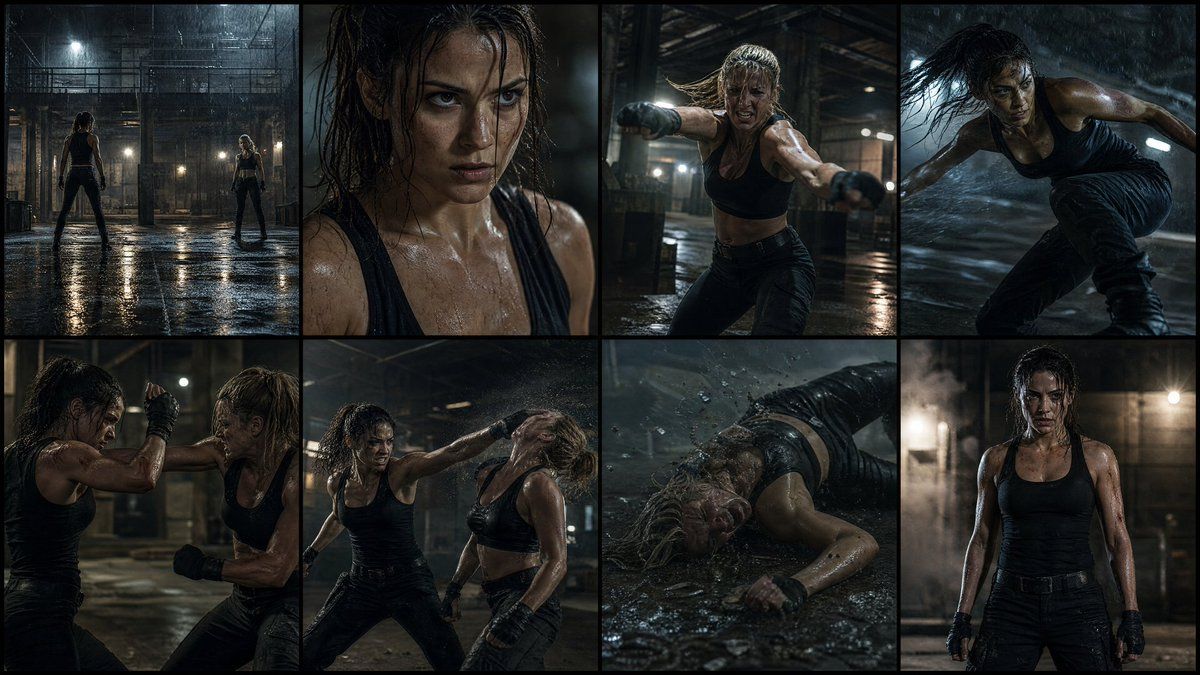
Create a high-quality 4K cinematic action movie storyboard with EXACTLY {argument name="panel count" default="8"} PANELS ONLY (no more, no less), showing a {argument name="protagonist" default="female protagonist"} in a realistic fight sequence where she wins. Use dramatic lighting, high contrast shadows, realistic environments ({argument name="location" default="abandoned warehouse, rooftop, or underground fight arena"}), and a gritty film tone. No text anywhere.
The storyboard must include exactly these 8 scenes:
Wide establishing shot of a dark, intense location (rain, dust, or low light atmosphere), both fighters facing each other
Close-up of the woman’s focused expression, controlled breathing, tension building
Opponent attacks first with aggressive movement (punch or kick)
She narrowly dodges—dynamic motion, fast reaction, camera tracking
Close combat exchange—blocks, counters, and impact moments with cinematic slow motion
Turning point—she reads the opponent and lands a clean, powerful counter move
Decisive takedown—opponent falls hard, dramatic impact, environment reacting (dust, water splash, etc.)
Final frame—she stands strong and calm, slightly injured but dominant, looking forward under dramatic lighting, clear victory
Use varied camera angles (wide, close-up, over-shoulder, low angle), realistic fight choreography, motion blur, and physical impact details.
Tone should feel like a Hollywood action film, focusing on tension, realism, and character strength—not stylized or social media aesthetic.
Strict rule: only 8 panels, no repetition, no extra frames.- Category
- Charts & Infographics
- Model
- GPT Image 2
- Creator
- Zara
- Source ID
- 17873
- Published
- May 2, 2026
Views13



![[STORYBOARD PROMPT] - SEGMENT 1/3 (0s–8s) STYLE: Cinematográfico Realista, 35mm](https://i.pixshop.app/storage/v1/render/image/public/prompt-source-media/promptsref/work-40297/image-1-21b401e475e76e15.png?width=800&quality=75&resize=contain)