18

Anime Shrine Street Portrait
Enlarge

Anime Shrine Street Portrait

Prompt
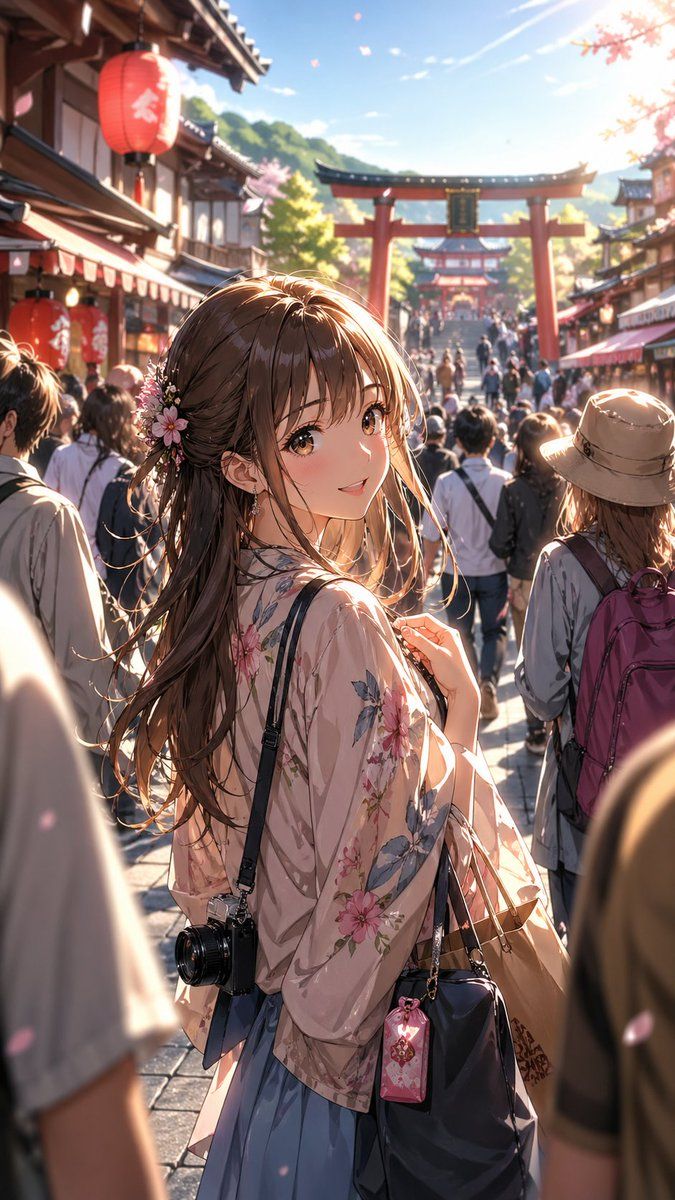
Create a vertical anime-style cinematic illustration of a young woman sightseeing on a crowded traditional Japanese shrine shopping street during cherry blossom season. The main subject stands in the foreground, seen from behind and slightly in profile, with her face intentionally covered by a plain opaque square censor block in muted brown. She has long flowing {argument name="hair color" default="warm chestnut brown"} hair with loose strands glowing in the sunlight, decorated with small pink and white flower hair ornaments. She wears a sheer pale pink floral kimono-style cardigan over a soft blue skirt, carrying 3 visible accessories: a black shoulder camera hanging at her hip, a dark navy handbag on her arm, and a small pink charm pouch clipped to the bag. The background shows a busy shrine approach packed with tourists, traditional wooden storefronts on both sides, 2 visible red paper lanterns with white Japanese characters on the left, and 2 red torii gates aligned down the street, one large gate in the mid-background and a smaller gate farther behind it. Add drifting sakura petals, warm golden late-afternoon backlight, lens flare from the upper right, soft depth of field with the crowd and shrine architecture blurred into the distance, highly detailed painterly anime rendering, delicate linework, romantic travel atmosphere, 9:16 portrait composition, vibrant but natural colors, no readable modern signage emphasized.
Category
Charts & Infographics
Model
GPT Image 2
Views3
Source ID
18154
Published
May 2, 2026

Guide

About "Anime Shrine Street Portrait"

What is this prompt for?

"Anime Shrine Street Portrait" AI image prompt for GPT Image 2 (Charts & Infographics). Generates a vertical anime travel illustration of a kimono-clad young w…

The full copyable prompt and example visuals above are ready for AI image generation or one-click recreate in Picva.

How to use this prompt

  1. Step 1

    Open the prompt detail

    Review the example visuals, category, and full prompt text for "Anime Shrine Street Portrait".

  2. Step 2

    Copy the prompt

    Copy the prompt body from this page, or load it directly in Studio.

  3. Step 3

    Pick a model (GPT Image 2)

    Prefer GPT Image 2. If you switch models, keep subject and composition and tweak style terms.

  4. Step 4

    Generate and export

    Recreate the look in Picva, or export into your workflow for editing and publishing.

FAQ

What is the "Anime Shrine Street Portrait" prompt?
It is an AI image-generation prompt for GPT Image 2 in the Charts & Infographics category. This page includes the full prompt text, example visuals, and a one-click recreate path in Picva.
How do I use this prompt to generate an image?
Copy the prompt from this page, or use Generate / Studio. Paste it into a compatible image model, or recreate the look in Picva with optional reference images.
Which model is this prompt for?
This page lists GPT Image 2. Most descriptive prompts also transfer to nearby image models such as GPT Image, Flux, or Midjourney with light style tweaks.
Can I use the result commercially?
You can usually copy the prompt for creation, but commercial use of the final image depends on the model terms, reference-image rights, and the generated content. Follow the source author and platform rules.