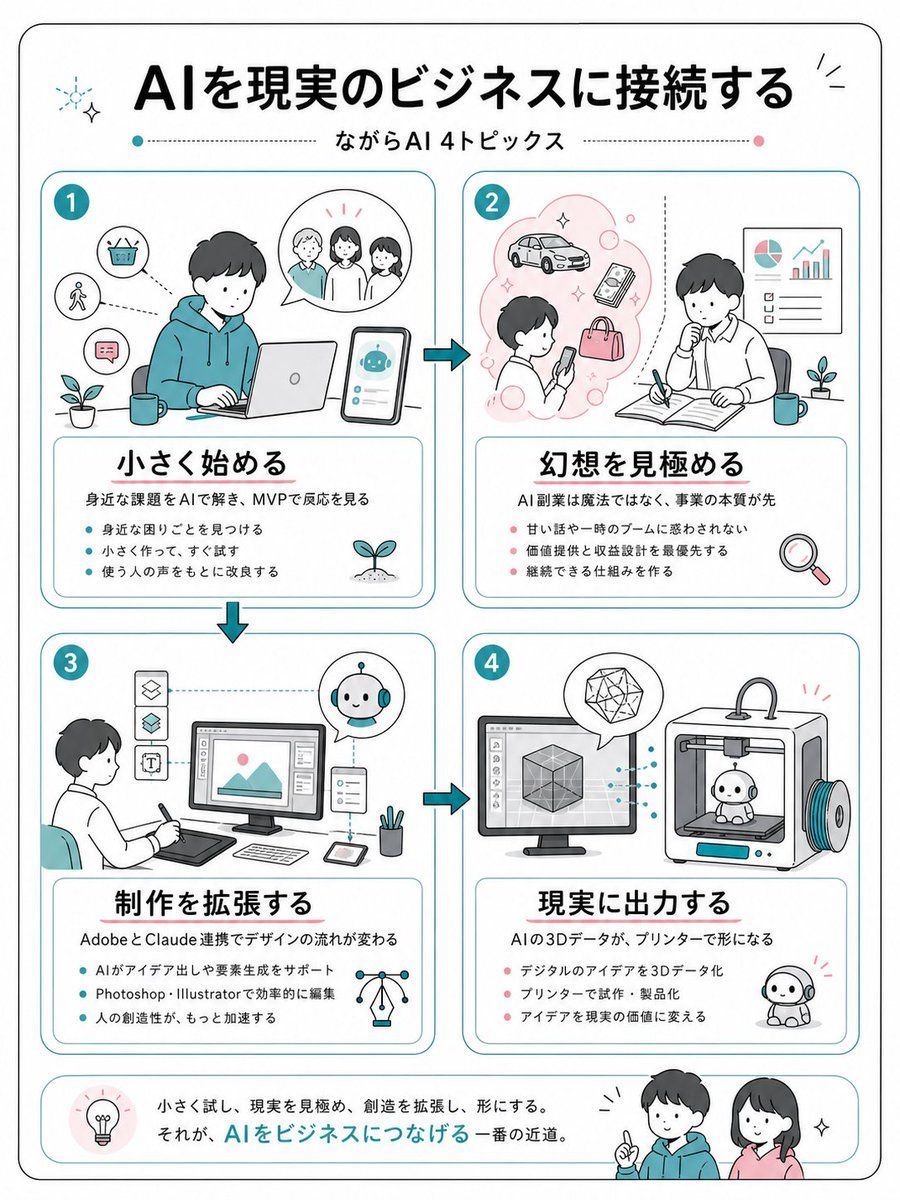
日本 AI 商业信息图
Prompt
{"type":"clean Japanese business infographic poster","format":"vertical A4-like page with rounded black outer border on white background","style":"friendly flat line illustration, minimal teal and coral accent colors, soft rounded rectangles, hand-drawn business sketch feel, black Japanese gothic headline typography, thin teal dividers, small sparkle and plant icons","language":"Japanese","headline":"{argument name=\"headline text\" default=\"AIを現実のビジネスに接続する\"}","subtitle":"{argument name=\"subtitle text\" default=\"ながらAI 4トピックス\"}","layout":{"top":"large centered headline with small decorative sparkles, subtitle below between dotted horizontal lines with teal and pink dots","main_grid":"four equal rounded cards arranged in a 2 by 2 grid, connected by teal arrow icons showing flow from 1 to 2, down to 3, across to 4","bottom_banner":"rounded summary strip with a lightbulb icon at left, Japanese closing sentence in the center, and two friendly characters at right"},"sections":[{"number":"1","position":"top left","title":"{argument name=\"section 1 title\" default=\"小さく始める\"}","main_illustration":"young person in teal hoodie working on a laptop at a desk, smartphone beside them showing a cute AI robot chat interface, speech bubble with three people, small icons for basket, walking person, chat message, plant and mug","description":"身近な課題をAIで解き、MVPで反応を見る","bullet_count":3,"bullets":["身近な困りごとを見つける","小さく作って、すぐ試す","使う人の声をもとに改良する"]},{"number":"2","position":"top right","title":"{argument name=\"section 2 title\" default=\"幻想を見極める\"}","main_illustration":"person looking at a smartphone inside a pink idea cloud with car, phone, bag and bubbles; second person thinking while writing in an open notebook, wall chart with pie chart and rising bar graph, plant, mug, magnifying glass icon","description":"AI副業は魔法ではなく、事業の本質が先","bullet_count":3,"bullets":["甘い話や一時のブームに惑わされない","価値提供と収益設計を最優先する","継続できる仕組みを作る"]},{"number":"3","position":"bottom left","title":"{argument name=\"section 3 title\" default=\"制作を拡張する\"}","main_illustration":"designer seated with pen tablet facing a desktop monitor showing an image editing interface, vertical tool icons at left, small AI robot assistant in circular bubble, tablet, stylus, pen cup, network lightbulb icon","description":"AdobeとClaude連携でデザインの流れが変わる","bullet_count":3,"bullets":["AIがアイデア出しや要素生成をサポート","Photoshop・Illustratorで効率的に編集","人の創造性が、もっと加速する"]},{"number":"4","position":"bottom right","title":"{argument name=\"section 4 title\" default=\"現実に出力する\"}","main_illustration":"desktop monitor with 3D cube modeling software connected by dotted teal lines to a 3D printer printing a small cute robot figure, geometric crystal in speech bubble, finished robot mascot on the floor","description":"AIの3Dデータが、プリンターで形になる","bullet_count":3,"bullets":["デジタルのアイデアを3Dデータ化","プリンターで試作・製品化","アイデアを現実の価値に変える"]}],"bottom_summary":{"icon":"lightbulb in a pale pink circle","text":"小さく試し、現実を見極め、創造を拡張し、形にする。\nそれが、AIをビジネスにつなげる一番の近道。","characters":"two smiling young people, one in teal hoodie pointing upward and one woman in pink top, with small sparkle marks"},"visual_requirements":"Use exactly 4 numbered topic cards, exactly 3 bullet points in each card, Japanese text must be crisp and readable, maintain generous margins, rounded corners, teal card borders, coral bullet dots in sections 2 and 4, teal bullet dots in sections 1 and 3, no photorealism."}- Category
- Charts & Infographics
- Model
- GPT Image 2
- Creator
- まき|SWC|Podcastまとめ
- Source ID
- 18414
- Published
- May 4, 2026
Views3