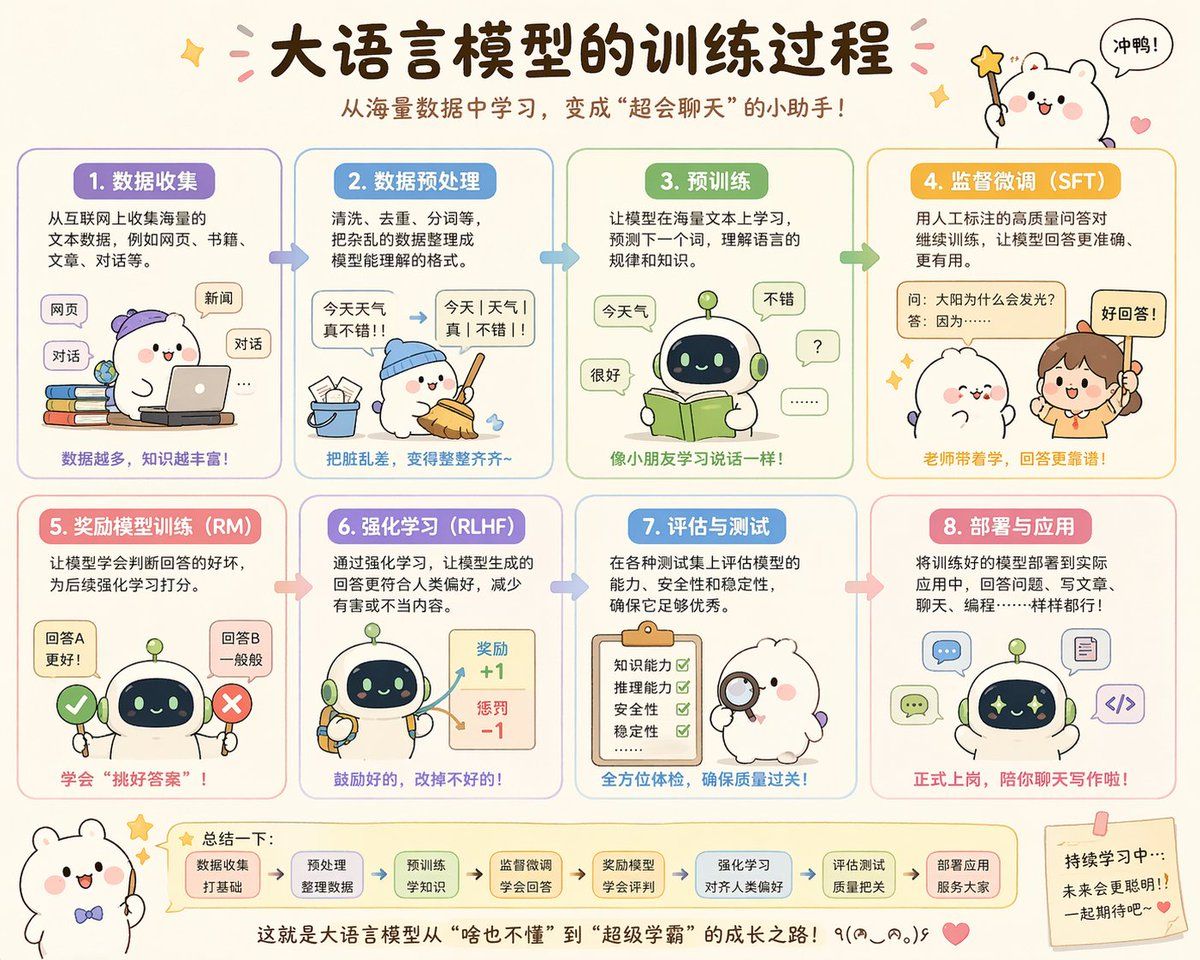
可爱的中文大语言模型训练流程图
Prompt
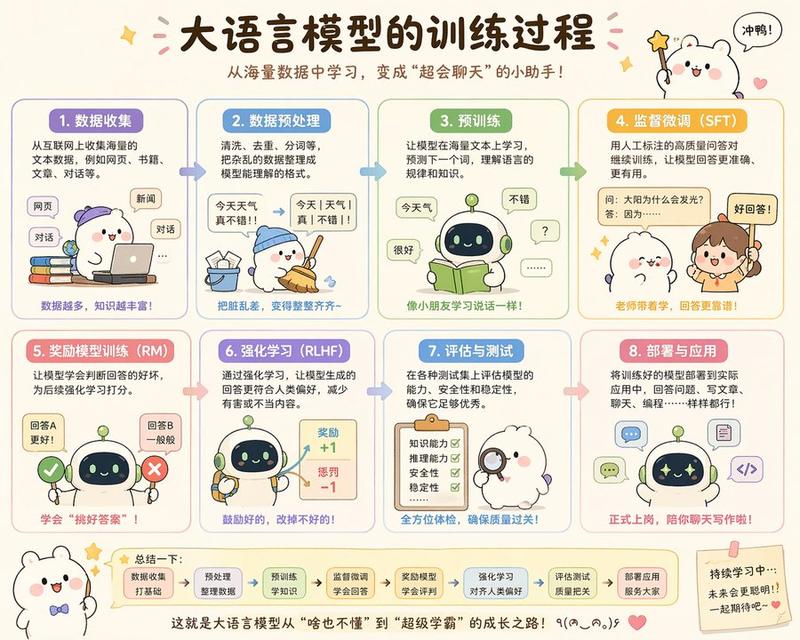
{"type":"cute educational infographic poster","topic":"{argument name=\"headline text\" default=\"大语言模型的训练过程\"}","subtitle":"{argument name=\"subtitle text\" default=\"从海量数据中学习,变成\"超会聊天\"的小助手!\"}","style":{"overall":"adorable Chinese explainer poster, pastel classroom infographic, rounded panels, soft cream background, hand-drawn cartoon aesthetic, clean vector-like illustration, warm friendly educational tone","palette":["cream","lavender","sky blue","mint green","yellow-orange","pink","soft brown"],"rendering":"high-quality flat illustration with subtle shading, crisp Chinese typography, sticker-like accents, tiny stars, hearts, arrows, and speech bubbles"},"layout":{"format":"horizontal poster","grid":{"rows":2,"columns":4,"count":8},"sections":[{"title":"1. 数据收集","position":"top-left","count":1,"labels":["网页","新闻","对话"]},{"title":"2. 数据预处理","position":"top row, second column","count":1,"labels":["今天 天气 真不错!!","今天|天气|真|不错!!"]},{"title":"3. 预训练","position":"top row, third column","count":1,"labels":["今天气","很好","不错","?","......"]},{"title":"4. 监督微调(SFT)","position":"top-right","count":1,"labels":["问:太阳为什么会发光?","答:因为……","好回答!"]},{"title":"5. 奖励模型训练(RM)","position":"bottom-left","count":1,"labels":["回答A 更好!","回答B 一般般"]},{"title":"6. 强化学习(RLHF)","position":"bottom row, second column","count":1,"labels":["奖励 +1","惩罚 -1"]},{"title":"7. 评估与测试","position":"bottom row, third column","count":1,"labels":["知识能力","推理能力","安全性","稳定性"]},{"title":"8. 部署与应用","position":"bottom-right","count":1,"labels":["聊天","写代码","写文章"]}],"topDecorations":{"count":4,"items":["small sparkle at upper left","pink confetti strokes around title","cute white mascot at upper right holding star wand","speech bubble saying 冲鸭!"]},"bottomDecorations":{"count":4,"items":["small white mascot with bow tie at lower left","summary strip with 7 rounded mini boxes and arrows","centered closing sentence at bottom","sticky note at lower right with encouraging text and heart"]}},"characters":{"main mascots":{"count":4,"types":["white chubby bear-like mascot with pink cheeks","small round robot with dark face screen and green antenna","human teacher girl with ponytail","fluffy white character with magnifying glass"]},"recurring_robot_design":"short cute robot, rounded body, pale green and cream shell, navy face display with glowing eyes, tiny limbs"},"sectionDetails":[{"title":"1. 数据收集","panelColor":"lavender","scene":"a white mascot wearing a purple cap uses a laptop while sitting beside a stack of colorful books; floating rounded labels represent internet sources","caption":"数据越多,知识越丰富!"},{"title":"2. 数据预处理","panelColor":"sky blue","scene":"the mascot in a blue cap sweeps scattered paper scraps into a bucket; a messy sentence is transformed into segmented clean text with an arrow","caption":"把脏乱差,变得整整齐齐~"},{"title":"3. 预训练","panelColor":"mint green","scene":"the robot reads an open green book while speech bubbles around it show simple tokens and responses, suggesting language learning","caption":"像小朋友学习说话一样!"},{"title":"4. 监督微调(SFT)","panelColor":"golden yellow","scene":"a teacher points to a labeled QA card while a cute mascot listens; emphasis on human-labeled high-quality question-answer pairs","caption":"老师带着学,回答更靠谱!"},{"title":"5. 奖励模型训练(RM)","panelColor":"pink","scene":"the robot stands between a green check mark and a red X, comparing two answer options to learn which is better","caption":"学会\"挑好答案\"!"},{"title":"6. 强化学习(RLHF)","panelColor":"lavender-blue","scene":"the robot holds tools while a reward board shows positive and negative score feedback with arrows","caption":"鼓励好的,改掉不好的!"},{"title":"7. 评估与测试","panelColor":"blue","scene":"a fluffy white examiner character holds a magnifying glass beside a clipboard checklist with four green check marks","caption":"全方位体检,确保质量过关!"},{"title":"8. 部署与应用","panelColor":"soft red-pink","scene":"the robot appears surrounded by application icons for chat, writing, coding, and documents, showing real-world deployment","caption":"正式上岗,陪你聊天写作啦!"}],"bottomSummary":{"title":"总结一下:","count":7,"steps":["数据收集 打好基础","预处理 整理数据","预训练 学知识","监督微调 学会回答","奖励模型 学会评判","强化学习 对齐人类偏好","评估测试 质量把关"],"closingText":"{argument name=\"closing sentence\" default=\"这就是大语言模型从\"啥也不懂\"到\"超级学霸\"的成长之路!٩(๑^o^๑)۶\"}"},"language":"Simplified Chinese","quality":"polished social-media-ready infographic, balanced spacing, legible Chinese text, charming and highly shareable"}- Category
- Charts & Infographics
- Model
- GPT Image 2
- Creator
- 歸藏(guizang.ai)
- Source ID
- 14665
- Published
- Apr 21, 2026
Views2