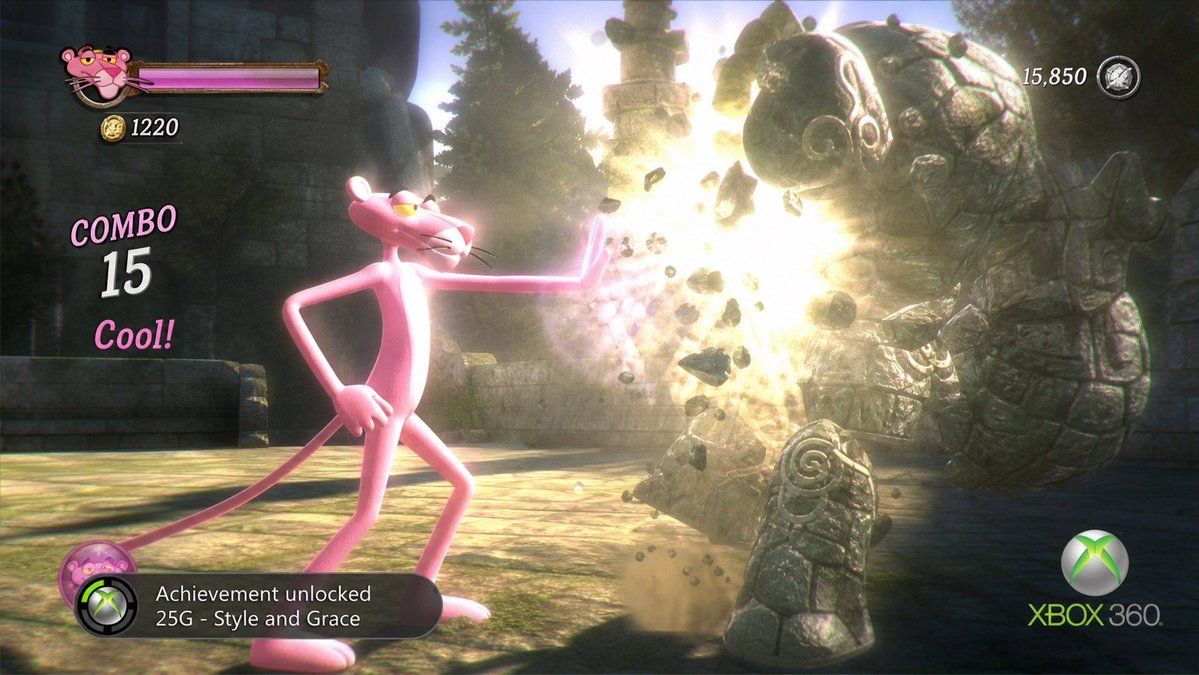
Pink Panther Xbox 360 战斗截图
Prompt
{"type":"cinematic Xbox 360 era 3D action game screenshot parody","aspect_ratio":"16:9 widescreen","scene":{"setting":"ancient mossy stone temple courtyard with ruined walls, carved pillars, evergreen trees in background, dusty sunbeams and volumetric light","camera":"third-person side view, low cinematic game camera, slight motion blur, depth of field, bloom-heavy high contrast lighting","mood":"stylish arcade combat, humorous licensed-character brawler, late-2000s console graphics"},"main_subject":{"character":"{argument name=\"main character\" default=\"Pink Panther\"}","appearance":"tall skinny pink cartoon panther with white muzzle and belly, yellow half-lidded eyes, black whiskers, long tail, oversized paws, confident smirk","pose":"standing left of center, one hand on hip, right arm stretched forward with palm out, casually stopping or blasting an enemy with elegant attitude"},"enemy":{"description":"large stone golem on the right, made of chunky cracked gray rock pieces with spiral carvings and ancient ornamental patterns, hunched forward and being shattered by impact","count":"1 enemy golem","effects":"bright golden-white explosion at the palm impact point, flying debris, dust clouds, separated boulders and cracked fragments suspended in midair"},"hud_and_ui":{"count":"6 discrete UI elements","elements":[{"label":"player portrait and health bar","position":"top left","description":"small Pink Panther head icon beside a long magenta health bar in a bronze frame"},{"label":"coin counter","position":"upper left below health bar","text":"1220","description":"gold coin icon followed by white number"},{"label":"combo indicator","position":"left center","text":"COMBO 15 Cool!","description":"pink stylized COMBO text, large white 15, pink Cool!"},{"label":"score counter","position":"top right","text":"15,850","description":"white score number beside a small silver medallion icon"},{"label":"achievement notification","position":"bottom left","text":"Achievement unlocked 25G - Style and Grace","description":"black translucent rounded Xbox notification bar with Xbox orb icon and small pink character badge"},{"label":"console branding","position":"bottom right","text":"XBOX 360","description":"green and gray Xbox sphere logo with Xbox 360 wordmark"}]},"text_to_render":{"achievement":"{argument name=\"achievement text\" default=\"Achievement unlocked 25G - Style and Grace\"}","combo":"{argument name=\"combo text\" default=\"COMBO 15 Cool!\"}","coin_count":"{argument name=\"coin count\" default=\"1220\"}","score":"{argument name=\"score\" default=\"15,850\"}"},"visual_style":"polished 3D render resembling a paused gameplay screenshot from a fictional Xbox 360 action game, glossy cartoon character contrasted with realistic stone ruins, intense bloom, particle debris, screen-space effects, clean readable HUD overlays, authentic late-2000s achievement pop-up, no real game title screen"}- Category
- Charts & Infographics
- Model
- GPT Image 2
- Creator
- Lars_Pragmata
- Source ID
- 18605
- Published
- May 6, 2026
Views4


