20

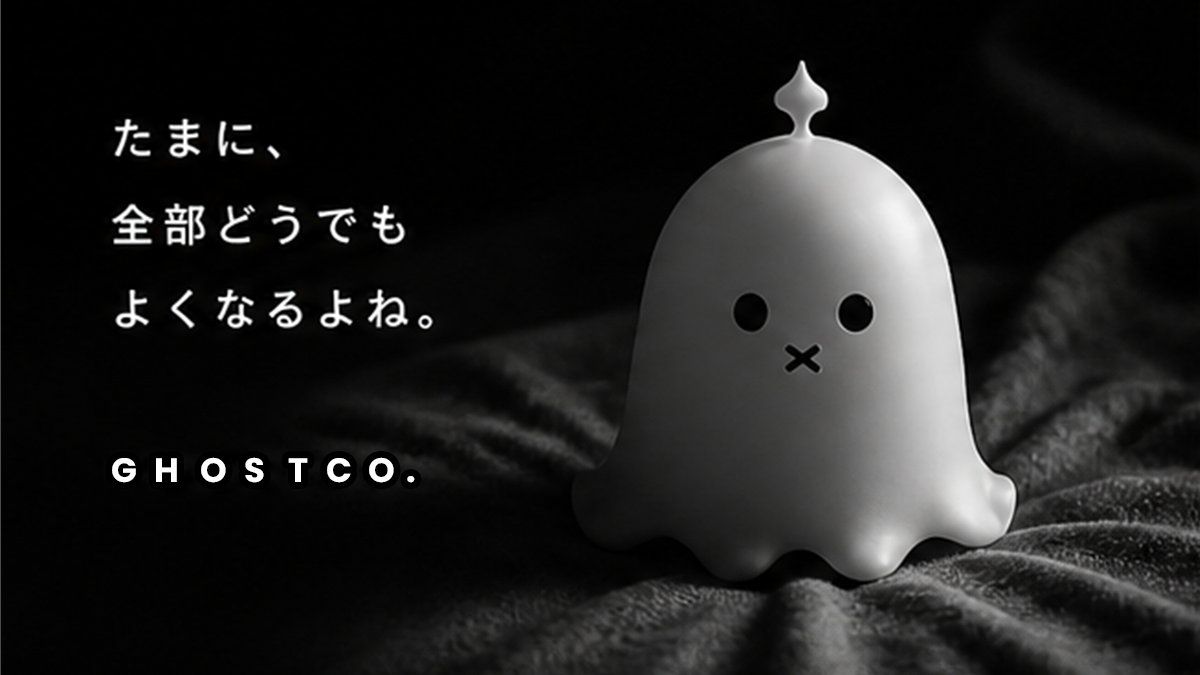
可爱幽灵吉祥物品牌海报
Enlarge

可爱幽灵吉祥物品牌海报

Prompt
Create a minimalist cinematic brand poster in a dark monochrome palette, showing a cute small white ghost mascot figurine sitting on rumpled black velvet fabric. The ghost has a smooth rounded dome body, soft scalloped base, tiny side flippers, glossy black circular eyes, a small black X-shaped mouth, and a small ornamental droplet-shaped knob on top of its head. Place the mascot on the right half of the composition, softly lit from the upper right with gentle specular highlights and deep shadows, shallow depth of field, premium product-photography feel, 16:9 horizontal format. On the left side, add exactly two text elements: a three-line Japanese quote in white handwritten-style type reading {argument name="quote" default="たまに、\n全部どうでも\nよくなるよね。"}, positioned upper left with generous line spacing, and a bold spaced uppercase brand wordmark reading {argument name="brand name" default="GHOSTCO."} near the lower left. Keep the background nearly black with subtle fabric texture, moody but adorable, calm, melancholic, modern Japanese character-brand advertising aesthetic.
Category
Charts & Infographics
Model
GPT Image 2
Creator
oni🍙
Views4
Source ID
19748
Published
May 11, 2026

Guide

About "可爱幽灵吉祥物品牌海报"

What is this prompt for?

"可爱幽灵吉祥物品牌海报" AI image prompt for GPT Image 2 (Charts & Infographics). 为可爱的幽灵角色品牌生成一张带有日文引语和醒目 Logo 的暗黑单色风格产品海报。 Copy it on Picva and recreate the look in one…

The full copyable prompt and example visuals above are ready for AI image generation or one-click recreate in Picva.

How to use this prompt

  1. Step 1

    Open the prompt detail

    Review the example visuals, category, and full prompt text for "可爱幽灵吉祥物品牌海报".

  2. Step 2

    Copy the prompt

    Copy the prompt body from this page, or load it directly in Studio.

  3. Step 3

    Pick a model (GPT Image 2)

    Prefer GPT Image 2. If you switch models, keep subject and composition and tweak style terms.

  4. Step 4

    Generate and export

    Recreate the look in Picva, or export into your workflow for editing and publishing.

FAQ

What is the "可爱幽灵吉祥物品牌海报" prompt?
It is an AI image-generation prompt for GPT Image 2 in the Charts & Infographics category. This page includes the full prompt text, example visuals, and a one-click recreate path in Picva.
How do I use this prompt to generate an image?
Copy the prompt from this page, or use Generate / Studio. Paste it into a compatible image model, or recreate the look in Picva with optional reference images.
Which model is this prompt for?
This page lists GPT Image 2. Most descriptive prompts also transfer to nearby image models such as GPT Image, Flux, or Midjourney with light style tweaks.
Can I use the result commercially?
You can usually copy the prompt for creation, but commercial use of the final image depends on the model terms, reference-image rights, and the generated content. Follow the source author and platform rules.