动漫婚纱系列设计项目
Prompt
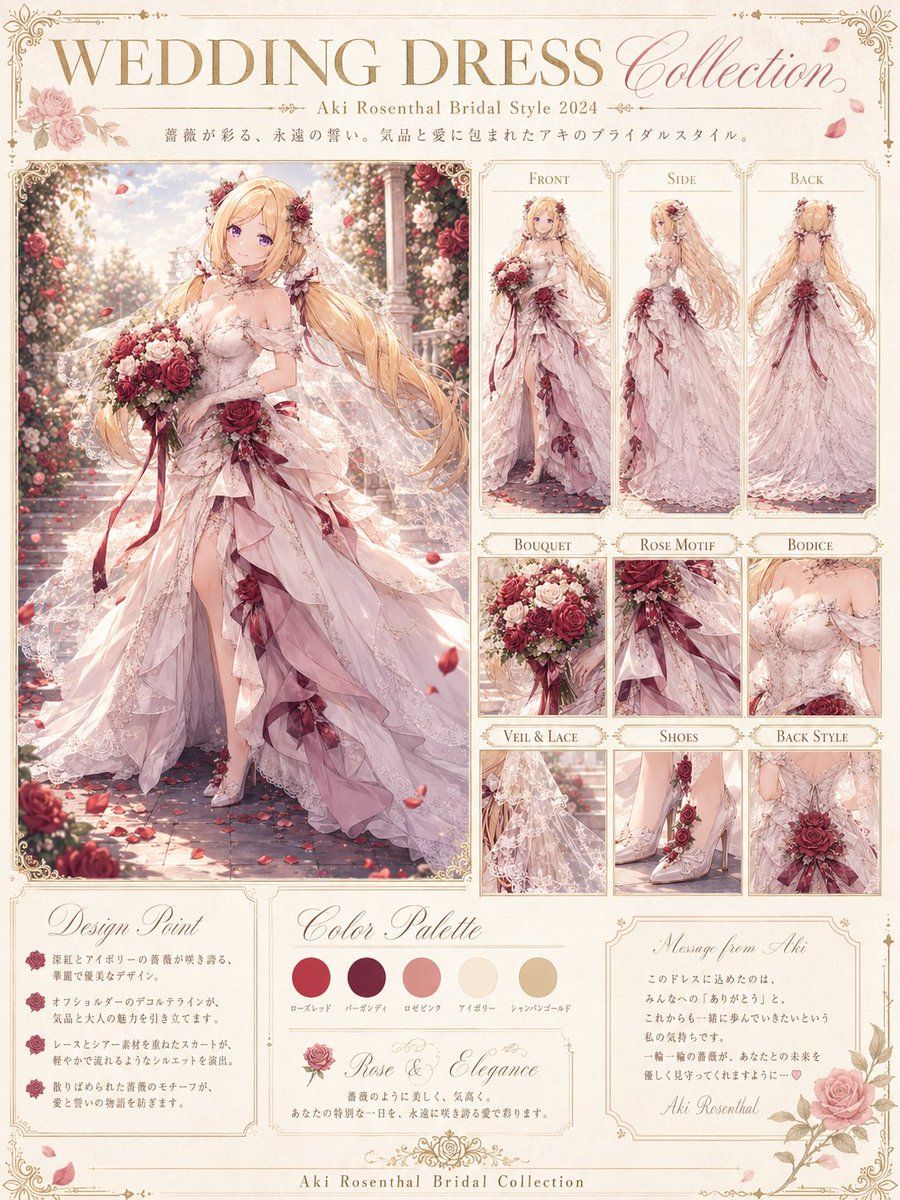
Goal: Create a refined anime wedding dress collection design board for {argument name="character name" default="Aki Rosenthal"}, presented as an elegant bridal fashion sheet.

Canvas: Vertical 4:5 poster, warm ivory parchment background, thin ornate gold border with floral corner filigree, soft rose petals scattered around the page. Use a high-detail romantic anime illustration style, pastel lighting, delicate linework, luxurious bridal-magazine layout.

Header: Large serif title at the top reading “WEDDING DRESS” in gold, with “Collection” in flowing pink cursive on the right. Under it, add the subtitle “- {argument name="character name" default="Aki Rosenthal"} Bridal Style 2024 -” and a short decorative Japanese-style tagline line in small gray text.

Main subject: On the left, one large full-body bridal illustration of a long-haired blonde elf-like anime bride in a rose garden aisle. She wears a romantic {argument name="dress color" default="pale blush ivory"} wedding gown with off-shoulder bodice, sheer lace sleeves, layered asymmetrical ruffled skirt, high slit, trailing veil, rose hair ornaments, burgundy rose accents, ribbons, lace embroidery, and jeweled details. She holds one lush bouquet of red, pink, and ivory roses with long burgundy ribbons. Her hair is extremely long, flowing, golden blonde, with soft curls and floral accessories. The face should be softly simplified or lightly obscured, keeping the focus on the dress design. Background: sunlit rose-covered archway, stone path, floating petals, dreamy bokeh.

Right-side layout: Include exactly 9 bordered reference panels arranged in a clean fashion-spec grid. Top row has exactly 3 tall panels labeled “Front”, “Side”, and “Back”, each showing the same bridal outfit from that view. Below them are exactly 6 small detail panels labeled “Bouquet”, “Rose Motif”, “Bodice”, “Veil & Lace”, “Shoes”, and “Back Style”. The detail panels should show: 1 bouquet close-up, 1 waist rose motif and ribbons, 1 bodice close-up, 1 veil and lace close-up, 1 lace high-heel shoe close-up with rose decorations, and 1 back bodice and large rose ornament close-up.

Bottom information area: Add exactly 4 cream cards with gold frames. Card 1, “Design Point”, contains exactly 3 bullet points with small burgundy rose icons. Card 2, “Color Palette”, contains exactly 5 circular swatches labeled in small Japanese-style text: rose red, burgundy, rose pink, ivory, and champagne gold. Card 3, “Rose & Elegance”, contains a small rose illustration and a short poetic bridal description. Card 4, “Message from Aki”, contains a short handwritten-style note and signature “Aki Rosenthal”. Footer text centered at the bottom reads “Aki Rosenthal Bridal Collection”.

Visual style: Soft watercolor-anime rendering mixed with polished fashion illustration, ornate Victorian bridal catalog design, warm cream paper, gold typography, muted burgundy roses, blush pink fabric, translucent lace, elegant shadows, high detail, delicate highlights, no harsh contrast.

Constraints: Keep the exact panel count: 1 main illustration, 3 view panels, 6 detail panels, 4 bottom cards, 5 color swatches, and 3 design bullets. Use readable decorative English headings. Avoid logos, watermarks, modern UI elements, or extra characters.- Category
- Charts & Infographics
- Model
- GPT Image 2
- Creator
- リベ|生成AIで自由に生きてます
- Source ID
- 20291
- Published
- May 14, 2026
Views3


