吕布历史武将海报
Prompt
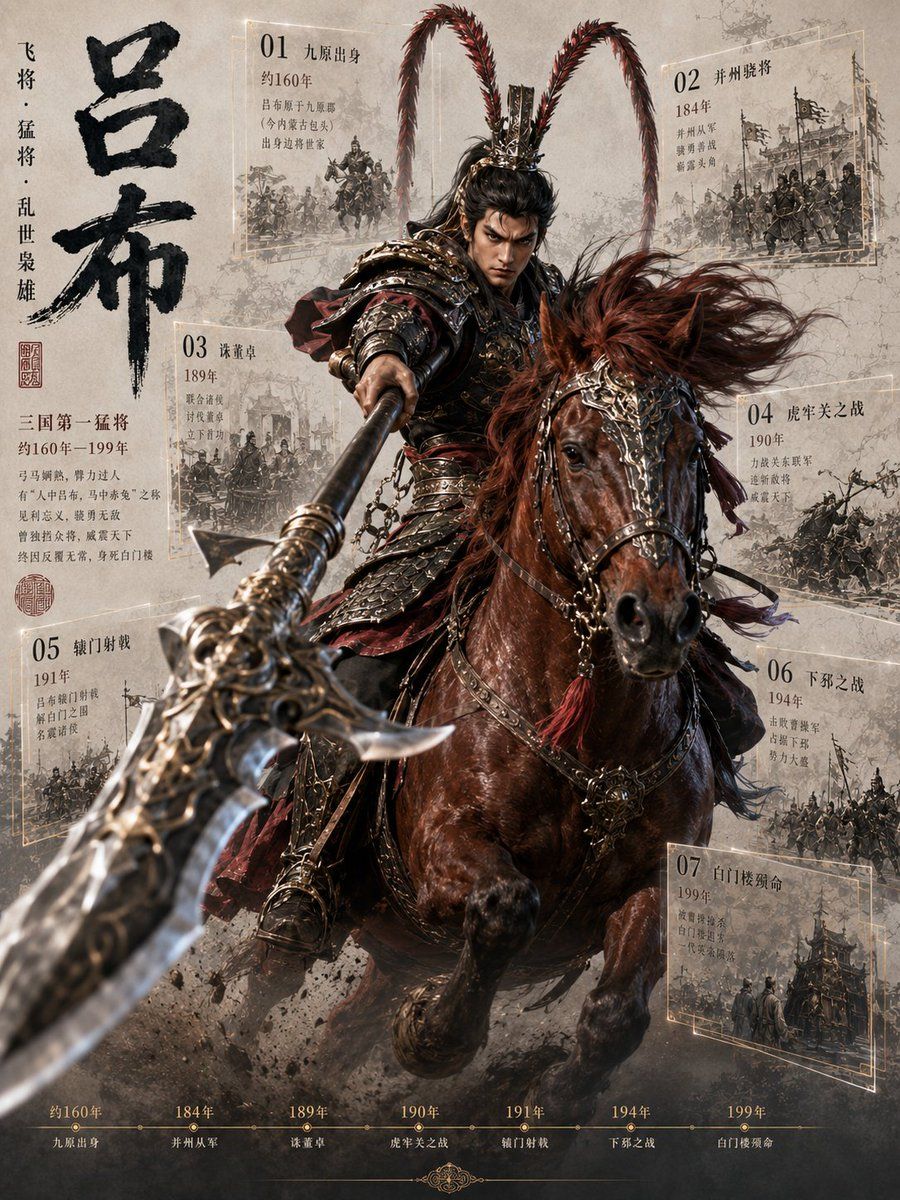
Goal: Create a dramatic vertical historical-warrior poster infographic about {argument name="character name" default="吕布"}, the legendary Three Kingdoms general, combining cinematic fantasy realism with aged Chinese manuscript design.

Canvas: Vertical 3:4 poster, parchment-gray textured background with ink wash stains, dust, smoke, battlefield grit, and faint cracks. Use a high-contrast cinematic composition with the main figure exploding forward from the center.

Main subject: A powerful armored Chinese cavalry general charges directly toward the viewer on a dark chestnut warhorse. The rider wears ornate dark bronze and black lamellar armor with red cloth accents, chains, metal shoulder guards, and an elaborate crown/helmet with two extremely long red pheasant-plume antennae rising high and curving outward. His face is intentionally obscured by a soft rectangular blur/mask while the rest of the image is sharp. He thrusts a massive ornate halberd toward the camera, creating extreme foreground perspective: the weapon blade is huge, blurred by depth of field, and extends from the lower left toward the rider’s hand. The horse has windblown reddish mane, decorated bridle, metal ornaments, tassels, and raised front legs, kicking up mud and smoke.

Left typography: Large black calligraphic Chinese title {argument name="main title" default="吕布"} arranged vertically on the left side, bold brush texture. Beside it place a smaller vertical phrase {argument name="vertical subtitle" default="飞将 · 猛将 · 乱世枭雄"}. Add red seal stamps and a short biography block in Chinese beneath the title, including “三国第一猛将”, “约160年–199年”, and several lines of small serif Chinese text.

Infographic panels: Include exactly 7 semi-transparent parchment event cards around the central rider, each with a thin pale-gold rectangular border, a large two-digit number, Chinese event title, year, small descriptive Chinese lines, and a monochrome sketch-like battle illustration. The 7 visible cards are: 01 “九原出身” with “约160年” near the upper left; 02 “并州骁将” with “184年” near the upper right; 03 “诛董卓” with “189年” at mid-left; 04 “虎牢关之战” with “190年” at mid-right; 05 “辕门射戟” with “191年” at lower left; 06 “下邳之战” with “194年” at lower right; 07 “白门楼殒命” with “199年” at bottom right. Keep the panels slightly tilted in perspective as if floating behind the warrior, partially obscured by smoke and the horse.

Bottom timeline: Add exactly 7 timeline milestones across the bottom edge in muted gold, matching the cards: “约160年 九原出身”, “184年 并州从军”, “189年 诛董卓”, “190年 虎牢关之战”, “191年 辕门射戟”, “194年 下邳之战”, “199年 白门楼殒命”. Use small dots connected by a thin horizontal line, with a subtle decorative flourish centered below.

Visual style: Hyper-detailed cinematic Chinese historical fantasy, realistic armor and horse anatomy, dynamic motion, shallow depth of field, smoky battlefield atmosphere, muted sepia parchment palette with black ink, dark bronze, oxblood red, and pale gold highlights. Make the background panels look like archival sketches printed on old paper.

Constraints: Use Chinese text as visible graphic elements, keep the exact count of 7 event cards and 7 timeline milestones, no modern objects, no logos or watermarks, no extra characters in the foreground, and maintain a poster-like editorial infographic layout.- Category
- Charts & Infographics
- Model
- GPT Image 2
- Creator
- Larus Canus
- Source ID
- 20332
- Published
- May 14, 2026
Views11