20

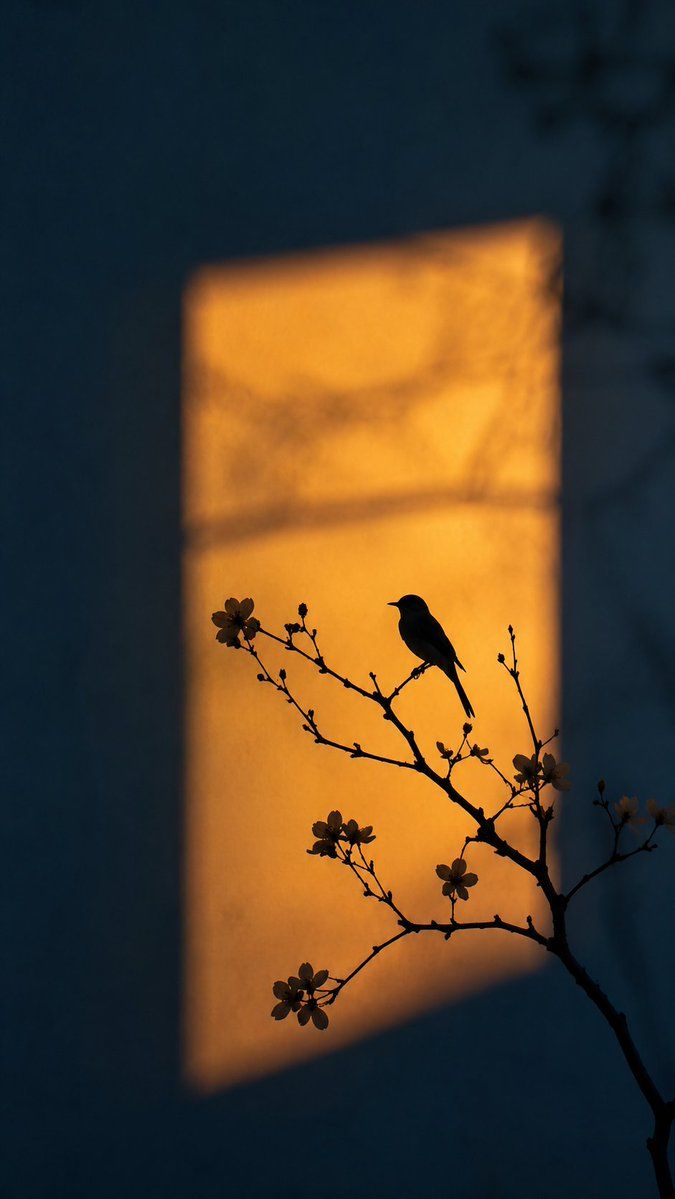
艺术剪影琥珀光摄影
Enlarge

艺术剪影琥珀光摄影

Prompt
艺术摄影风格。画面中心是一束明亮的{argument name="光影颜色" default="琥珀色"}矩形光影,像是傍晚的阳光穿过窗户投射在{argument name="墙面颜色" default="深蓝色(Dark Blue)"}的墙面上。
前景是精细的树枝剪影,枝头点缀着几朵盛开的花朵,{argument name="主体" default="一只灵动的小鸟"}静静地停歇在枝头。
关键视觉点:
1. 剪影(Silhouette):小鸟和花枝呈现出完全的深色剪影,在亮黄色的背景光下轮廓极其清晰。
2. 色彩对比(Color Contrast):深蓝色的环境背景色与中心温暖的黄色窗光形成鲜明的补色对比。
3. 氛围:画面极其干净,充满诗意与禅意,极简构图,柔和的光影边缘。
4. 4k分辨率,超高画质,电影级质感。
--ar 9:16 --v 6.0
Category
Photography & Realism
Model
GPT Image 2
Views4
Source ID
20509
Published
May 15, 2026

Guide

About "艺术剪影琥珀光摄影"

What is this prompt for?

"艺术剪影琥珀光摄影" AI image prompt for GPT Image 2 (Photography & Realism). 生成一幅充满诗意的场景:深蓝色墙面上投射着琥珀色的矩形光影,画面中呈现出鸟儿与花枝的剪影。 Copy it on Picva and recreate the look in on…

The full copyable prompt and example visuals above are ready for AI image generation or one-click recreate in Picva.

How to use this prompt

  1. Step 1

    Open the prompt detail

    Review the example visuals, category, and full prompt text for "艺术剪影琥珀光摄影".

  2. Step 2

    Copy the prompt

    Copy the prompt body from this page, or load it directly in Studio.

  3. Step 3

    Pick a model (GPT Image 2)

    Prefer GPT Image 2. If you switch models, keep subject and composition and tweak style terms.

  4. Step 4

    Generate and export

    Recreate the look in Picva, or export into your workflow for editing and publishing.

FAQ

What is the "艺术剪影琥珀光摄影" prompt?
It is an AI image-generation prompt for GPT Image 2 in the Photography & Realism category. This page includes the full prompt text, example visuals, and a one-click recreate path in Picva.
How do I use this prompt to generate an image?
Copy the prompt from this page, or use Generate / Studio. Paste it into a compatible image model, or recreate the look in Picva with optional reference images.
Which model is this prompt for?
This page lists GPT Image 2. Most descriptive prompts also transfer to nearby image models such as GPT Image, Flux, or Midjourney with light style tweaks.
Can I use the result commercially?
You can usually copy the prompt for creation, but commercial use of the final image depends on the model terms, reference-image rights, and the generated content. Follow the source author and platform rules.