浪漫海滩日落电影海报
Prompt
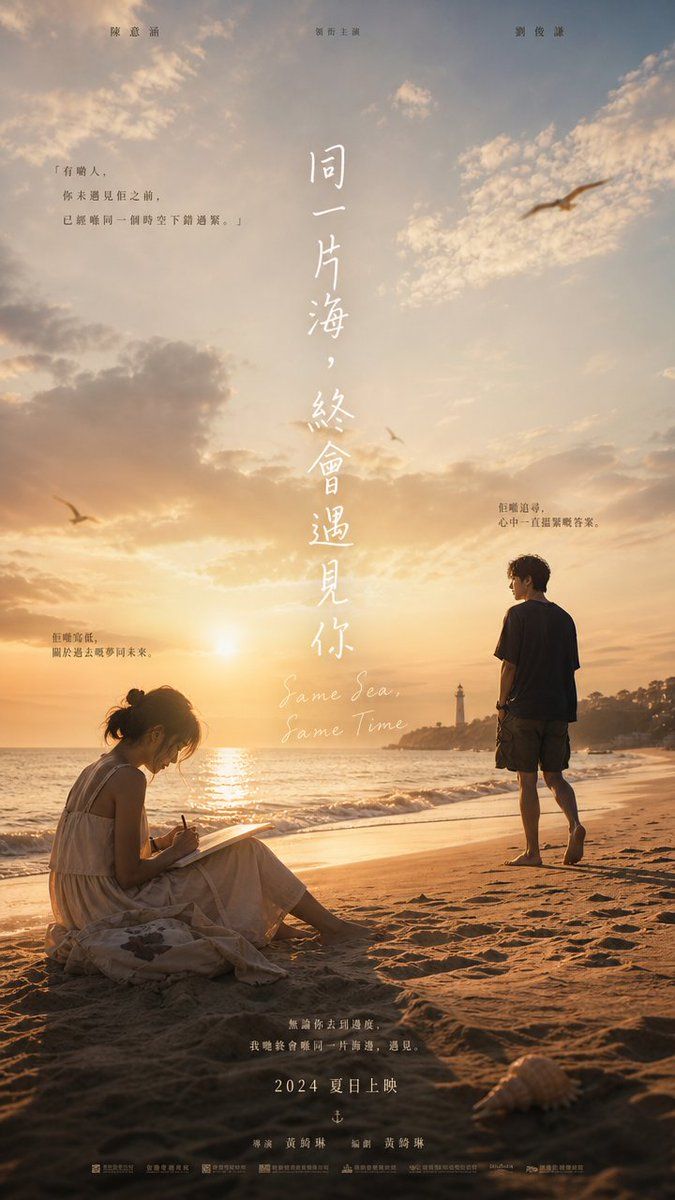
Goal: Create a cinematic vertical romance movie poster for a seaside drama titled {argument name="movie title" default="同一片海,終會遇見你"}, with a warm, nostalgic, poetic mood.

Canvas: Tall 9:16 poster, photorealistic golden-hour beach scene, soft film grain, high dynamic range sunset lighting, gentle haze, dreamy clouds, commercial film-poster composition.

Main scene: A sandy beach at sunset with the sun low near the horizon over the ocean. The sea glows with orange reflections and small waves roll onto shore. In the far background, include a rocky point with a small lighthouse and low coastal trees. Add exactly 3 seabirds in the sky: 1 large blurred bird at upper right, 1 small bird near the center horizon, and 1 small bird at left above the waves. Add a single pale seashell in the lower right foreground.

Characters: Include exactly 2 human figures. On the lower left, a young woman in a loose white sleeveless summer dress sits on the sand in profile, hair tied in a messy bun, writing or sketching in a notebook on her lap with a pen. Her face is turned downward and should have minimal recognizable detail, slightly soft or obscured. On the right, a young man in a dark T-shirt and knee-length shorts stands barefoot on the wet sand facing the ocean and sunset, shown from behind/side, contemplative and still. Long shadows stretch across the sand.

Typography and layout: Use elegant vertical Chinese calligraphy in white down the center of the poster for the main title: {argument name="movie title" default="同一片海,終會遇見你"}. Beneath it, add a small handwritten English subtitle in white: {argument name="English subtitle" default="Same Sea, Same Time"}. At the top edge, place exactly 3 small actor-name text groups spaced left, center, and right: {argument name="actor names" default="陳意涵 胡宇威 劉俊謙"}. Add exactly 3 small Chinese quote blocks placed around the sky and beach: one on the upper left, one near the right of the title above the standing man, and one on the lower left above the seated woman. Use delicate, readable, poster-style Chinese text.

Bottom credits: Add a centered emotional tagline above the release date: {argument name="tagline" default="無論你去到哪裡,我總會在同一片海邊,遇見。"}. Below it, set the release line clearly in spaced white text: {argument name="release date" default="2024 夏日上映"}. Add one line of director/writer credits and a dense row of tiny production logos and billing text along the very bottom, like a professional film poster.

Visual style: Realistic photographic poster, warm amber and peach sky, soft sea breeze feeling, romantic melancholy, delicate white typography, shallow atmospheric depth, subtle lens flare from the sunset, crisp sand texture in foreground, no modern UI elements, no borders, no watermark.- Category
- Charts & Infographics
- Model
- GPT Image 2
- Creator
- multivio
- Source ID
- 21106
- Published
- May 17, 2026
Views9