20

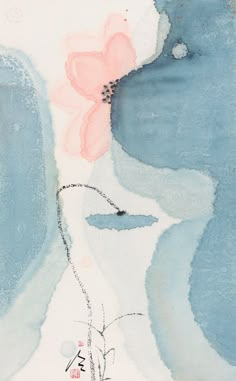
极简水墨花卉
Enlarge

极简水墨花卉

Prompt
Create a vertical minimalist watercolor painting on off-white rice paper, inspired by restored ancient East Asian ink-wash aesthetics with cinematic softness and visible paper grain. The composition has exactly two large translucent blue-green abstract rock or lotus-leaf forms: one tall rounded form cropped along the left edge and one larger rounded form cropped at the upper right, with a pale blue wash continuing downward on the right. Place exactly one delicate pale pink flower near the top center, partially tucked behind the right blue form, with five soft translucent petals and a small cluster of dark ink dots at its center. Add exactly one small horizontal blue pond-like brush shape in the middle. Draw exactly three very thin black ink plant stems rising from the bottom center, with sparse tiny leaves and a curved dotted branch arcing left-to-right across the center. At the bottom left, include exactly one small red artist seal and one small black calligraphic signature mark. Use {argument name="color palette" default="misty teal blue, pale pink, off-white, black ink, muted red"}, {argument name="painting style" default="minimalist Chinese watercolor and ink wash on textured rice paper"}, and {argument name="mood" default="quiet, airy, poetic, cinematic"}. Keep the image uncluttered, asymmetrical, softly blurred at the edges, with no frame, no modern objects, and no readable text except the small abstract seal and signature.
Category
Charts & Infographics
Model
GPT Image 2
Creator
小小东
Views4
Source ID
21134
Published
May 17, 2026

Guide

About "极简水墨花卉"

What is this prompt for?

"极简水墨花卉" AI image prompt for GPT Image 2 (Charts & Infographics). 一个用于生成宁静的竖构图东亚水彩画的提示词,包含抽象蓝色形态、淡粉色花朵和精致的水墨茎秆。 Copy it on Picva and recreate the look in one c…

The full copyable prompt and example visuals above are ready for AI image generation or one-click recreate in Picva.

How to use this prompt

  1. Step 1

    Open the prompt detail

    Review the example visuals, category, and full prompt text for "极简水墨花卉".

  2. Step 2

    Copy the prompt

    Copy the prompt body from this page, or load it directly in Studio.

  3. Step 3

    Pick a model (GPT Image 2)

    Prefer GPT Image 2. If you switch models, keep subject and composition and tweak style terms.

  4. Step 4

    Generate and export

    Recreate the look in Picva, or export into your workflow for editing and publishing.

FAQ

What is the "极简水墨花卉" prompt?
It is an AI image-generation prompt for GPT Image 2 in the Charts & Infographics category. This page includes the full prompt text, example visuals, and a one-click recreate path in Picva.
How do I use this prompt to generate an image?
Copy the prompt from this page, or use Generate / Studio. Paste it into a compatible image model, or recreate the look in Picva with optional reference images.
Which model is this prompt for?
This page lists GPT Image 2. Most descriptive prompts also transfer to nearby image models such as GPT Image, Flux, or Midjourney with light style tweaks.
Can I use the result commercially?
You can usually copy the prompt for creation, but commercial use of the final image depends on the model terms, reference-image rights, and the generated content. Follow the source author and platform rules.







