Claude Code 日本 SaaS 营销海报
Prompt
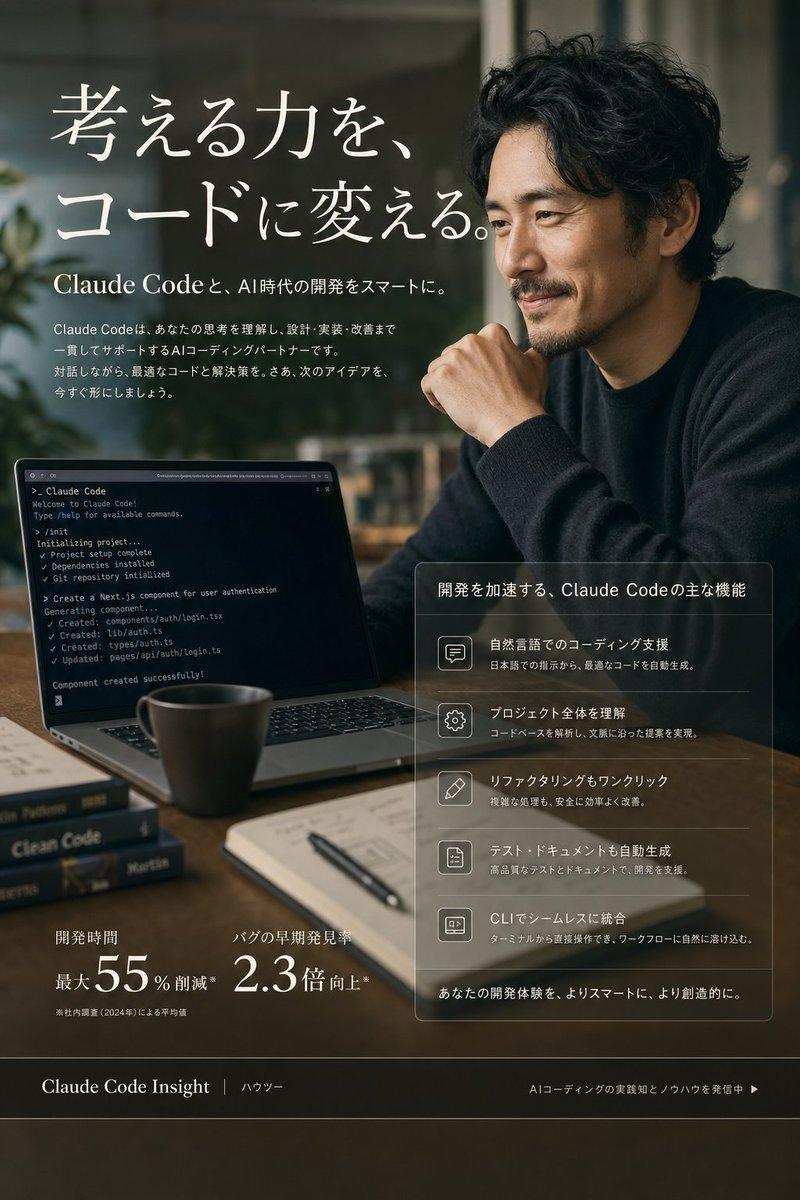
Goal: Create a premium vertical Japanese marketing poster for {argument name="product name" default="Claude Code"}, promoting AI coding automation and smarter development.

Canvas: Vertical 3:4 poster, 768×1024 style, cinematic editorial photography with dark warm tones, shallow depth of field, soft window light, subtle film grain, high-end SaaS advertisement aesthetic.

Main visual: A realistic workspace scene in a modern cafe or studio. On the right, an adult Japanese man in a dark knit sweater sits at a wooden table, leaning forward with one hand near his chin; his face is covered by a plain opaque warm-brown rectangular privacy block. He has messy black hair visible above the block. On the left foreground, an open laptop displays a dark terminal window with Claude Code-like command-line output, checkmarks, generated files, and project-complete messages. Add a ceramic coffee cup, a notebook with pen, and two stacked programming books on the table; one book spine reads “Clean Code.” Background is blurred with plants and interior glass, muted green and brown palette.

Top headline area: Large elegant Japanese serif typography in white, placed upper left, reading 「考える力を、コードに変える。」 with generous line spacing and a refined magazine-ad feel. Under it, add a smaller subheading: 「Claude Codeと、AI時代の開発をスマートに。」 Then add a short Japanese body paragraph explaining that Claude Code understands thinking and supports design, implementation, and improvement as an AI coding partner.

Feature panel: Place one translucent glassmorphism card in the lower-right middle, with a thin white border and soft blur. Card title: 「開発を加速する、Claude Codeの主な機能」. Include exactly 5 feature rows, each with a simple outlined icon on the left, a bold Japanese feature label, and a smaller Japanese description. The 5 rows are: 1) speech bubble icon, 「自然言語でのコーディング支援」; 2) gear icon, 「プロジェクト全体を理解」; 3) pencil icon, 「リファクタリングもワンクリック」; 4) document icon, 「テスト・ドキュメントも自動生成」; 5) terminal window icon, 「CLIでシームレスに統合」. End the card with the line 「あなたの開発体験を、よりスマートに、より創造的に。」

Metrics: In the lower-left area, show exactly 2 large numerical proof points in white serif type: first metric label 「開発時間」 with value 「最大 55% 削減」 and a tiny footnote; second metric label 「バグの早期発見率」 with value 「2.3倍 向上*」.

Footer: Add a full-width dark translucent footer bar at the bottom. Left text: 「Claude Code Insight」 followed by a divider and 「ハウツー」. Right text: 「AIコーディングの実践知とノウハウを発信中 ▶」.

Visual style: Sophisticated Japanese tech magazine advertisement, photorealistic but with polished layout overlays, cream-white typography, thin lines, restrained contrast, warm shadows, no bright neon colors.

Constraints: Keep the composition text-heavy but clean and readable. Use exactly 1 main person, 1 laptop, 1 coffee cup, 1 notebook, 1 pen, 2 visible stacked books, 1 feature card, 5 feature rows, and 2 metric blocks. Do not add logos beyond the product name. Preserve the Japanese text exactly where specified.- Category
- Charts & Infographics
- Model
- GPT Image 2
- Creator
- AIエンジニア_BOSS
- Source ID
- 21948
- Published
- May 21, 2026
Views3