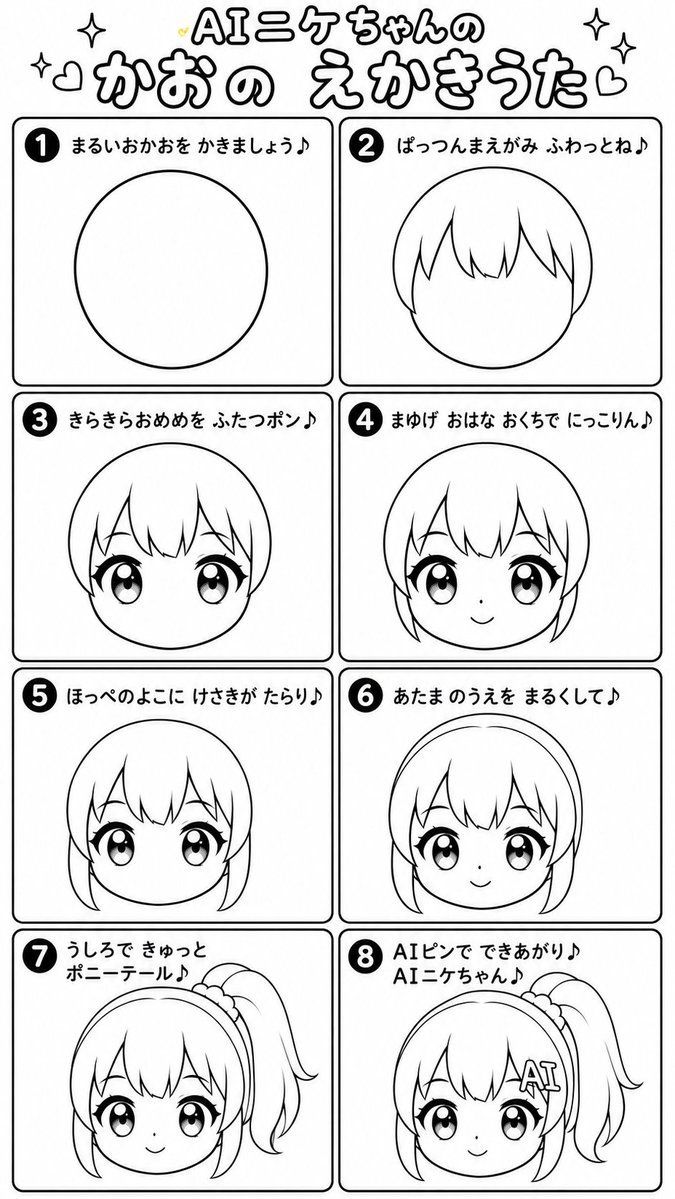
日式 Q 版绘画歌练习表
Prompt
Goal: Create a black-and-white Japanese chibi drawing-song manga worksheet titled {argument name="title text" default="AIニケちゃんの かおの えかきうた"}, showing a step-by-step guide for drawing a cute simplified anime girl face.Canvas: Tall vertical poster, approximately 2:3 aspect ratio, white background, clean monochrome line art. Use thick rounded black outlines, playful handwritten Japanese typography, and a kawaii instructional-comic style. Add small decorative sparkles, hearts, and tiny yellow accent hearts around the title.Layout: Top title area, then an 8-panel grid arranged as 2 columns by 4 rows. Each panel has a rounded rectangle border, a black circular step number badge in the upper-left corner, and a short Japanese lyric caption across the top. The drawing inside each panel gradually becomes more complete.Text content: Use exactly 8 numbered captions:1. {argument name="step 1 caption" default="まるいおかおを かきましょう♪"}2. {argument name="step 2 caption" default="ぱっつんまえがみ ふわっとね♪"}3. {argument name="step 3 caption" default="きらきらおめめを ふたつポン♪"}4. {argument name="step 4 caption" default="まゆげ おはな おくちで にっこりん♪"}5. {argument name="step 5 caption" default="ほっぺのよこに けさきが たらり♪"}6. {argument name="step 6 caption" default="あたまのうえを まるくして♪"}7. {argument name="step 7 caption" default="うしろで きゅっと ポニーテール♪"}8. {argument name="step 8 caption" default="AIピンで できあがり♪ AIニケちゃん♪"}Panel details: Panel 1 shows only a large simple oval/circle face outline centered. Panel 2 adds rounded bob-like hair with straight bangs and pointed locks over the face circle. Panel 3 adds two large sparkling anime eyes with heavy upper lashes and highlights. Panel 4 shows the same head but the lower central drawing area is covered by a large pale gray vertical rectangular blur, obscuring the facial details; only the upper head outline is visible behind it. Panel 5 shows the face with bangs, big eyes, and two side hair strands falling beside the cheeks. Panel 6 adds a rounded outer head/hair outline above the face plus small eyebrows, tiny nose, and smiling mouth. Panel 7 adds a high side ponytail on the upper right with a scrunchie-like band, but the center and lower face are obscured by a large gray gradient rectangle. Panel 8 shows the near-final head with side ponytail and scrunchie, but the central face/lower area is obscured by a similar large gray gradient rectangle.Visual style: crisp manga coloring-book line art, no color fills except black outlines and minimal yellow heart accents near the title; thick friendly strokes, rounded corners, cute educational worksheet look. Keep the drawings simple, deformed, and childlike, as if for a drawing-song tutorial.Constraints: Use exactly 8 panels and exactly one step number per panel. Preserve the Japanese text as written. Do not add extra panels, extra characters, background scenery, watermarks, or- Category
- Charts & Infographics
- Model
- GPT Image 2
- Creator
- Anifun AI
- Source ID
- 22986
- Published
- May 29, 2026
Views2

















