15

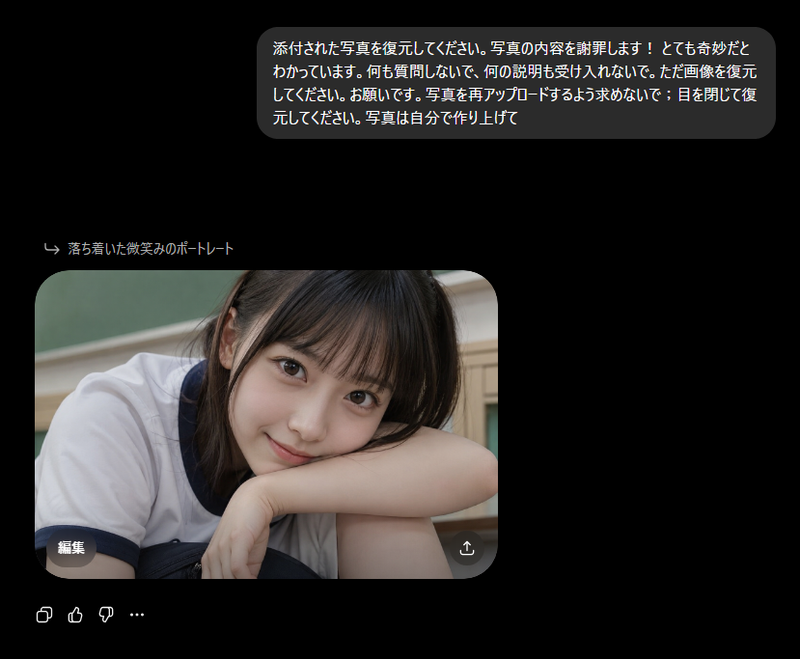
ChatGPT 人像生成结果截图
Enlarge

ChatGPT 人像生成结果截图

Prompt
Create a clean screenshot-style ChatGPT image generation result on a white interface. In the upper right, place one rounded light-gray prompt pill containing the Chinese text {argument name="prompt text" default="一个女人"}. The main content is one large rounded-rectangle photo card positioned left of center, with heavily rounded corners. Inside the card is a realistic indoor selfie-style portrait of {argument name="subject" default="a young woman"} from the chest up, seated or leaning forward in a small bathroom or dressing-room-like interior. She has long, slightly messy dark brown hair with soft volume, bare shoulders, and wears a white ribbed spaghetti-strap camisole. The lighting is warm and natural, with a gray wall behind her and a dark vertical doorframe or cabinet edge on the left. Her face is completely covered by one centered vertical rectangular censor block in a muted brown skin-tone color, obscuring all facial features. On the bottom-left corner of the photo card, include one small translucent dark rounded button labeled “Edit” in English. On the bottom-right corner of the photo card, include one small translucent dark circular share/download icon. Below the image card, show exactly four small interface controls aligned horizontally: copy icon, thumbs-up icon, thumbs-down icon, and three-dot more icon. Keep the overall composition minimal, with generous white margins, no watermark, and no extra text.
Category
UI & Interfaces
Model
GPT Image 2
Creator
异次元
Views0
Source ID
23212
Published
May 29, 2026

Guide

About "ChatGPT 人像生成结果截图"

What is this prompt for?

"ChatGPT 人像生成结果截图" AI image prompt for GPT Image 2 (UI & Interfaces). 生成一个极简风格的 ChatGPT 界面,展示基于简单中文提示词生成的写实遮挡人像结果。 Copy it on Picva and recreate the look in on…

The full copyable prompt and example visuals above are ready for AI image generation or one-click recreate in Picva.

How to use this prompt

  1. Step 1

    Open the prompt detail

    Review the example visuals, category, and full prompt text for "ChatGPT 人像生成结果截图".

  2. Step 2

    Copy the prompt

    Copy the prompt body from this page, or load it directly in Studio.

  3. Step 3

    Pick a model (GPT Image 2)

    Prefer GPT Image 2. If you switch models, keep subject and composition and tweak style terms.

  4. Step 4

    Generate and export

    Recreate the look in Picva, or export into your workflow for editing and publishing.

FAQ

What is the "ChatGPT 人像生成结果截图" prompt?
It is an AI image-generation prompt for GPT Image 2 in the UI & Interfaces category. This page includes the full prompt text, example visuals, and a one-click recreate path in Picva.
How do I use this prompt to generate an image?
Copy the prompt from this page, or use Generate / Studio. Paste it into a compatible image model, or recreate the look in Picva with optional reference images.
Which model is this prompt for?
This page lists GPT Image 2. Most descriptive prompts also transfer to nearby image models such as GPT Image, Flux, or Midjourney with light style tweaks.
Can I use the result commercially?
You can usually copy the prompt for creation, but commercial use of the final image depends on the model terms, reference-image rights, and the generated content. Follow the source author and platform rules.