20

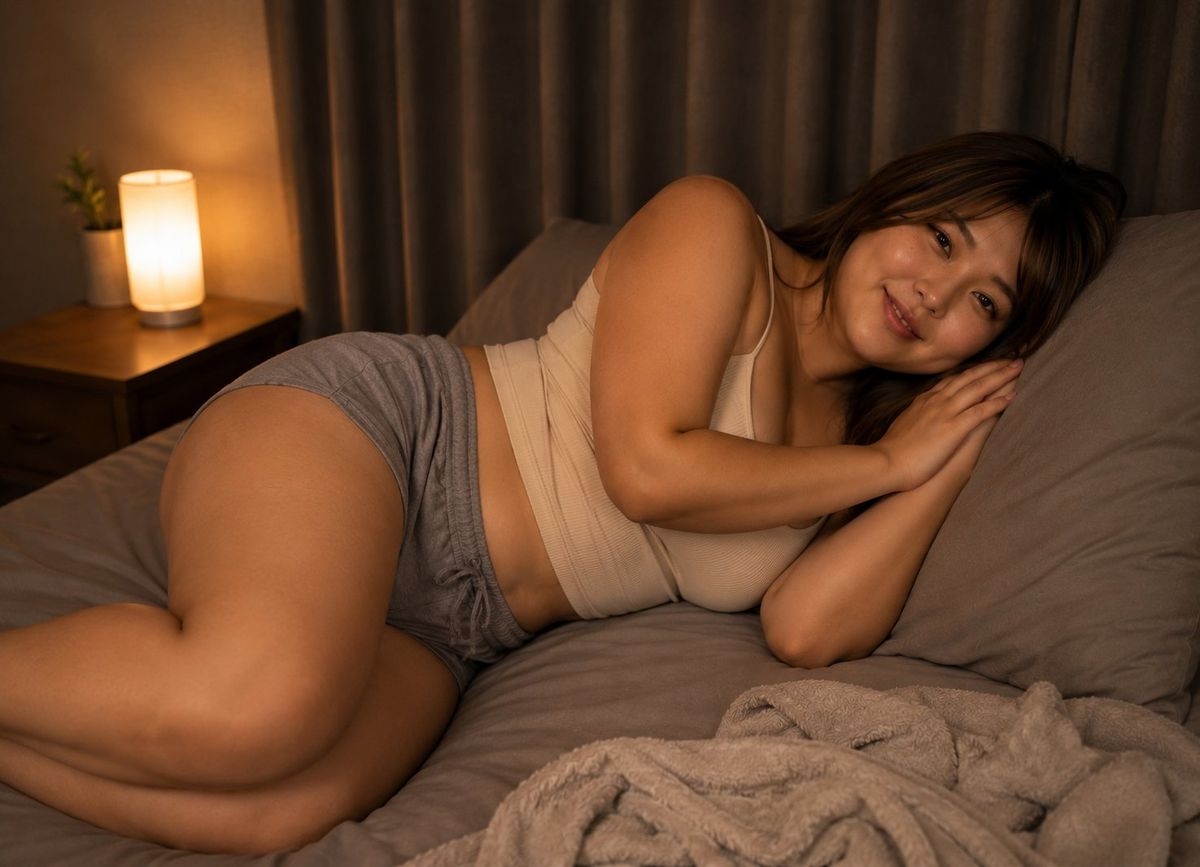
温馨卧室睡前人像
Enlarge

温馨卧室睡前人像

Prompt
Create a realistic warm bedtime lifestyle photograph of an adult woman with {argument name="hair color" default="dark brown"} hair lying curled on her side on a gray bed, viewed from a slightly elevated side angle. She wears exactly 2 visible clothing pieces: a {argument name="top" default="cream ribbed camisole tank top"} and {argument name="shorts" default="loose gray drawstring sleep shorts"}. Her face is intentionally hidden by exactly 1 solid opaque brown square censor block, with no facial features visible. The bedroom contains exactly 1 wooden nightstand on the left, exactly 1 glowing cylindrical bedside lamp on it, exactly 1 small potted plant beside the lamp, exactly 2 gray pillows behind her head and upper body, and exactly 1 crumpled beige fleece blanket in the lower right foreground. Use soft amber night lighting from the lamp, gray curtains across the background, muted neutral colors, shallow depth of field, realistic skin texture, cozy quiet atmosphere, and a horizontal 4:3 composition. Make the image tasteful and non-explicit, like a private good-night social media photo.
Category
Architecture & Spaces
Model
GPT Image 2
Views0
Source ID
26705
Published
Jun 24, 2026

Guide

About "温馨卧室睡前人像"

What is this prompt for?

"温馨卧室睡前人像" AI image prompt for GPT Image 2 (Architecture & Spaces). 一张照片级真实的温馨卧室场景,展示了一位侧卧的成年女性,面部带有隐私遮罩,适合用于创作温馨的晚安社交媒体视觉内容。 Copy it on Picva and recreate the…

The full copyable prompt and example visuals above are ready for AI image generation or one-click recreate in Picva.

How to use this prompt

  1. Step 1

    Open the prompt detail

    Review the example visuals, category, and full prompt text for "温馨卧室睡前人像".

  2. Step 2

    Copy the prompt

    Copy the prompt body from this page, or load it directly in Studio.

  3. Step 3

    Pick a model (GPT Image 2)

    Prefer GPT Image 2. If you switch models, keep subject and composition and tweak style terms.

  4. Step 4

    Generate and export

    Recreate the look in Picva, or export into your workflow for editing and publishing.

FAQ

What is the "温馨卧室睡前人像" prompt?
It is an AI image-generation prompt for GPT Image 2 in the Architecture & Spaces category. This page includes the full prompt text, example visuals, and a one-click recreate path in Picva.
How do I use this prompt to generate an image?
Copy the prompt from this page, or use Generate / Studio. Paste it into a compatible image model, or recreate the look in Picva with optional reference images.
Which model is this prompt for?
This page lists GPT Image 2. Most descriptive prompts also transfer to nearby image models such as GPT Image, Flux, or Midjourney with light style tweaks.
Can I use the result commercially?
You can usually copy the prompt for creation, but commercial use of the final image depends on the model terms, reference-image rights, and the generated content. Follow the source author and platform rules.