日本 SaaS AI 提示词管理广告
Prompt
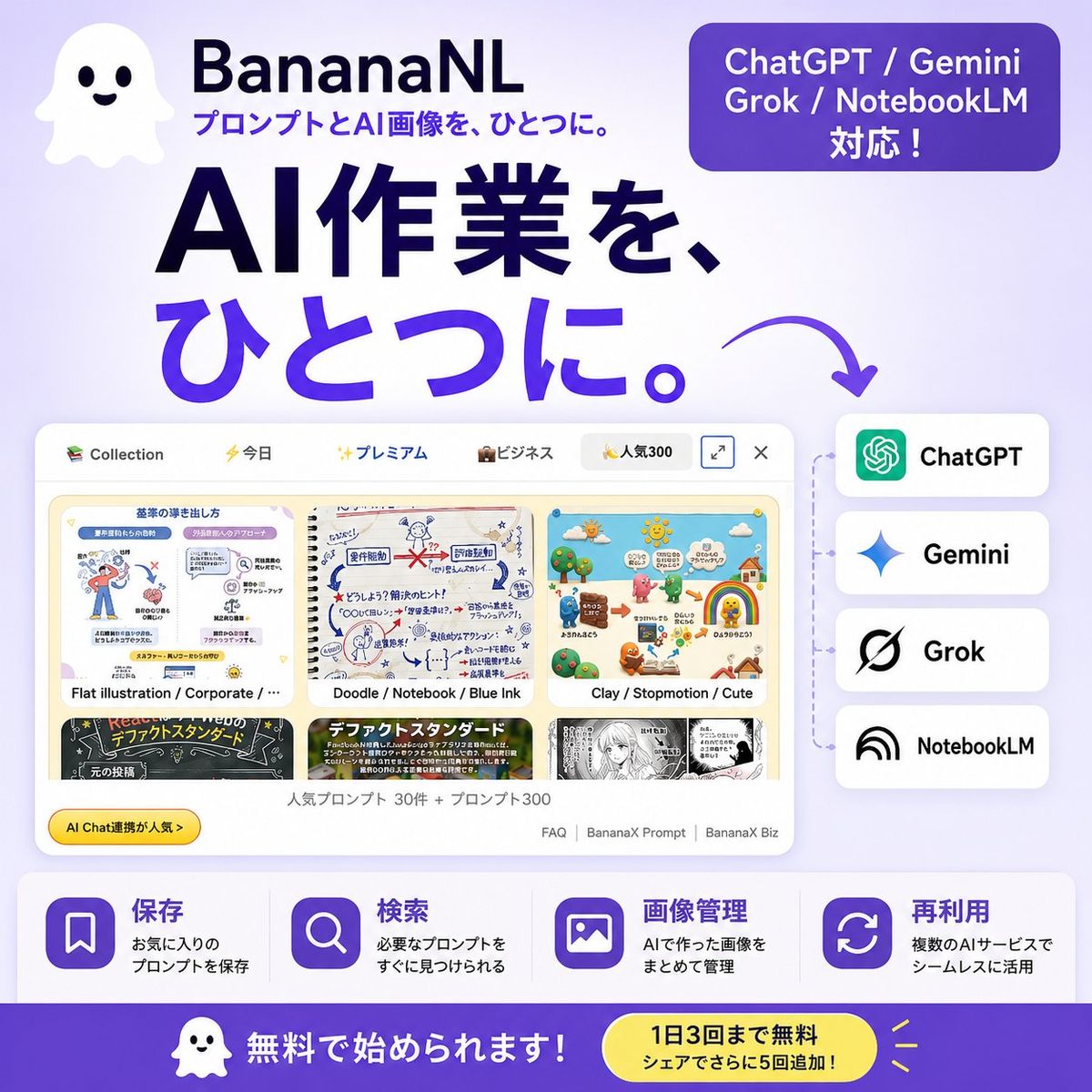
Goal: Create a square Japanese promotional banner for {argument name="product name" default="BananaNL"}, a service that manages and reuses AI image prompts across multiple AI tools.

Canvas: 1:1 square social media ad, 768×768 style, soft lavender-to-white gradient background, bold modern SaaS advertising look, high contrast navy and purple typography, rounded UI cards, clean shadows.

Layout: Top left has a cute white ghost mascot icon with two black eyes and a smiling mouth. To its right place the product name “BananaNL” in bold dark navy, with the smaller tagline “プロンプトとAI画像を、ひとつに。” underneath in purple. Top right has one rounded purple pill badge containing three lines of white text: “ChatGPT / Gemini”, “Grok / NotebookLM”, “対応!”. Center-left contains the huge main headline in Japanese, split across two lines: “AI作業を、” in dark navy and “ひとつに。” in vivid purple. Add a curved purple arrow pointing from the headline down/right toward the supported-service list.

Main visual: In the lower middle, show a large floating browser/app window mockup with rounded corners and a pale UI. It should display a prompt collection gallery with exactly 6 visible thumbnail cards arranged in 2 rows by 3 columns. The visible thumbnail styles are: 1) flat corporate illustration, 2) doodle notebook blue-ink sketch, 3) clay stop-motion cute scene, 4) black chalkboard layout, 5) colorful text-heavy standard design, 6) monochrome manga page. The top bar should include small category labels/icons such as “Collection”, “今日”, “プレミアム”, “ビジネス”, and “人気300”, plus small window control icons. Under the thumbnails add small Japanese UI text suggesting popular prompts, for example “人気プロンプト 30件 + プロンプト300”, and small footer links like “FAQ | BananaX Prompt | BananaX Biz”. Add a small yellow rounded badge on the lower left of the mockup reading “AI Chat連携が人気→”.

Right side integration list: Place exactly 4 stacked rounded white service cards connected by a faint dotted vertical line from the app mockup. The four cards, from top to bottom, are: 1) ChatGPT with green knot-like icon, 2) Gemini with blue sparkle icon, 3) Grok with black slashed circular logo, 4) NotebookLM with black arc/rainbow icon. Use bold black service names.

Feature strip: Along the bottom above the CTA, create exactly 4 equal feature blocks on a white translucent rounded rectangle. Each block has a purple rounded-square icon and Japanese heading/body text. The 4 blocks are: 1) bookmark icon, heading “保存”, body “お気に入りのプロンプトを保存”; 2) magnifying glass icon, heading “検索”, body “必要なプロンプトをすぐに見つけられる”; 3) image icon, heading “画像管理”, body “AIで作った画像をまとめて管理”; 4) refresh/reuse arrows icon, heading “再利用”, body “複数のAIサービスでシームレスに活用”.

Bottom CTA bar: Full-width deep purple footer band. On the left include the same small ghost mascot and large white text “無料で始められます!”. On the right include a yellow rounded pill callout with dark navy text: “1日3回まで無料” and smaller line “シェアでさらに5回追加!”, plus small yellow accent rays.

Visual style: Friendly Japanese startup SaaS ad, polished vector UI, soft shadows, rounded corners, minimal clutter, purple gradient accents, navy headline, crisp readable Japanese typography. Keep all Japanese text legible and preserve the AI service names exactly. Do not add extra service cards, extra feature blocks, watermarks, or unrelated logos.- Category
- UI & Interfaces
- Model
- GPT Image 2
- Creator
- Mojofull
- Source ID
- 27103
- Published
- Jun 28, 2026
Views2