13

现代极简主义编辑海报
Enlarge

现代极简主义编辑海报

Prompt
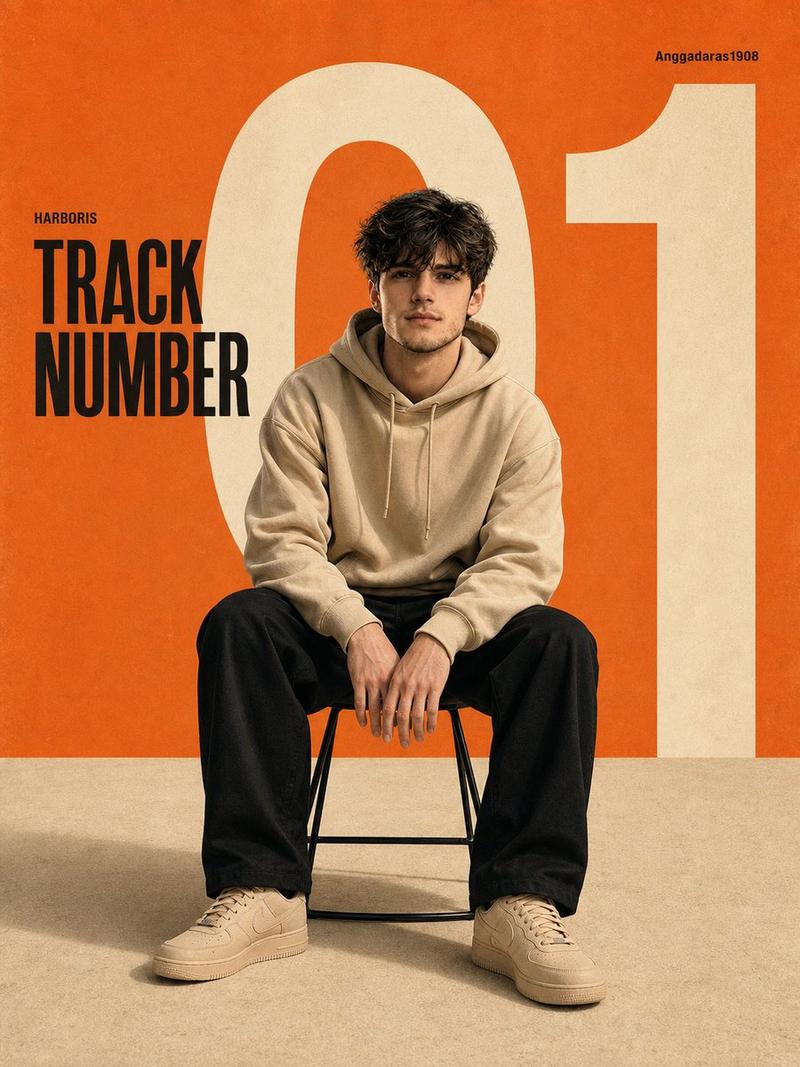
Design a modern minimalist editorial poster centered on an {argument name="subject" default="Asian man"} seated on a simple stool. He wears a {argument name="clothing" default="beige hoodie, relaxed black trousers, and beige sneakers"}. His posture should feel casual and confident, with a slight forward lean and both hands resting on his knees. Set the scene in a clean studio with a bold retro graphic layout. Use a {argument name="background color" default="warm orange"} field across the upper area, contrasted with a soft textured beige floor. Place a large ivory white "01" behind the subject, partially cropped so it stretches across the canvas. Include these typography details: "TRACK NUMBER" in bold black sans serif on the left side, a small "HARBORIS" caption above it, and a small upper right caption reading "Anggadaras1908". Keep the design modern and editorial, with Swiss style typography, clear negative space, and balanced composition. Use soft studio lighting with subtle shadows beneath the chair. The image should feel cinematic but clean, with no harsh contrast. Frame it as an eye level, medium range, full body shot with centered composition, sharp focus, and high resolution. Color palette: orange, cream, off white, and black accents. Add slight grain, poster paper texture, and a vintage print feel. Keep the face and body exactly the same as the uploaded reference image. Final aspect ratio 3:4.
Category
Posters & Typography
Model
GPT Image 2
Creator
PromptLab
Views0
Source ID
27640
Published
Jul 4, 2026

Guide

About "现代极简主义编辑海报"

What is this prompt for?

"现代极简主义编辑海报" AI image prompt for GPT Image 2 (Posters & Typography). 生成一张具有复古美学、风格时尚的极简主义编辑海报,特色在于醒目的排版和干净的摄影棚灯光。 Copy it on Picva and recreate the look in one…

The full copyable prompt and example visuals above are ready for AI image generation or one-click recreate in Picva.

How to use this prompt

  1. Step 1

    Open the prompt detail

    Review the example visuals, category, and full prompt text for "现代极简主义编辑海报".

  2. Step 2

    Copy the prompt

    Copy the prompt body from this page, or load it directly in Studio.

  3. Step 3

    Pick a model (GPT Image 2)

    Prefer GPT Image 2. If you switch models, keep subject and composition and tweak style terms.

  4. Step 4

    Generate and export

    Recreate the look in Picva, or export into your workflow for editing and publishing.

FAQ

What is the "现代极简主义编辑海报" prompt?
It is an AI image-generation prompt for GPT Image 2 in the Posters & Typography category. This page includes the full prompt text, example visuals, and a one-click recreate path in Picva.
How do I use this prompt to generate an image?
Copy the prompt from this page, or use Generate / Studio. Paste it into a compatible image model, or recreate the look in Picva with optional reference images.
Which model is this prompt for?
This page lists GPT Image 2. Most descriptive prompts also transfer to nearby image models such as GPT Image, Flux, or Midjourney with light style tweaks.
Can I use the result commercially?
You can usually copy the prompt for creation, but commercial use of the final image depends on the model terms, reference-image rights, and the generated content. Follow the source author and platform rules.