18

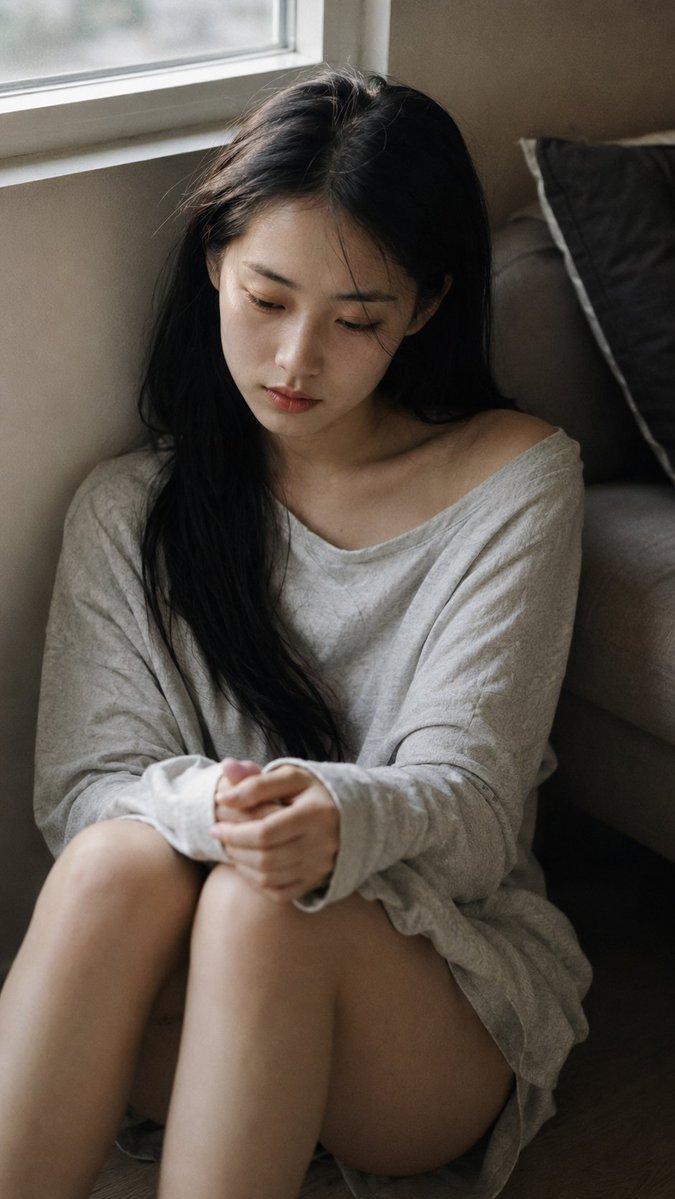
卧室黑白纪实肖像
Enlarge

Example images

卧室黑白纪实肖像

Prompt
Close-up portrait, 85mm f/1.4, a {argument name="subject description" default="young East Asian woman in her early 20s"} sits at the edge of her bed in a dim bedroom, hunched slightly forward, elbows on knees, face tilted down in thought, authentic daily life photography, natural candid moment. Almond-shaped eyes with downcast gaze aimed at the floor, expression contained and held — not crying, not calm, somewhere in the held-breath space between. Strong jaw slightly tensed. Straight black hair falls forward around her face, curtaining partially. Skin with natural texture, visible fine lines around eyes from tiredness, subsurface scattering under low side lamp light. She wears an {argument name="clothing" default="oversized men's cotton shirt"}, buttons partially done, hem long over thighs. Phone held loosely in one hand beside her knee, not being looked at. Several stray hairs fall forward with gravity, not arranged. Black and white rendering. Low key: single bedside lamp as only light source, positioned low and to one side, casting half her face in deep shadow with soft falloff — shadow side retains detail and tonal gradation, not crushed to black. Mid-tones preserved in shirt fabric and bedding texture. Grain structure visible and tactile, ISO 800 film grain, photographic texture not CG render smoothness. Aspect ratio 4:5. No watermark, no text overlay, not cartoon, not digitally painted, not illustration, not anime.
Category
Architecture & Spaces
Model
GPT Image 2
Views1
Source ID
28613
Published
Jul 13, 2026

Guide

About "卧室黑白纪实肖像"

What is this prompt for?

"卧室黑白纪实肖像" AI image prompt for GPT Image 2 (Architecture & Spaces). 在昏暗的卧室中创作一张充满氛围感的女性黑白肖像,聚焦于自然的质感、光影及情感深度。 Copy it on Picva and recreate the look in one cli…

The full copyable prompt and example visuals above are ready for AI image generation or one-click recreate in Picva.

How to use this prompt

  1. Step 1

    Open the prompt detail

    Review the example visuals, category, and full prompt text for "卧室黑白纪实肖像".

  2. Step 2

    Copy the prompt

    Copy the prompt body from this page, or load it directly in Studio.

  3. Step 3

    Pick a model (GPT Image 2)

    Prefer GPT Image 2. If you switch models, keep subject and composition and tweak style terms.

  4. Step 4

    Generate and export

    Recreate the look in Picva, or export into your workflow for editing and publishing.

FAQ

What is the "卧室黑白纪实肖像" prompt?
It is an AI image-generation prompt for GPT Image 2 in the Architecture & Spaces category. This page includes the full prompt text, example visuals, and a one-click recreate path in Picva.
How do I use this prompt to generate an image?
Copy the prompt from this page, or use Generate / Studio. Paste it into a compatible image model, or recreate the look in Picva with optional reference images.
Which model is this prompt for?
This page lists GPT Image 2. Most descriptive prompts also transfer to nearby image models such as GPT Image, Flux, or Midjourney with light style tweaks.
Can I use the result commercially?
You can usually copy the prompt for creation, but commercial use of the final image depends on the model terms, reference-image rights, and the generated content. Follow the source author and platform rules.